19
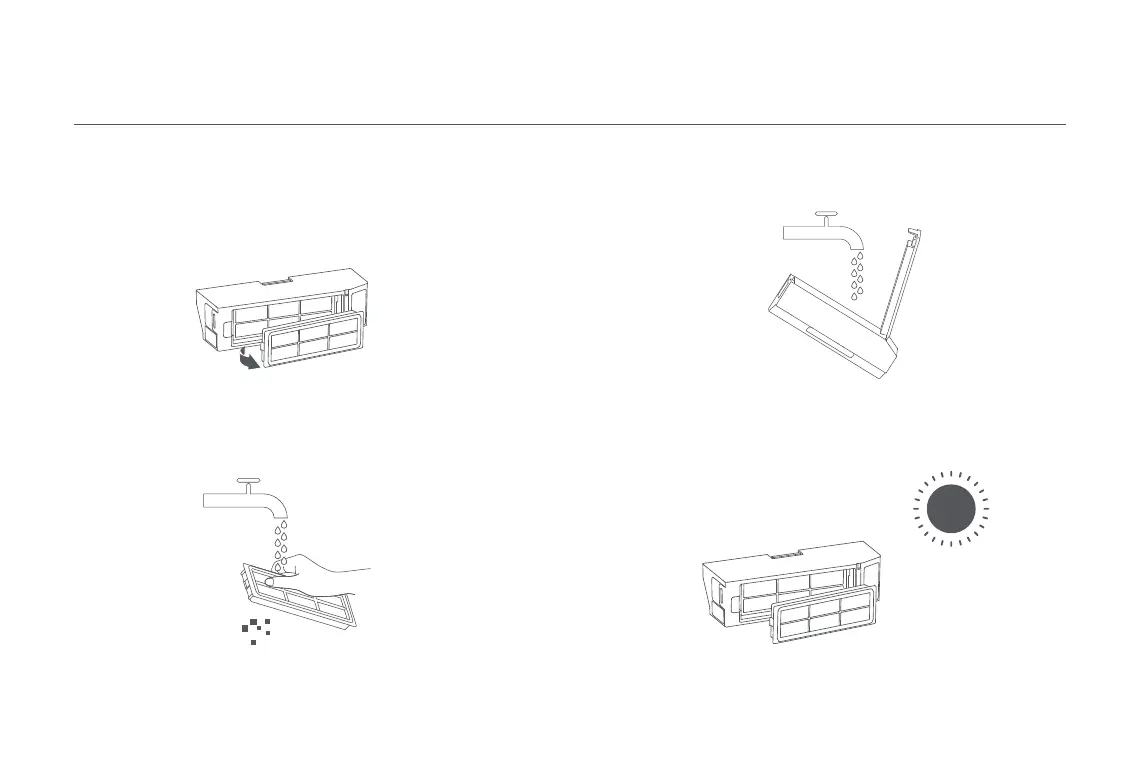
3. Open the dust compartment cover, fill the dust compartment with clean
water and close the dust compartment cover. Shake the dust
compartment from side to side and then pour the dirty water out of the
compartment.
4. Place the dust compartment and filter aside to dry before
reinstallation.
CAUTION: Only use clean water to clean the filter. Do not use detergent.
Note: Thoroughly dry the dust compartment and the filter before putting them back.
1. Remove the filter from the filter clip as illustrated.
Filter
2. Rinse and gently tap the edges of the filter to remove any dust and
debris until it is clean.
Note: Do not attempt to clean the filter with a brush or finger.





 To Next Page