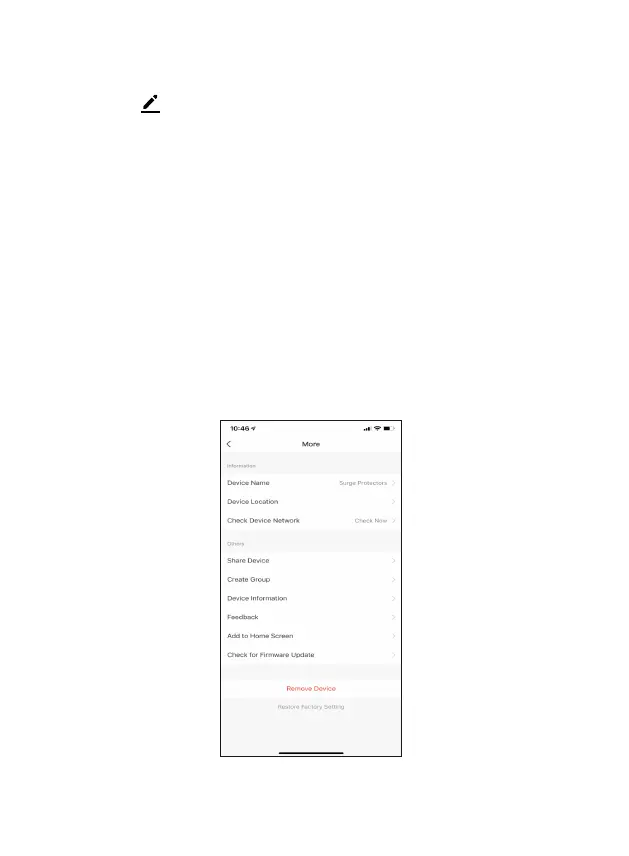
Configure the Power Strip Sengs
Different features can be adjusted from the menu buon on the upper right
hand buon “ ” on the APP.
1. Device Name can be changed as desired.
2. Device Locaon can set the locaon of the power strip in your home.
3. Check Device Network allows to check the network connecon status.
4. Add Members to be able to control the device in the Share Device seng.
5. Create Group to control other smart device at the same me.
6. Device Informaon provide network configuraon informaon.
7. Feedback allows users to report issues and get help.
8. Add to Home Screen allows to add the power strip to the home screen of
your smartphone.
9. Firmware Informaon allows to check soware or install updates to device.
10. Remove device will remove the smart strip from the Xodo Smart app and
remove pairing. This is necessary if pairing with a new device.
11. Restore Factory Seng allows to reset the Surge Protector to factory
seng.


 To Next Page