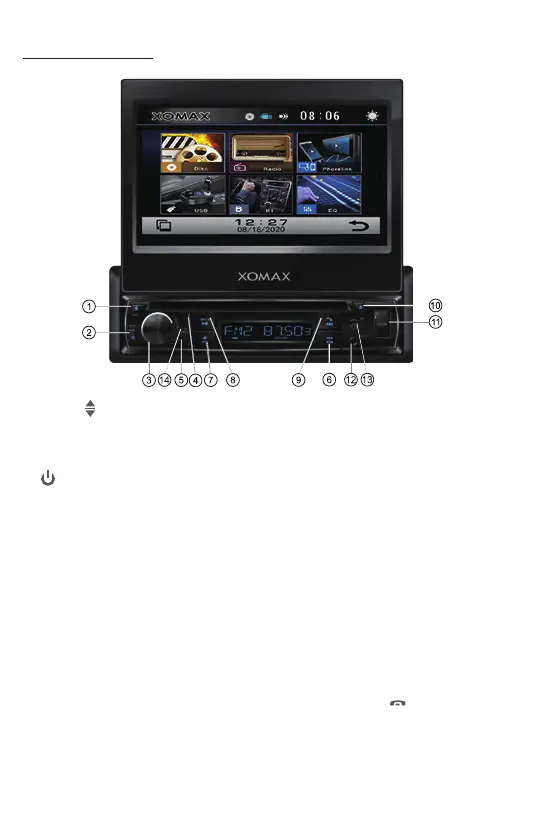
1. OPEN/ BUTTON
Briefly press to slide the monitor out of slot.
Repeatedly press this buon to lt up and down the monitor.
Press and hold this buon to slide the monitor inside of the slot.
2. /MODE BUTTON
In power off mode, press it to turn on the unit. Long press it to turn off the unit.
In power on mode, short press it repeatedly to select one mode of the RADIO,
DISC, USB, Bluetooth and AUX IN(AV IN).
3. Volume KNOB / SELECT BUTTON
Rotate the VOL knob to increase or decrease the volume level.
Press the SEL buon to access to audio sengs: Volume, Dimmer, Bass, Treble,
Balance, Fader, Loundness On/off, EQ Standard/Classic/Rock/Pop/Jazz/ Electric
/User.
4. Handsfree Microphone
Uses the bluetooth handsfree system to receive your voice when calling.
5. IR REMOTE SENSOR
6. Tune Previous/ Skip Previous track, Reject and End Call ( )
In Radio mode, press it to tune radio frequency downward one step at a me.
Press and hold to scan strong singal radio staon downward step by step.
In Disc/USB/BT music playback, press this buon to skip previous track.
Press and hold this buon to fast backward playback.
In BT mode, press this buon to reject an income call or end a call.
Control Panel Buons:



 To Next Page