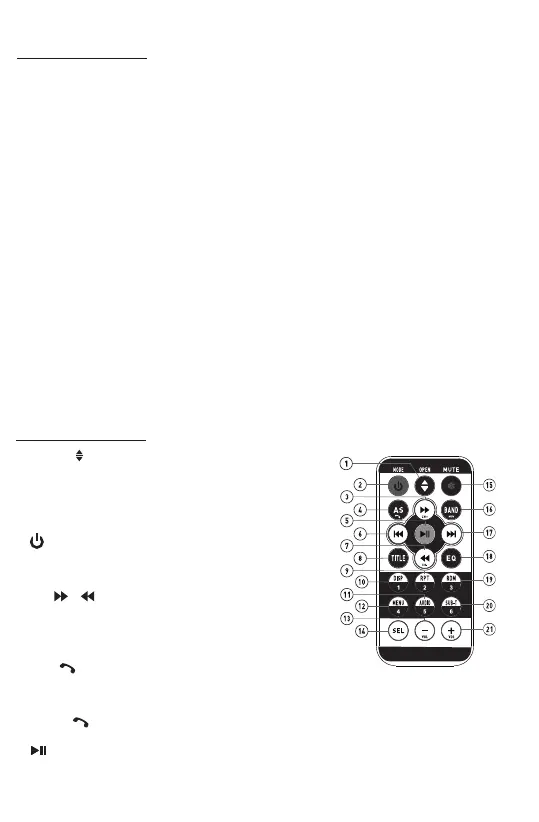
Control Panel Buons:
14. TA(Traffic Announcement Sengs)/AF(Alternave Frequencies),
(For XM-750 Only)
In Radio mode, briefly press the TA/AF buon to toggle TA on or off.
• ON: TA symbol will be displayed if this funcon is acvated. In the TA mode,
once a traffic message is received, the unit switches to the radio staon from a
different mode(e. g. USB mode).
• OFF: The funcon is deacvated.
In Radio mode, press and hold the TA/AF buon to toggle AF on or off, the device
searches the best frequency for the selected staon.
• ON: If a certain broadcast staon has bad recepon, the device switches
automacally to a broadcast staon broadcasng the same program via the
same RDS broadcast chain.
• OFF: The funcon is deacvated.
15. Release the detachable front panel
If you want to remove the front panel from the chassis for safe keeping, please
press this release buon to detach this lile front panel.
16. RESET SYSTEM
The RESET buon is used to reset all paramenters to factory default sengs.
This funcon may be used when the LCD does not display normally or sound is
distorted, or when any of controls are disabled.
Gently press the RESET buon to reset your system with a thin object with a
pointed end.
Remote controls:
1. OPEN /
Briefly press this buon to slide the monitor out of slot.
Repeatedly press this buon to lt up and down the
monitor.
Press and hold this buon to slide the monitor inside of
the slot.
2. (Power on/off), MODE
Press it to turn the unit ON or OFF.
Press it briefly to select different modes: DISC, RADIO,
USB, Phonelink,Bluetooth and AUX IN / AV IN
3 & 7. /
In Disc/USB Playback mode, press each one to reverse
and fast forward with X2, X4, X8, X20 speed.
In Radio mode, press each one to select the next or the
previous preset staon.
4. AS /
In Radio mode, press and hold AS buon to store 18 FM staons and 12 AM staons
automacally.
Press it briefly to recall the preset staon that stored in memories in each band.
Press the buon to make a call / receive a call / redial the last dialed phone
number.
5. (Play/Pause)
In Disc/USB/BT music playback mode, press it to pause playback.
Press it again to start where playback stopped.



 To Next Page