Remote controls:
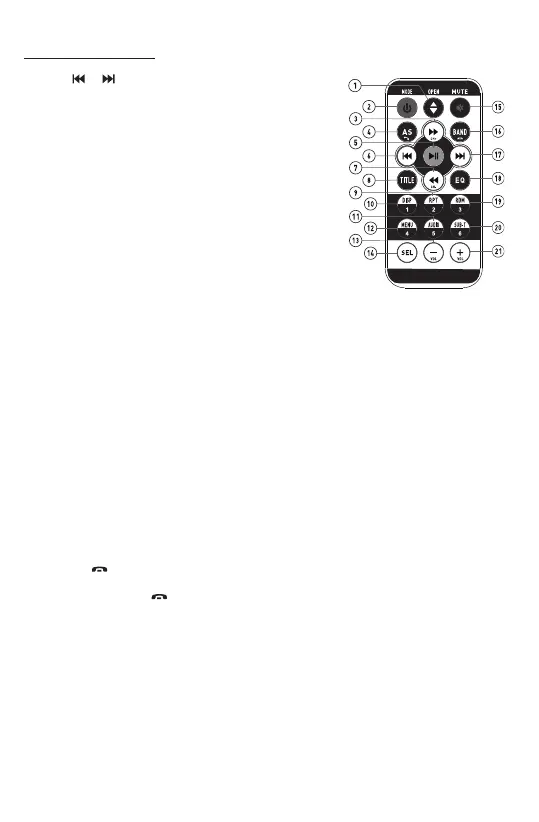
6 & 17. /
In Disc/USB/BT music playback, press both buons to
skip next or previous track.
In Radio mode, press each one to seek tuning down
or up.
Press and hold each one to manual tuning down or up.
8. TITLE
In DVD playback, press this buon to enter tle menu
which is recorded on the media. (If the DVD disc with
tle menu).
9. RPT(Repeat playback) / 2
In Disc/USB playback mode, press and hold the RPT
buon to enter different repeatedly playing modes:
Repeat tle, Repeat One, Repeat Dir(folder), Repeat All.
In radio mode, press to store or recall the preset staon 2.
10. DISP / 1
In video playing mode, press and hold DISP buon show informaon such as Title
number, Chapter number, Track number, elapsed me, remain me etc.
In radio mode, press to store or recall the preset staon 1.
11. AUDIO / 5
In DVD playback, press and hold AUDIO buon repeatedly to switch the language
of audio if the DVD disc is recorded with mul-languages.
In VCD playback, press and hold AUDIO buon repeatedly to switch L/R or stereo
audio track.
In radio mode, press to store or recall the preset staon 5.
12. MENU / 4
In DVD playback mode, press and hold the MENU buon to display the root level
directory of DVD disc.
In radio mode, press to store or recall the preset staon 4.
13 & 21. VOL+/VOL-
Use these controls to adjust the volume level.
14. SEL
Press to turn to EQ sengs.
15. MUTE
In power on mode, press the MUTE buon to toggle mute on or off.
16. BAND /
Press BAND to select between FM1, FM2, FM3, AM1 and AM2 bands.
In BT mode, press the buon to reject an income call or end a call.
18. EQ
Press repeatedly to cycle through the different equalizer curve presets you may wish to
use for enhanced listening.
19. RDM / 3
In Disc/USB Playback mode, press and hold RDM buon to play tracks in random order,
press again to cancel the RDM funcon.
In radio mode, press to store or recall the preset staon 3.
20. SUB-T/6
In DVD playback, press and hold the SUB-T buon repeatedly to switch the language
of subtle if the DVD disc is recorded with mul-subtles.
In radio mode, press to store or recall the preset staon 6.



 To Next Page
 Loading...