HSD 7799 ENG-13
English
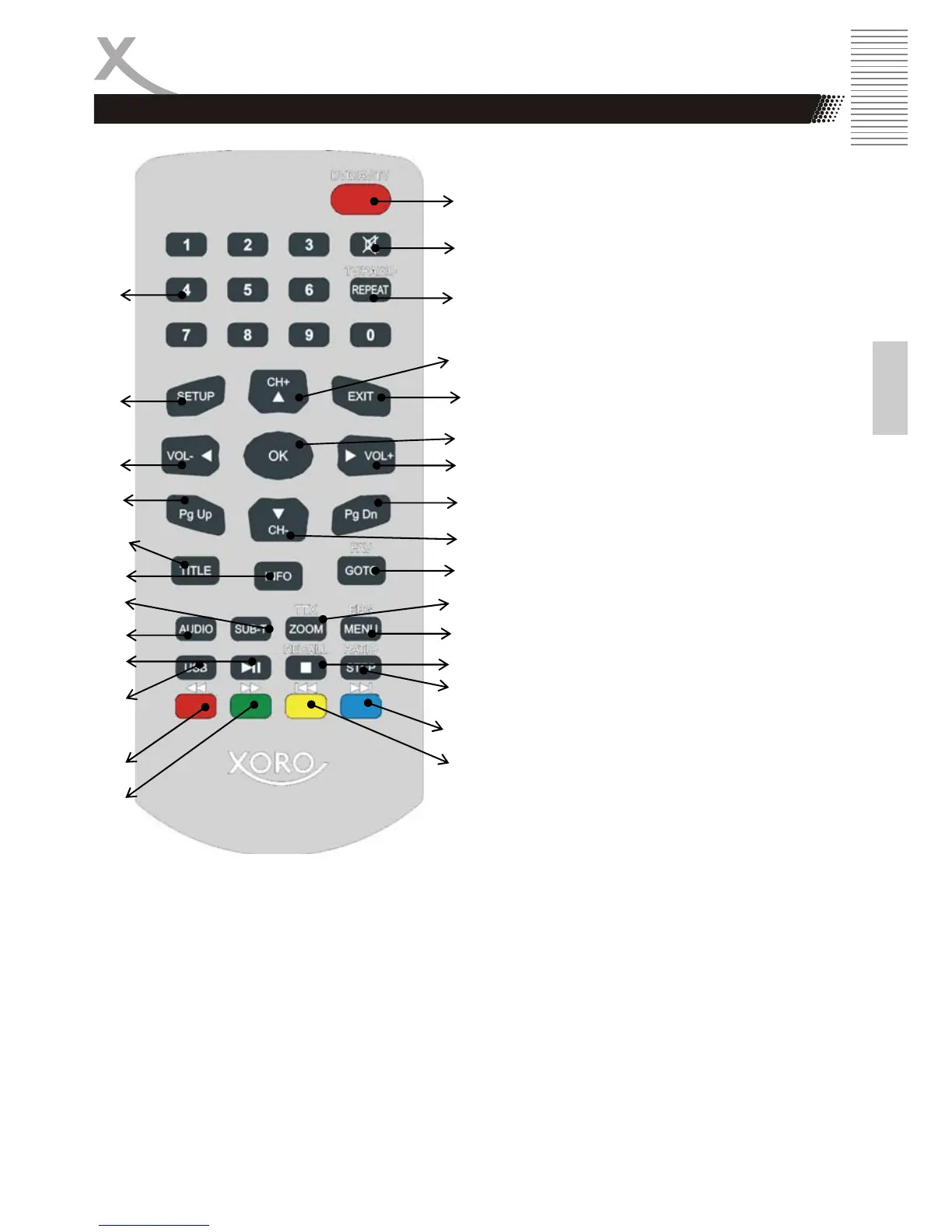
REMOTE CONTROL
Buttons on the remote control:
1. Numeric buttons (0 … 9)
2. SETUP button
3. Reduce Volume (VOL-) / Navigation
button Left
4. Page Up button (PgUp)
5. TITLE button
6. Information button (OSD/INFO)
7. SUBTITLE button
8. AUDIO button
9. PLAY / PAUSE button
10. USB/CARD (DVD-Mode only)
11. Fast backward (<<); DVB-T: Red
button
12. Fast Forward button (>>); DVB-T:
Green button
13. DVD/DTV/AV button
14. Mute button
15. DVD: REPEAT button; DVB-T: TV/
Radio button
16. DVB-T: Change Channel (CH+);
Navigation button UP
17. EXIT button
18. Confirmation button (OK)
19. Increase Volume (VOL-); Navigation
button Right
20. Page Down button (PgDn)
21. DVB-T: Change channel (CH-);
Navigation button Down
22. DVD: GOTO button; DVB-T:
Favourite Channel
23. DVD: Zoom button; DVB-T: Teletext
button
24. DVD: Video-DVD MENU button:
DVB-T: EPG button
25. DVD: STOP button
26. DVD: STEP button
27. DVB-T: Aspect Ratio
28. DVD: Previous button (|<<); DVB-T:
Blue button
29. DVD: Next button (>>|); DVB-T:
Yellow button
1.
2.
3.
4.
5.
6.
7.
8.
9.
10.
11.
12.
13.
14.
15.
16.
17.
18.
19.
20.
21.
22.
23.
24.
25.
26.
27.
28.



 To Next Page