ENG-17
English
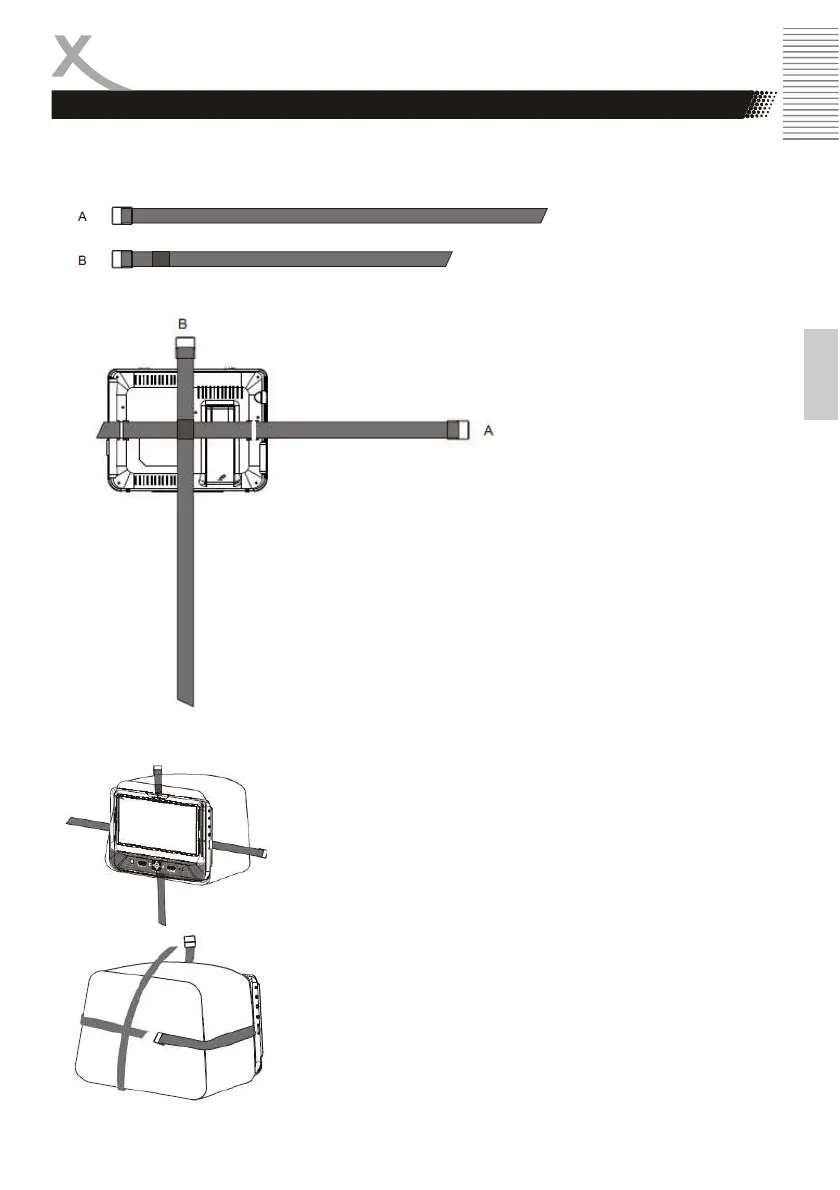
In car Installation with straps
Turn the player around so the backs are facing you.
1.Fit the straps to the DVD Player / Monitor as required.
The DVD Player will fit to the mount in this position, as shown below
.
Turn the player around, slide
the strap a through the strap
lock upon the right bouttom of
the DVD player, then slide the
strap through the strap B and
the left bootom player as
shown. Enter the strap B
mounted centrally
Note:
Be sure to complete the installation
then use DVD player in the car.
For installation is recommended that
the DVD player is on the LEFT
headrest, to ensure a neat cable run
to the monitor
2. Fitting the straps to the headrest.
Fit the straps around the headrest and engage the 2 trident
clips. Ensure clips are securely fastened..
Pull the straps tight using the adjustment.
Tuch the loose ends into the strap tidy.



 To Next Page