4
Aquarium Experts
I. Installation with Sensor Housing (Standard Installation)
Installation
1
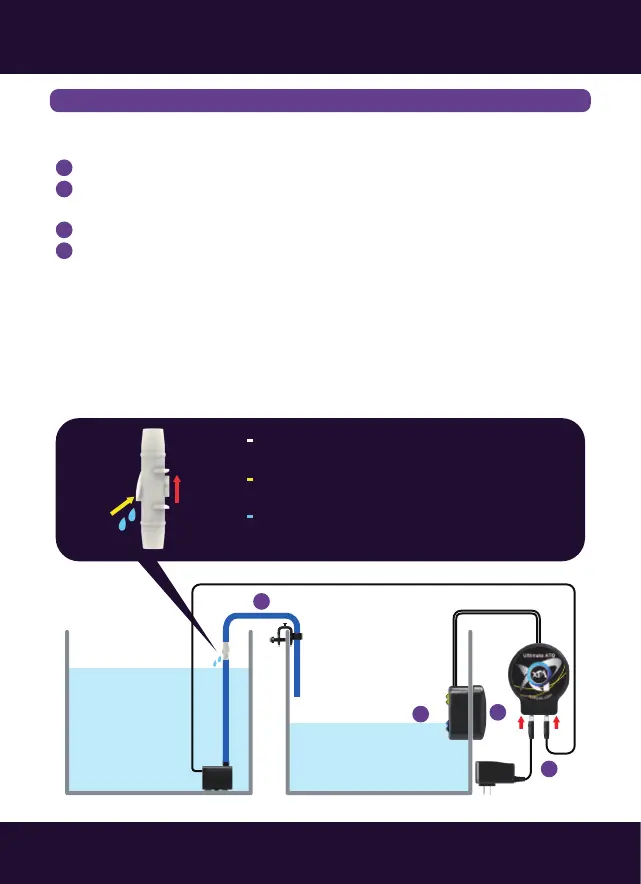
Mountthesensormoduletothesumpwiththemagnet.
Movethesensortothenormalwaterlevelwiththewaterlevelreachingthe
upperbluesensor.
ConnectATOrefilltube(pump↔siphonbreak↔tubingholder).
ConnectbothoftheDCpumpandpoweradapterwiththecontroller.
*Pleaseavoidsettingupthesensorinanareawithmicrobubblesordirectlight.
2
3
4
Reservoir
Tank/Sump
ATODCPump
Power
OpticalLevelSensor
1
4
3
2
AirIn
Direction
Siphonbreakmustbehigherthanthewater
levelinthereservoir.
AirIn:Siphonbreakallowsairintobreakthe
siphonwhenthepumpturnsoff.
WaterOut:Waterdropsoutoftheholeare
normalwhenthepumpison.
WaterOut



 To Next Page