English - 5
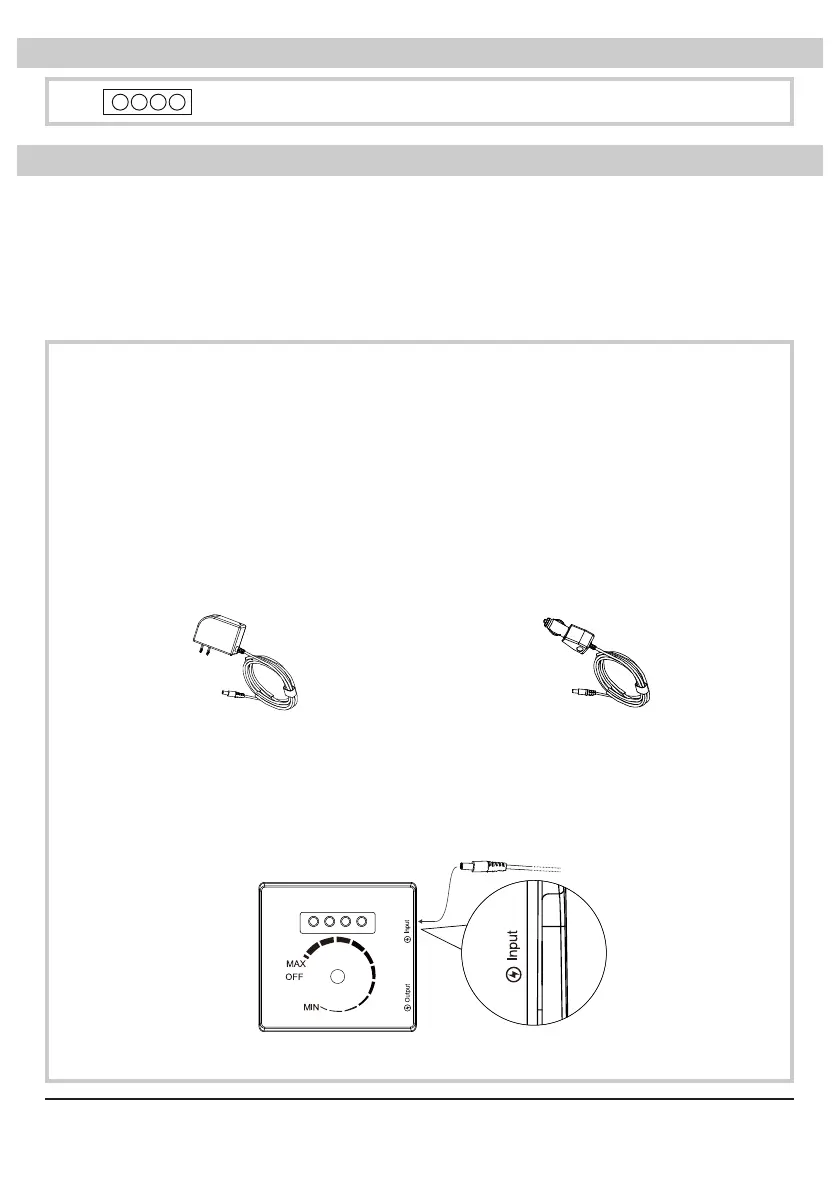
• This light indicates the life of the battery.
Battery Indicator Light
AC CHARGER
(Model: HCX3601-1202200U)
• For use on a nominal 115 V circuit
(NEMA 1-15R or NEMA 5-15R)
CAR CHARGER
(Model: NB-1201200)
• For use on a 12 V auxiliary car
power outlet / cigarette lighter
receptacle
Charging the Battery
Machine
Charging Port
Switch Plate
Instructions for FC-125B:
• Connect the charger to the power source. The power indicator light on the
charger (if applicable) will display green.
• Then connect the charger to the machine. The power indicator on the charger
(if applicable) will display red. When the battery is charging, all the bars of the
battery indicator light will shine green.
• When the battery is fully charged, the power indicator light on the charger (if
applicable) will display green.
• IMPORTANT: Please turn the unit off (in the “OFF” position) before charging.
• WARNING: DO NOT use unoriginal chargers or power adapters to charge the battery,
as this may cause malfunction or permanent damage to the battery or other related
safety concerns.
• IMPORTANT: Please charge the battery fully to activate the battery before initial use.
• IMPORTANT: To avoid the battery working on low capacity condition and encountering
permanent damage, it’s recommended to charge the battery fully before each usage.


 To Next Page