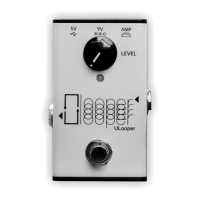
A. 5V USB: Connect to a power bank or phone charger. For firmware updates, connect to your computer
via this port. This port requires a minimum current of 1A.
B. 9V In: Connect to a standard 9-volt pedal adapter, center negative. This port requires a minimum
current of 1A.
C. Amp USB: Connect your amplifier to this port. Typically, the cable for this port is included with your
amp and is used to connect your amp to a computer. Ensure your guitar is connected to your amp, not
the ULooper.
D. Footswitch: Operates the looper for functions like recording, overdubbing, playback, stopping, and
clearing.
E. LED Indicator: Indicates the looper's state, such as recording, overdubbing, and playback.
F. Line Out: Connects to an external speaker or recording device without muting the amp's own speaker.
It offers a balanced mono output, compatible with both TS and TRS cables.
G. Reserved Port: Currently unavailable. Reserved for future uses, such as connecting an external
footswitch.
H. LEVEL: Controls the playback volume of the loop.
Instructions
Before Using
Amp Firmware Update
Update your amp's firmware to the latest version to ensure compatibility with ULooper.
ULooper Firmware Update
Update your ULooper to the newest firmware for improved stability and the latest features.
ULooper Firmware Update
(Spark Only) Disconnect Bluetooth Audio & Aux In
Before using ULooper, disconnect Spark's Bluetooth audio and Aux In. Spark won't transmit data over
USB if these connections are active.
Only the Bluetooth audio connection needs to be disconnected, the Spark App and Airstep usage won't
impact USB functionality.
Connection
Connect your amplifier using the ULooper's Amp port. Power the device through the 5V or 9V port. A
successful connection is indicated by a solid blue.
Note: If you're using a KATANA 50 and higher models, or a Fender LT, you'll need an additional
6.35mm (1/4") to 3.5mm (1/8") TRS stereo cable for connection. This cable is not included in the
ULooper's box and must be purchased separately. The reason for this additional connection is that these
amps' USB ports only support recording, not playback. Therefore, you need to use ULooper's Line Out
port to connect to the amp's AUX port for playback using this cable.


 To Next Page
 Loading...