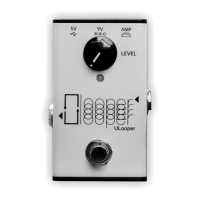
To switch between Loop Mode (amp's AUX) and Line Out Mode with ULooper's Line Out port, follow
these steps. By default, ULooper is set to Loop Mode:
1. Connect ULooper to power, ensuring it is not connected to the amp's USB. The purple LED will light
up.
2. Insert a 6.35mm (1/4") cable into ULooper's Line Out port.
3. Press and hold the Footswitch until the white LED flashes briefly, then release it.
4. Turn the LEVEL knob counterclockwise until the LED shows either red or green.
5. Rotate the knob: when the LED is red, press the Footswitch to set it to Loop Mode; when the LED is
green, press the Footswitch to set it to Line Out Mode.
6. Once the setting is complete, disconnect the power.
LED Color Explanation
Connection successful, no loops currently stored.
Record a Loop
With the LED solid blue, press the footswitch to start recording your loop. Press again to stop recording
and start playback immediately.
Overdub
During playback (when the LED is solid green), pressing the footswitch initiates an immediate overdub.
Press again to stop overdubbing.
Undo Overdub
This function will be available in the future firmware update.
Stop Playback
To stop playback, double-press the footswitch within one second. Pressing again will immediately restart
the playback.
Clear All Loops
To clear all loops for a new recording, double press and hold for two seconds during playback or
overdubbing, or press and hold for two seconds if stopped.


 To Next Page
 Loading...