Note: Holding down the button when stopped will cause the loop to play momentarily. Erasing the loop
without playback will be possible with an external footswitch in future updates.
Control Loop Volume
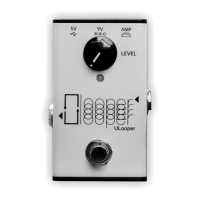
To adjust the volume of your loop, simply use the LEVEL knob on the ULooper and the
Music/Audio/Master knob on your amp.
Note: It's important to note that the Music button on Spark Go does not control the loop's volume but
is solely for adjusting the volume of Bluetooth audio.
Specifications
Included: ULooper, USB A-C Cable, User Manual
Power Supply: 5V/1A or 9V/1A
Current Draw: 200mA
Ports: AMP (USB A), 5V (USB C), 9V (DC IN, Center Negative), Line Out (1/4-inch TRS), Input (1/4-inch
TRS, reserved for future use)
Max Recording Time: 180 Minutes
Line Out: Balanced MONO TRS
Controls: Footswitch, LEVEL Knob
Indicator: Loop Status LED
Dimensions and Weight: 97 x 56 x 39 mm (3.82 x 2.20 x 1.54 inches), 160 g
FAQ
(Spark Only) LED Stuck on Purple
If you see a solid purple LED followed by a blinking, repeating continuously, it indicates that the
ULooper is unable to successfully connect to your Spark. Restarting your Spark should resolve this issue.
(Spark Only) Loop Sound Cracking or Breaking Up
If you experience cracking in the loop sound, try reducing the master volume of the amp in the Spark
App. Cracking occurs when the amp's output exceeds the maximum range of the USB signal. Typically,
setting the ULooper's volume knob and Spark's music knob to the 9-12 o'clock position should result in
a normal sound level.
(Spark Only) No Loop Sound from Amp
If the ULooper's LED appears normal yet there's no loop sound from the amp, verify the settings of
ULooper's Level knob and Spark's Music knob. Should it remain silent, consider powering off and


 To Next Page
 Loading...