8 9
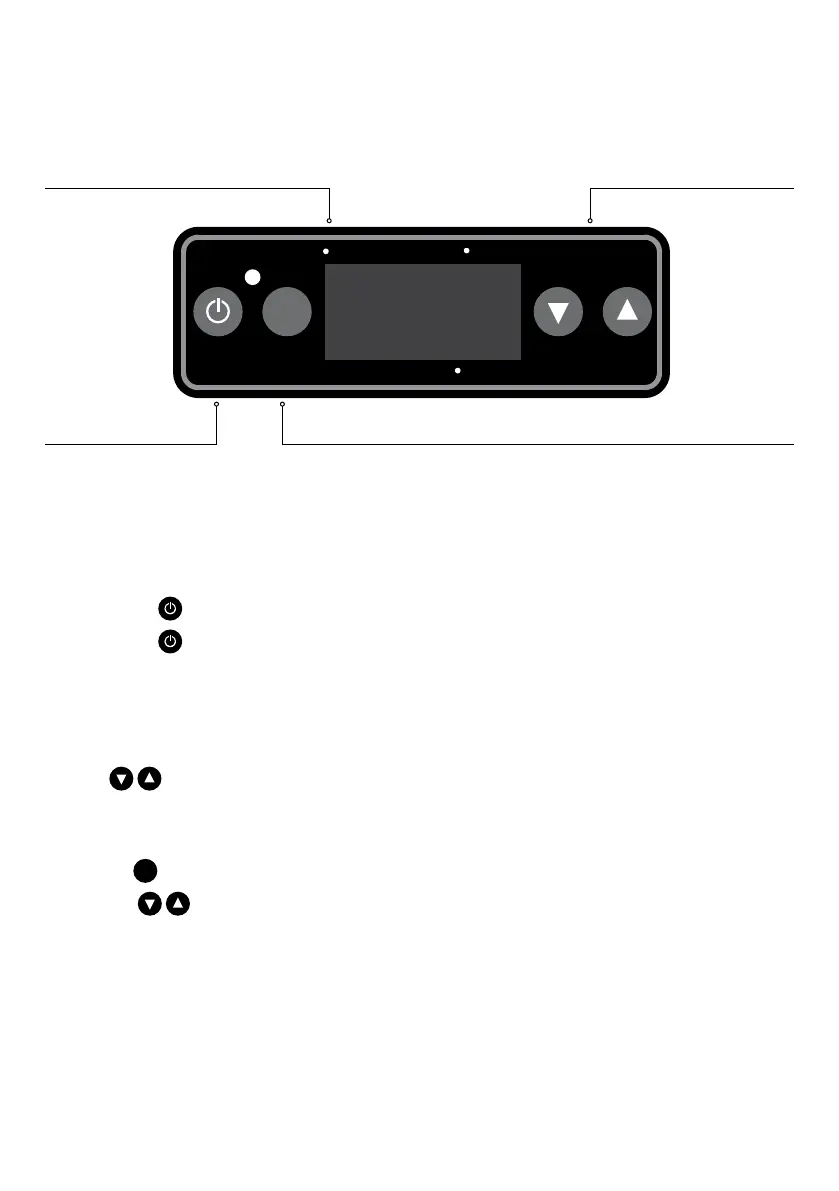
Set
BATTERY
VOLTAGETEMPERATURE
RUN
TEMPERATURE CONTROL UNIT
POWER
1. Press & Hold button to turn fridge ON.
2. Press & Hold
button for 3 seconds to turn
fridge OFF.
TEMPERATURE SETTING
1. Press the SET BUTTON once
2. Press
to set temperature.
BATTERY PROTECTION
1 Press the
Set
BUTTON twice
2 Press the
arrows to select the
required battery protection
3 The selection will flash 4 times
SET BUTTONPOWER ON/OFF BUTTON
UP AND DOWN BUTTONSTEMP. DISPLAY


 To Next Page