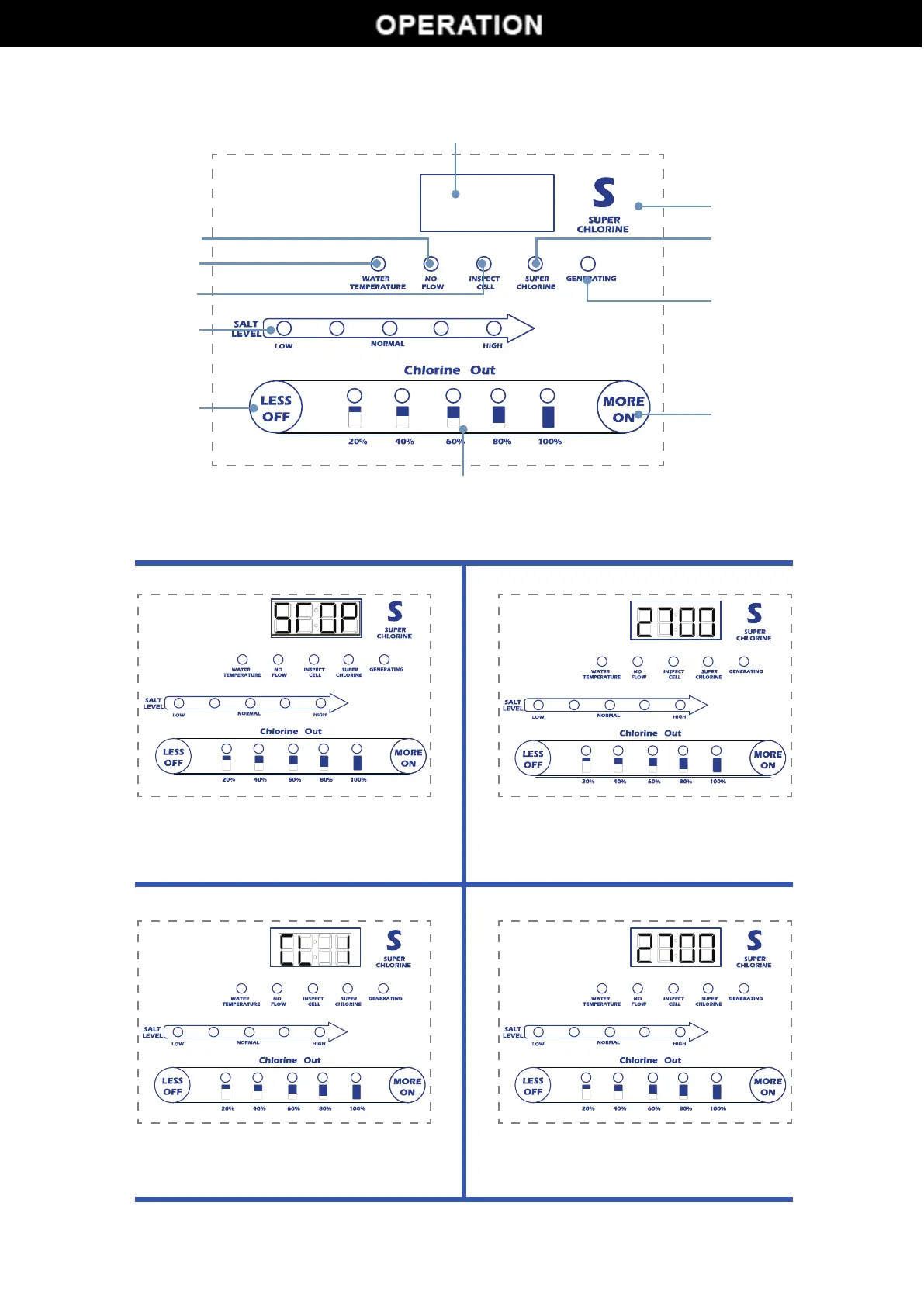
CONTROL PANEL
Salinity/Temperature/StatusDisplay
Insufficientwaterflowerrorindicationlight
Watertemperatureerrorindicationlight
Salinityerrorindicationlight
Salinityleveldisplay
Shutdown/functionselectbutton
SalinityDisplay
Poweron/functionselectbutton
Operatingindicationlight
Superchlorinationmodelight
Superchlorinationmode
Button Instructions:
Poweron/off Functionselecting
Automaticcleaningmode Superchlorinationmode
Instandbystatus,press"MORE/ON"forthe
firsttimetoturnonthegenerator,andpress
"LESS/OFF"forthefirsttimetoturnoffthe
generator,anditwillshowas"STOP".
Saltproducingtimeincrease:press"MORE/ON"
buttonwhenmachineisonSaltproducingtime
decrease:press"LESS/OFF"forfirsttime,the
machinewillbeoff,andpressagain
Keeppressing"MORE"forawhiletoenterthe
self-cleaningmodewhenstartingup,and
continuetopress"MORE"or"LESS"toadjust
Wheneverinanymode,press'S'toenterSuper
chlorinationmode
5


 To Next Page