EasyManua.ls Logo

Y-cam Knight - User Manual

Y-cam Knight
66 pages
Print Icon
To Next Page IconTo Next Page
Loading...
ThismanualappliestothefollowingYcamproducts.
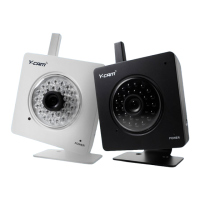
Ycam Black
Y
Featuresandoperationslistedinthis anualdependonthespecificmodel.
Pleasereadthismanualcarefullybeforeattemptingtoinstalloroperatethisproduct.
ThisUser pdated.
v3.25

UserManual
English
camKnight
YcamWhite
m
Eachcamerasmodelnamecanbefoundonthereverseofthecamera.
Pleaseretainthismanualforyourfuturereference.
Manualisaworkinprogressandisconstantlybeingu
Youareinvitedtocheckthewebsiteregularlyforupdatedversions.

Table of Contents

Questions and Answers

  • L
    Larry JohnsonAug 16, 2025
    How to fix Y-cam Security Camera when WiFi connectivity doesn’t work?
    • M
      Mark MayerAug 16, 2025
      If your Y-cam Security Camera's WiFi isn't working, it could be due to a weak signal. Try relocating the camera closer to your router or removing any obstacles between them. Also, ensure the SSID and encryption settings on your camera match your network settings exactly. Finally, check for any interference from other electronic equipment.
  • J
    Jose NelsonAug 19, 2025
    What to do if I forgot my Y-cam Knight Security Camera password?
    • D
      David SotoAug 19, 2025
      If you've forgotten your password to access the settings menu on your Y-cam Security Camera, you'll need to press the RESET button. Keep in mind that doing so will erase all of your current configuration settings.
  • E
    Emily MooreAug 22, 2025
    What to do if Y-cam Security Camera motion detection triggers unexpectedly?
    • O
      ostevensonAug 22, 2025
      If your Y-cam Security Camera's motion detection is triggering unexpectedly, it might be due to changes in lighting affecting the image. Motion detection is based on changes in pixel in the image. Lowering the sensitivity setting can help avoid these false triggers.
  • S
    seanreeseAug 25, 2025
    What to do if the motion detection feature of Y-cam Knight does not send email alerts?
    • J
      John WigginsAug 26, 2025
      If the motion detection feature on your Y-cam Security Camera isn't sending email alerts, first check that the email alert feature is properly configured. It's also possible that the SMTP server used by the camera is filtering emails to prevent spam. Try using a different SMTP server or contact your ISP to see if SMTP access is being blocked.
  • J
    Jeremy LamAug 28, 2025
    What to do if the picture viewing interface of Y-cam Knight does not appear?
    • M
      Mary ArnoldAug 28, 2025
      If the picture viewing interface for your Y-cam Security Camera isn't appearing, ensure that your Internet Explorer settings allow you to download and install ActiveX controls. Also, remember that only a maximum of 16 users can access the camera simultaneously through the network. Network traffic might also be the issue, so wait a while or try refreshing the page.
  • O
    ochoadavidAug 31, 2025
    Why is the colour of the picture strange on my Y-cam Knight Security Camera?
    • D
      dwilliamsAug 31, 2025
      If the color of the picture on your Y-cam Security Camera appears strange, first confirm that your PC's color setting is set to 16 bits or more. If you have an infrared version of the Y-cam, the infrared LEDs might be altering the image's colors. In this case, try turning the infrared off.
  • A
    Andrea WilliamsSep 3, 2025
    How to find the IP address of my Y-cam Knight?
    • C
      Christopher SteeleSep 3, 2025
      To find the IP address of your Y-cam Security Camera, you can use the supplied Y-cam Setup program. Alternatively, you can use UPNP (only for XP OS). You can also set up PPPoE IP Notification to send an email to your mailbox. As a last resort, you can reset your Network to the default IP address.
  • M
    Mary Howell MDSep 6, 2025
    What does it mean if the power LED is flashing green and the Y-cam Security Camera is inaccessible?
    • J
      Julie MaddenSep 6, 2025
      If the power LED on your Y-cam Security Camera is flashing green and the camera is inaccessible, it indicates that a firmware upgrade has been interrupted or the firmware has been damaged. Please contact your place of purchase or Y-cam Technical Support for assistance.
  • K
    Katie CastanedaSep 8, 2025
    How to fix unreadable characters displayed on Y-cam Knight Security Camera?
    • K
      Kimberly WeberSep 9, 2025
      If unreadable characters are displayed on your Y-cam Security Camera, set the Encoding or the Character Set of the selected language on the web browser.
  • C
    Charles ClarkeSep 12, 2025
    What to do if I cannot see the controls of the Live Feed on my Y-cam Security Camera?
    • D
      Daniel DavisSep 12, 2025
      If you can't see the controls of the Live Feed on your Y-cam Security Camera because they are underneath the picture, reset your browser's Zoom setting or text size setting. Pressing Ctrl and “0” (zero) at the same time should do this.

Summary

Y-cam Installation Guide

Connecting to Router or Switch

Step-by-step instructions for linking the Y-cam to a network via Ethernet and power.

Y-cam Software Installation

PC Software Installation

Steps to install the Y-cam setup utility on a Windows PC from the installation CD.

Y-cam Settings and Configuration

Initial Setup and Password Security

Guidance on changing the default administrator password for enhanced security and initial setup.

Camera Settings and Adjustments

Configuration options for image, stream, OSD, and night vision settings for optimal performance.

Network Connectivity Setup

Steps for configuring wireless, TCP/IP, PPPoE, DDNS, and UPnP for network access.

Alarm and Event Management

Setting up motion detection, schedules, and managing alarms via FTP or email notifications.

Advanced Y-cam Operations

Port Forwarding for Internet Access

Configuring router ports to allow external access to the Y-cam over the internet.

Troubleshooting Y-cam Issues

Connectivity and Display Problems

Solutions for IP address issues, Wi-Fi connectivity, interface display, and color problems.

Alerting, LED, and Unexpected Behavior

Addressing email alert failures, inaccessible cameras, false motion triggers, and LED indicator meanings.

Y-cam Knight Specifications

General IconGeneral
BrandY-cam
ModelKnight
CategorySecurity Camera
LanguageEnglish

Related product manuals