EasyManua.ls Logo

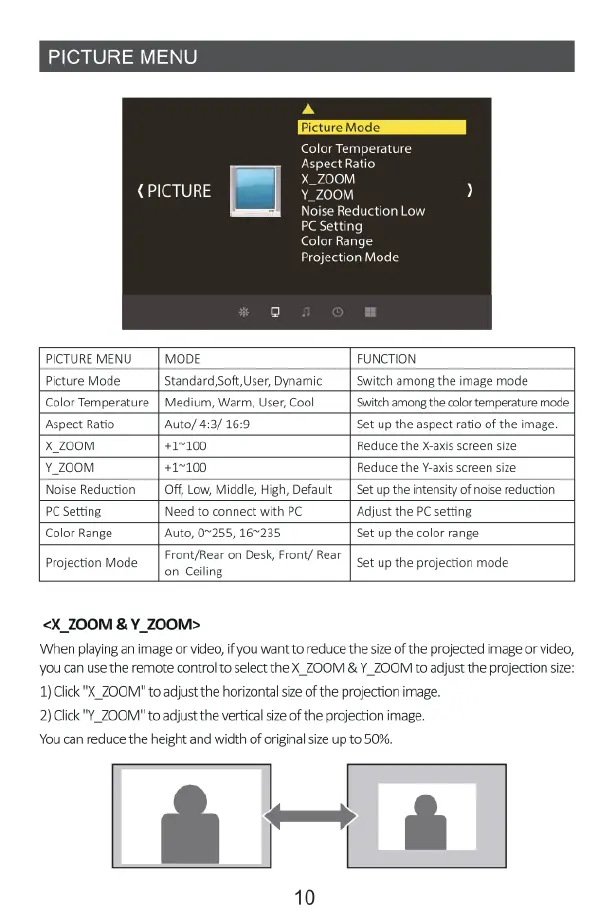
Yaber Y21 - Menu Settings; Picture Menu Settings; X_ZOOM & Y_ZOOM

Yaber Y21
19 pages
Print Icon
To Next Page IconTo Next Page
To Previous Page IconTo Previous Page
Loading...
Color
Temperature
Aspect
Ratio
|
M
{PICTURE
i
Y_Z0OM
Noise
Reduction
Low
PC
Setting
tion
M
PICTURE
MENU
|
MODE
FUNCTION
Picture
Mode
Standard,Soft,User,
Dynamic___|
Switch
among
the
image
mode
Color
Temperature
|
Medium,
Warm,
User,
Cool
Switch
among
the
color
temperature
mode
Aspect
Ratio
Auto/
4:3/
16:9
Set
up
the
aspect
ratio
of
the
image.
X_z00M
+17100
Reduce
the
X-axis
screen
size
Y_z00M
+1~100
Reduce
the
Y-axis
screen
size
Noise
Reduction
|
Off,
Low,
Middle,
High,
Default_|
Set up the
intensity
of
noise
reduction
PC Setting,
Need
to
connect
with
PC
‘Adjust the
PC
setting
Color
Range
Auto,
07255,
167235
Set
up
the
color
range
Projection
Mode
Front/Rear
on
Desk,
Front/
Rear
on
Ceiling
Set
up
the
projection
mode
<X_ZOOM
&
Y_700M>
When
playing
an
image
or
video,
if
you
want
to
reduce
the
size
of
the
projected
image
or
video,
you
can use the
remote
control
to
select
the
X_ZOOM
&
Y_ZOOM
to
adjust
the
projection
size:
1)
Clck
"X_ZOOM"
o
adjust
the
horizontalsize
of
the
projection
image.
2)
Click"Y_ZOOM"
to
adjust
the
vertical
size of
the
projection
image.
You
can
reduce
the
height
and width
of
originalsize
up
to
50%.
D
10

Related product manuals