EasyManua.ls Logo

Yaber Y21 - Sound Menu Settings; Time Menu Settings

Yaber Y21
19 pages
Print Icon
To Next Page IconTo Next Page
To Previous Page IconTo Previous Page
Loading...
MEM
A
Blance
Auto
Volume
TS
¢
Sound
E
EQ
ound
Surround
Sound
Source
v
n
SOUND
MEMU_|
MODE
FUNCTION
Sound
Mode
|
UserStandard,
Music,Movie
Sports
|
Set
up
the
sound
mode
N
Balance
the
sound
of
the
left
and
right
Balance
500
channel
of
the
speaker
AutoVolume
|
On,
Off
Intelligently
adjust
volume
Surround
Sound
Off,
SRS
TruSurround
XT,surround
Set
up
the
surround sound
mode
EQ
120Hz,500Hz,1.5KHz,
5KHz,
10KHz
Adjusts
the
HDMI
input
signal
level
depending
on
the
connected
device
Sound
Source
Normal
Sound
Box,
Line
Setting the
connection
of
external
devices
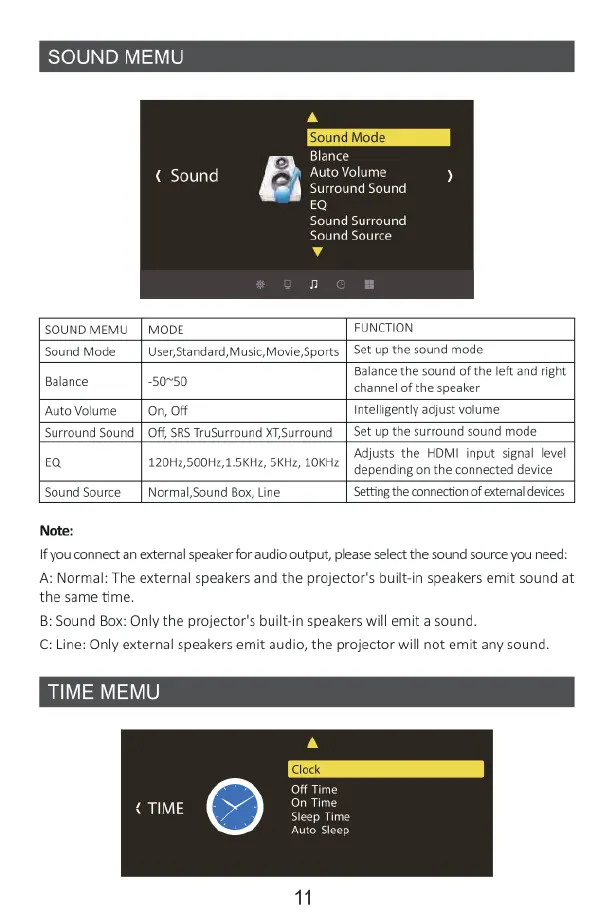
Note:
If
you
connect
an
external
speaker
for
audio ovtput,
please
select
the
sound
source
you
need:
A:
Normal:
The
external
speakers
and
the
projector's
built-in
speakers
emit
sound
at
the
same
time.
8:
Sound
Box:
Only
the
projector's
built-in
speakers
will
emit
a
sound.
C:
Line:
Only
external
speakers
emit
audio,
the
projector
will
not
emit
any
sound
TIME
ME|
A
Off
Time
on
Time
Sleep
Time
Auto
eep

Related product manuals