WARNING:
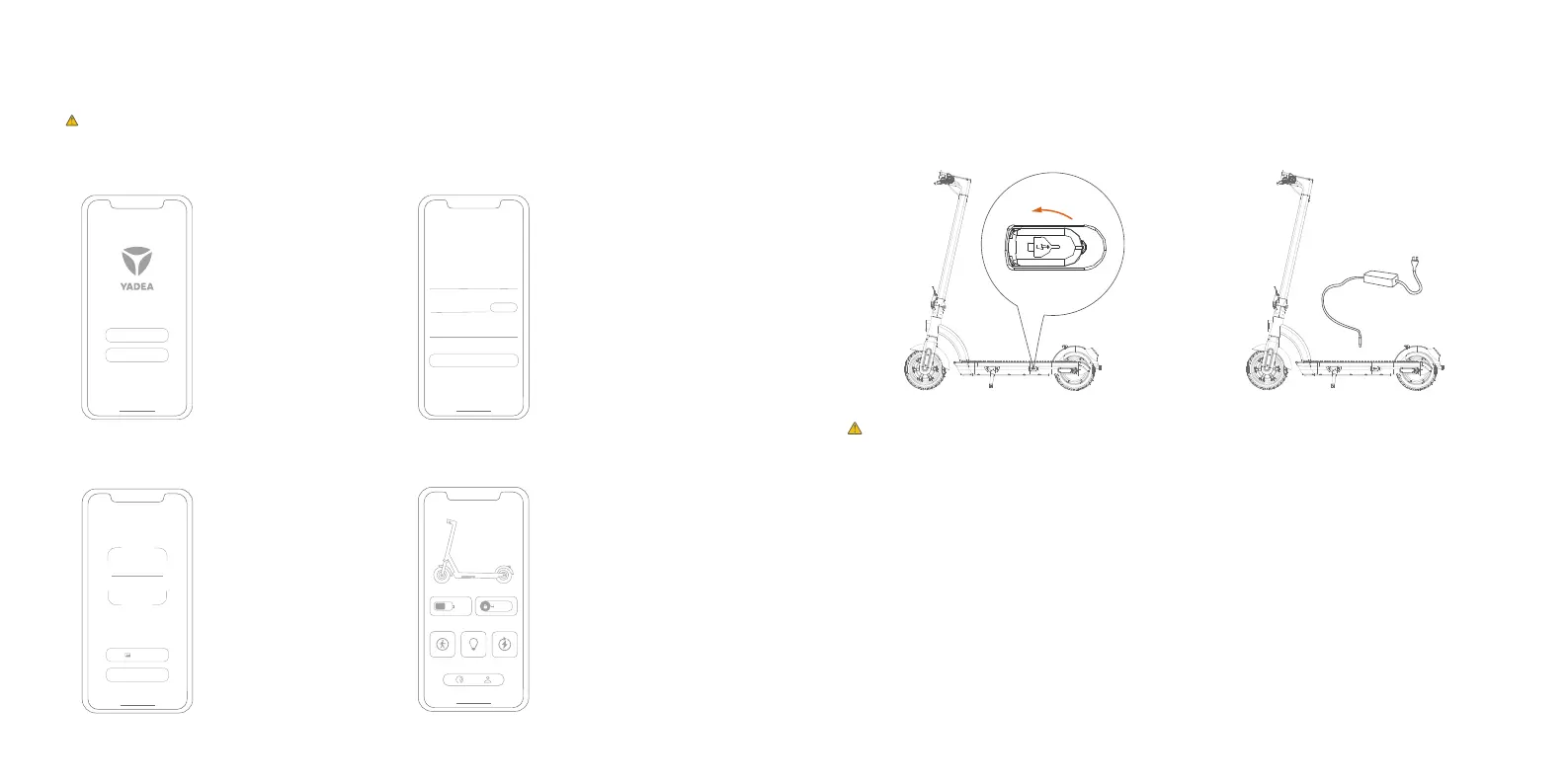
1. Open the charging port.
7 Battery charging
Charger red light on means charging is in progress, green light on means charging is completed.
Disconnect the charger upon full charging.
Use original charger, or battery may be subject to damage or risk of fire.
Charging port
2. Charger connection: Connect battery first,
then connect to town electricity.
4. After the connection is
successful, start using.
Enjoy your ride now!
2.
Click Register, enter email
address, get verification
code, set password, complete
registration.
3. Scan the QR code of the
scooter instrument position
or "VIA BLUETOOTH" to bind
the vehicle.
Sign up
Mail
Verify code
Login password
Sign up
Send
Login
Europe
Download “Yadea ”APP from APP store (iOS&Android)
1.Open “Yadea” APP.
Click "Agree" to <the User
Service Agreement >and
<Privacy Policy>, then Register.
Read all the precautions in the manual.
Attention: During ride, the phone should be as close to the scooter as possible.
VIA BLUETOOTH
Photos
6 APP Initial Settings
07 08


 To Next Page