2200 YRM 1067 ZAPI™ PC Interface
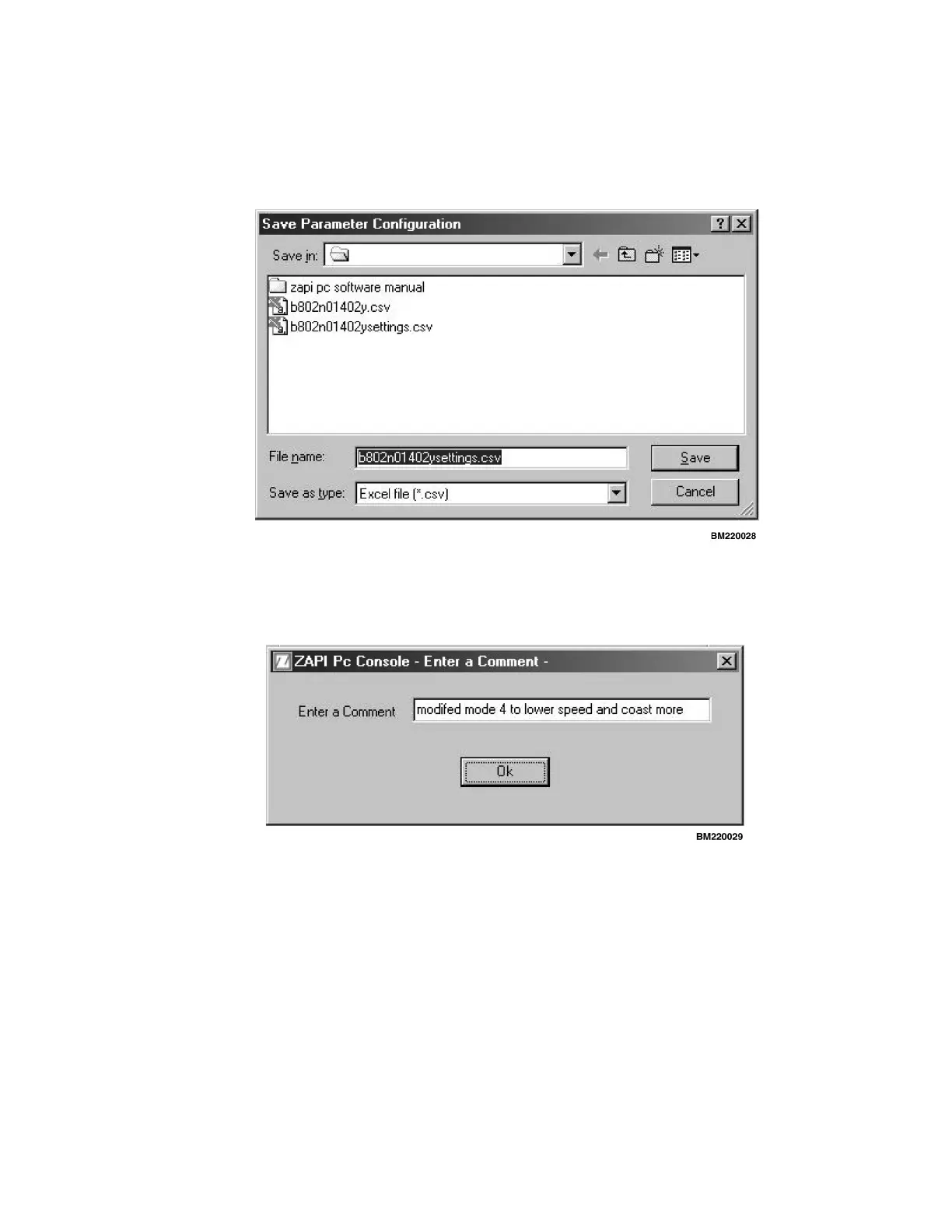
1. Try to use the actual truck serial number and put
the word "settings" after it. (This is to keep the con-
troller settings file separate from the tester function
Save file.) See Figure 19.
Figure 19. Save: In
2. Once you select a file name and click on Save, you
will see the screen shown in Figure 20.
Figure 20. Enter a Comment
3. Under the Enter a Comment box, you can either
describe what is different with the settings or enter
a customer name.
Here is what a saved parameter file looks like:
[Info]
Chopper_Name=MPB NA V1.01
User_Comment=modified mode 4 to lower speed
and coast more
Save_Date=Thu Apr 04 15:58:15 2002
[Code;Name;Position;Menu;Value;Scaled Value]
0;ACCELER.DELAY;0;0;0;LEVEL=0
5;DECELER.DELAY;1;0;9;LEVEL=9
11;RELEASE BRAKING;2;0;0;LEVEL=9
12;INVERS.BRAKING;3;0;9;LEVEL=9
30;MAX SPEED FORW;4;0;9;LEVEL=9
31;MAX SPEED BACK;5;0;9;LEVEL=9
248;DRIVE MODES ;01;1;ON
[End]
[Validation]
Code=FFDA
[Stop]
43



 To Next Page