86 Mixing and Automation
Digital Recording Console 02R Getting Started Guide
Using the AUTOMIX Library
Storing an Automix
The Digital Recording Console 02R has 16 automix program locations (1
through 16) for you to store the current automix. The following instructions
show you how to store your automix program in the library.
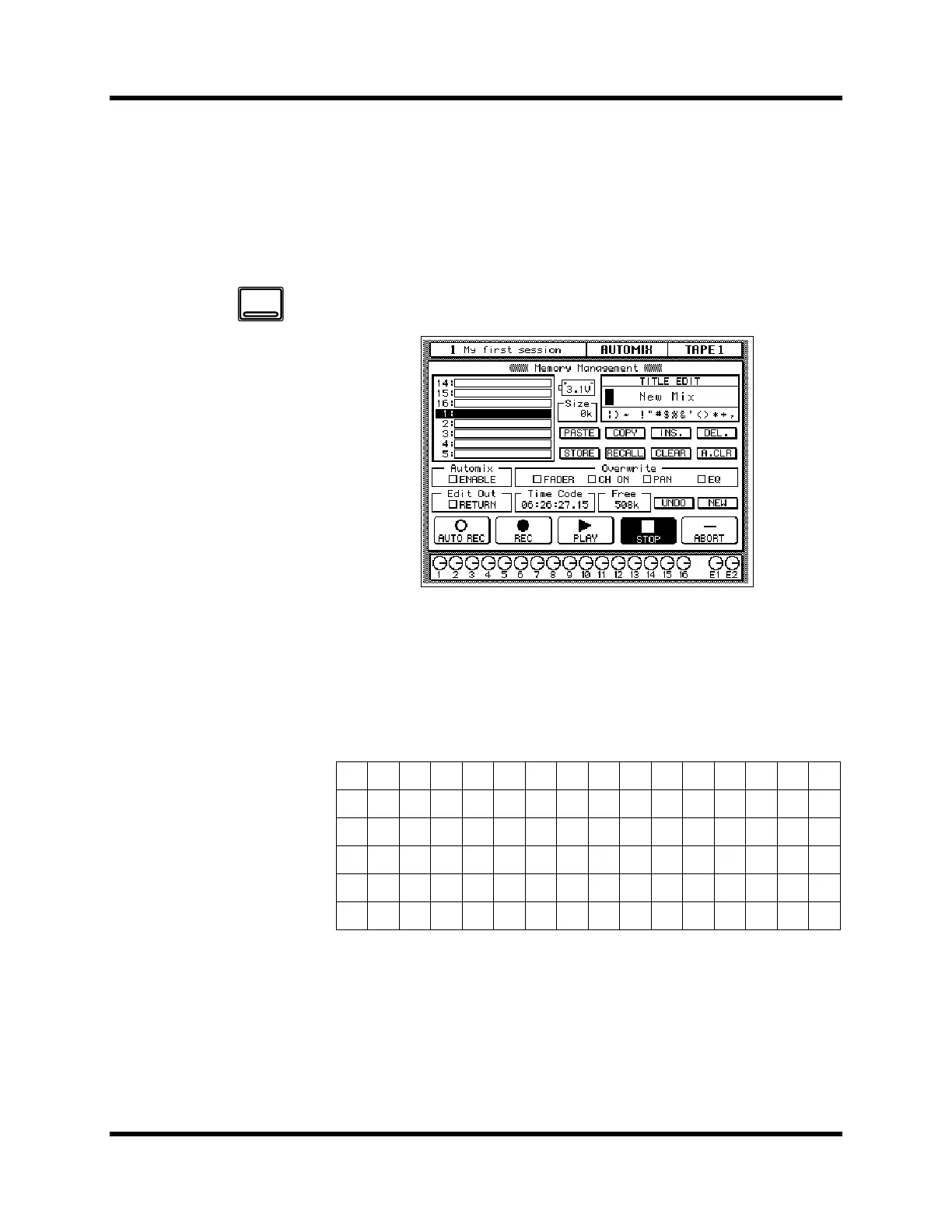
1. Press the [AUTOMIX] button until the “Memory Management”
screen appears:
2. Use the CURSOR buttons to select the TITLE EDIT box.
3. Select the individual character positions with the CURSOR
buttons. Use the encoder wheel to select the characters.
You can create a name of up to 16 characters long. It can contain any of the
following characters:
!“#$%&'()*+,-./
0123456789: ;<=>?
@ ABCDEFGH I JKLMNO
PQRSTUVWXYZ [\]^_
` abcdefghi jk lmno
pqrstuvwxyz { | } ~
AUTOMIX


 To Next Page