EDIT-LFO
● ● ● ● ● ● ● ● ● ● ● ● ● ● ● ● ● ● ● ● ● ● ● ● ● ● ● ● ● ● ● ● ● ● ● ● ● ● ● ● ● ● ● ● ● ● ● ● ● ● ● ● ● ● ● A5000/A4000 • Chapter 5 EDIT Mode 143
5. LFO
You use the LFO function to set up the sample’s LFO (low-
frequency oscillator). The LFO applies a low-frequency mod-
ulation to the output volume, filter cutoff frequency, and
pitch.
• The [COMMAND/EXIT] button gives you rapid access to a number
of helpful commands while you are working with this function. For
example, you can use the [COMMAND/EXIT] button when you
want to save your edit results to disk, or when you want to cancel
your new changes and restore the previously saved data.
Press the [EDIT] button and then the [F5] button to go to the
LFO functions.
1 display page is provided: LFO.
• See the "Basic Operation" section on page 78 for details on switch-
ing between display pages.
LFO
[EDIT] Button → [F5] Button → Knob 1 to select "EDIT-LFO"
You use the LFO function to set up the sample’s LFO (low-
frequency oscillator).
The LFO applies a low-frequency modulation to the output
volume, filter cutoff frequency, and pitch.
Knob 1
[ Turn] Cursor Position/Page Selection
Positions the cursor and selects display pages.
[ Press] Tree View
Calls the Tree View display (page 83).
Knob 2
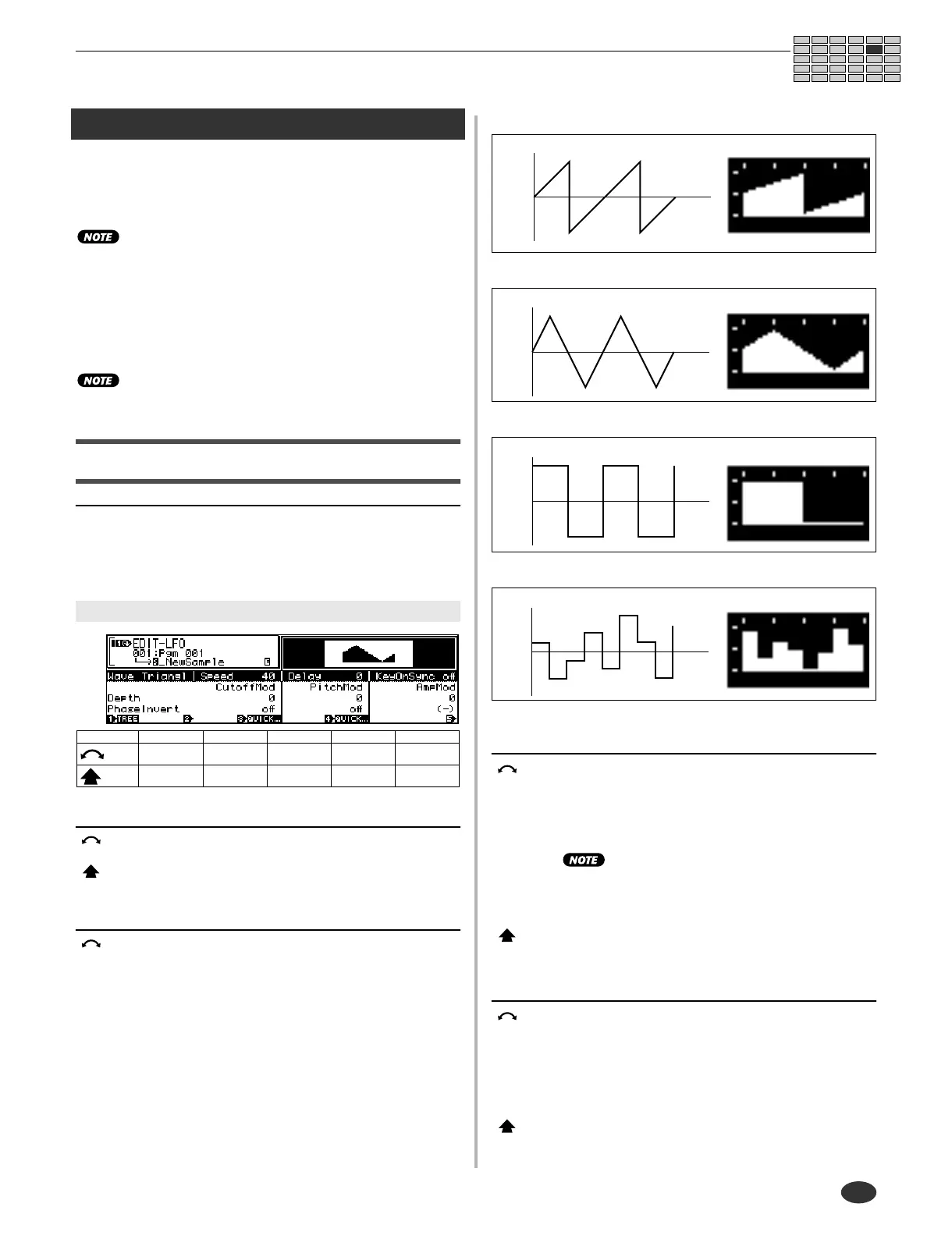
[ Turn] LFO Wave
This parameter selects the LFO waveform. The waveform, in
turn, determines the type of modulation (oscillation) applied
to the sample’s filter, pitch, and amplitude.
[Range] Saw, Triangle, Square, S/H
• Saw (Sawtooth wave)
• Triangle (Triangle wave)
• Square
• S/H ("Sample & hold" : random pattern)
Knob 3
[ Turn] LFO Speed
This value sets the modulation speed for the saw, trian-
gle, or square waveform. Higher values produce faster
modulation.
[Range] 1 — 128
•
Modulation speed for the S/H waveform must be set
at the program side (page 107). If you have selected
the S/H waveform (knob2), the screen displays the
current program-side setting. You cannot change the
setting from this page.
[ Press] QUICK...
Calls the quick entry menu (page 83).
Knob 4
[ Turn] LFO Delay
This parameter sets the interval between Note On and
the onset of LFO modulation. Higher values produce
longer delay together with a more gradual buildup of the
modulation level.
[Range] 1 — 127
[ Press] QUICK...
Calls the quick entry menu (page 83).
Cursor q
Knob 1 Knob 2 Knob 3 Knob 4 Knob 5
Turn
action
Cursor/Page LFO Wave LFO Speed LFO Delay
LFO Key On
Sync
Press
action
Tree View — QUICK... QUICK... —
q
Cursor
Time
Modulation
Time
Modulation
Time
Modulation
Time
Modulation


 To Next Page