EasyManua.ls Logo

Yamaha AM802 - PRECAUTIONS; Avoid Excessive Heat, Humidity, Dust and Vibration; Avoid Physical Shocks; Do Not Open the Case or Attempt Repairs or Modifications Yourself

Yamaha AM802
38 pages
Print Icon
To Next Page IconTo Next Page
To Previous Page IconTo Previous Page
Loading...
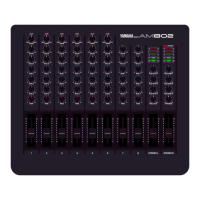
Congratulations!
Your
AM802
is
a
high-performance
8-inl2-out
mixer
that
will
deliver
outstanding
sonic
performance
and
broad
control
versatility
in
a
variety
of
applications.
In
order
to
make
the
most
of
the
AM802’s
many
features
and
fine
performance,
we
urge
you
to
read
this
operation
manual
thoroughly,
and
keep
it
in
a
safe
place
for
later
reference.
CONTENTS
CONTROLS
&
CONNECTORS
.2
CONTROLS
.3
Input
Channels
...3
Master
Control
Section
.4
CONNECTORS
.5
PRECAUTIONS
SAMPLE
APPLICATIONS
.6
LEVEL
DIAGRAM.
.7
DIMENSIONS
.7
SPECIFICATIONS
.
8
BLOCK
DIAGRAM
.10
1.
AVOID
EXCESSIVE
HEAT,
HUMIDITY,
DUST
AND
VIBRATION
Keep
the
unit
away
from
locations
where
it
is
likely
to
be
exposed
to
high
temperatures
or
humidity
such
as
near
radiators,
stoves,
etc.
Also
avoid
lo¬
cations
which
are
subject
to
excessive
dust
accu¬
mulation
or
vibration
which
could
cause
mechanical
damage.
2.
AVOID
PHYSICAL
SHOCKS
Strong
physical
shocks
to
the
unit
can
cause
dam¬
age.
Handle
it
with
care.
3.
DO
NOT
OPEN
THE
CASE
OR
ATTEMPT
REPAIRS
OR
MODIFICATIONS
YOURSELF
This
product
contains
no
user-serviceable
parts.
Refer
all
maintenance
to
qualified
YAMAHA
service
personnel.
Opening
the
case
and/or
tampering
with
the
internal
circuitry
will
void
the
warranty.
4.
MAKE
SURE
POWER
IS
OFF
BEFORE
MAKING
OR
REMOVING
CONNECTIONS
Always
turn
the
power
OFF
prior
to
connecting
or
disconnecting
cables.
This
is
important
to
prevent
damage
to
the
unit
itself
as
well
as
other
con¬
nected
equipment.
5.
HANDLE
CABLES
CAREFULLY
Always
plug
and
unplug
cables
including
the
AC
cord
by
gripping
the
connector,
not
the
cord.
6.
CLEAN
WITH
A
SOFT
DRY
CLOTH
Never
use
solvents
such
as
benzine
or
thinner
to
clean
the
unit.
Wipe
clean
with
a
soft,
dry
cloth.
7.
ALWAYS
USE
THE
CORRECT
POWER
SUPPLY
Make
sure
that
the
power
supply
voltage
specified
on
the
rear
panel
matches
your
local
AC
mains
supply.
-
1
-

Related product manuals