EasyManua.ls Logo

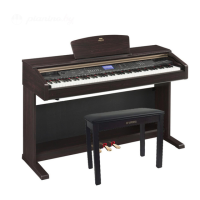
Yamaha Arius YDP-C71 - User Manual

Yamaha Arius YDP-C71
38 pages
Print Icon
To Next Page IconTo Next Page
Loading...
YDP-C71
Owner’s Manual
Bedienungsanleitung
Mode d’emploi
Manual de instrucciones
ENGLISHDEUTSCHFRANÇAISESPAÑOL FRANÇAIS
Weitere Informationen über die Montage des Keyboard-Ständers erhalten Sie in den Anweisungen am Ende dieses Handbuchs.
WICHTIG
Überprüfen Sie Ihren Netzanschluss —
For information on assembling the keyboard stand, refer to the instructions at the end of this manual.
IMPORTANT — Check your power supply —
Make sure that your local AC mains voltage matches the voltage specified on the name plate on the bottom panel. In some areas a voltage
selector may be provided on the bottom panel of the main keyboard unit near the power cord. Make sure that the voltage selector is set for the
voltage in your area. The voltage selector is set at 240V when the unit is initially shipped.
To change the setting use a "minus" screwdriver to rotate the selector dial so that the correct voltage appears next to the pointer on the panel.
Pour obtenir des informations sur l'assemblage du support du clavier, reportez-vous aux instructions à la fin de ce manuel.
IMPORTANT — Contrôler la source d'alimentation
Vérifiez que la tension spécifiée sur le panneau inférieur correspond à la tension du secteur. Dans certaines régions, l'instrument peut être équipé
d'un sélecteur de tension situé sur le panneau inférieur du clavier à proximité du cordon d'alimentation.
Vérifiez que ce sélecteur est bien réglé en fonction de la tension secteur de votre région. Le sélecteur de tension est réglé sur 240 V au départ
d'usine. Pour modifier ce réglage, utilisez un tournevis à lame plate pour tourner le sélecteur afin de mettre l'indication correspondant à la tension de
votre région vis à vis du repère triangulaire situé sur le panneau.
Para información sobre el montaje del soporte del teclado, consulte las instrucciones al final de este manual.
IMPORTANTE — Verifique la alimentación de corriente
Asegúrese de que tensión de alimentación de CA de su area corresponde con la tension especificada en la placa de características del panel
inferior. En algunas zonas puede haberse incorporado un selector de tensión en el panel inferior de la unidad del teclado principal, cerca del cable
de alimentación. Asegúrese de que el selector de tensión esté ajustado a la tensión de su área. El selector de tension se ajusta a 240V cuando la
unidad sale de fábrica. Para cambiar el ajuste, emplee un destornillador de cabeza "recta" para girar el selector de modo que aparezca la tensión
correcta al lado del indicador del panel.
Vergewissern Sie sich, dass die Spannung in Ihrem örtlichen Stromnetz mit der Spannung übereinstimmt, die auf dem Typenschild auf der Unterseite des
Instruments angegeben ist. In bestimmten Regionen ist auf der Unterseite des Keyboards in der Nähe des Netzkabels ein Spannungswähler angebracht.
Vergewissern Sie sich, dass der Spannungswähler auf die Spannung Ihres lokalen Stromnetzes eingestellt ist. Dieser Spannungswähler ist bei Auslieferung
auf 240 V eingestellt. Sie können die Einstellung mit einem Schlitzschraubenzieher ändern. Drehen Sie dazu den Wählschalter, bis der Pfeil auf dem
Instrument auf die richtige Span
nung zeigt.
ES
FR
DE
EN


Other manuals for Yamaha Arius YDP-C71

Questions and Answers

Summary

Getting Started

Power Supply Check

Ensure local AC mains voltage matches the name plate voltage and set the voltage selector correctly.

Safety and Product Information

Product Safety Markings and Warnings

Explains safety symbols, cautions, and important notices regarding product use and environment.

Safety and Compliance

FCC Information and Safety Instructions

Details FCC compliance for USA and essential safety guidelines for instrument operation.

Precautions and Hazard Warnings

Electrical, Fire, and Water Hazards

Critical warnings about shock, fire, water exposure, and handling abnormalities.

Physical Safety and Handling Cautions

Cautions for assembly, placement, and connecting cables to prevent injury.

Handling, Usage, and Data Notes

Operational Cautions and Bench Usage

Guidelines on safe handling, avoiding hearing damage, and proper bench use.

Data and Copyright Information

Notes on saving data, product copyrights, and manual references.

Manuals and Accessories

Instrument Manuals and Online Resources

Lists included manuals and how to access online PDF manuals.

Included Accessories List

Lists all accessories provided with the instrument.

Panel Controls and Terminals

Front Panel Controls Overview

Description of all buttons and knobs on the instrument's front panel.

Terminal Jacks Description

Details of the PHONES, MIDI, PEDAL, and AC IN jacks on the rear/side.

Setting Up the Instrument

Key Cover Operation

Instructions on how to safely open and close the keyboard's key cover.

Music Rest Setup

Guidance on raising and lowering the music rest for use.

Powering On the Instrument

Connecting the Power Cord

Step-by-step instructions for connecting the power cord to the unit and outlet.

Using Headphones

Headphone Connection and Hanger

How to connect headphones and use the included headphone hanger.

Playing the Piano

Volume Control and Pedal Usage

How to set the master volume and use the Damper, Sostenuto, and Soft pedals.

Damper Resonance Feature

Instructions to activate and deactivate the Damper Resonance feature for string resonance.

Using the Metronome

Metronome Beat and Tempo Settings

How to select the beat, adjust tempo, and reset the metronome.

Metronome Volume Adjustment

How to adjust the volume level of the metronome sound.

Touch Sensitivity and Maintenance

Adjusting Keyboard Touch Sensitivity

How to change the keyboard's response to playing touch for expression.

Instrument Maintenance and Care

Guidelines for cleaning, pedal care, tuning, and transporting the instrument.

Advanced Functions: Voices

Selecting and Exploring Instrument Voices

How to select different instrument sounds and view the voice list.

Octave Shifting for Voices

How to shift the octave for selected instrument voices.

Listening to Demo Songs

Demo Song Playback Control

Instructions for starting, navigating, and stopping demo song playback.

Adding Sound Variations (Reverb)

Selecting Reverb Types

How to choose different reverb effects to enhance the sound's ambience.

Adjusting Reverb Depth

How to control the intensity or depth of the selected reverb effect.

Pitch Adjustment Functions

Transposing Keyboard Pitch

How to shift the keyboard pitch up or down in semitones.

Fine Tuning Instrument Pitch

How to make fine adjustments to the overall pitch for precise tuning.

Layering Voices (Dual Mode)

Engaging and Configuring Dual Mode

Instructions for layering two voices and adjusting their balance.

Song Playback and Practice

Listening to Preset Songs

How to select and play the 50 preset songs for listening pleasure.

Practicing One-Hand Parts

Isolating Parts for Practice

How to turn parts on/off to focus practice on one hand at a time.

Recording Your Performance

Recording Keyboard Performances

Step-by-step guide to record performances for the right and left hands separately.

Managing Recorded Songs

Changing Recorded Song Settings

How to modify parameters like Voice, Reverb, and Tempo after recording.

Deleting Recorded Data

Procedures for deleting entire songs or specific recorded parts.

Settings Retention and Initialization

Data Maintained When Power is Off

Lists settings and data that are preserved when the instrument is turned off.

Initializing Instrument Settings

How to reset the instrument to its factory default settings.

Using MIDI Terminals

Understanding MIDI Basics

Explanation of what MIDI is and its capabilities for musical instruments.

MIDI Connectivity and Data Transfer

How to connect to MIDI devices and transfer data to/from a computer.

MIDI Function Settings

Transmit;Receive Channel Configuration

How to set MIDI channels for communication between instruments.

Local Control and Program Change Settings

How to manage local control and program change messages for MIDI.

Troubleshooting

Common Problems and Solutions

A guide to identifying and resolving common issues with the instrument.

Keyboard Stand Assembly - Frame

Assembling the Stand Frame

Instructions for assembling the initial frame parts of the keyboard stand.

Attaching the Lower Support

Steps to attach the main keyboard support piece to the stand frame.

Keyboard Stand Assembly - Mounting

Securing the Keyboard Support

Instructions for securely attaching the keyboard support to the stand frame.

Mounting the Keyboard Unit

Steps for positioning and securing the main keyboard unit onto the stand.

Keyboard Stand Assembly - Connections

Connecting Pedals and Power Cord

How to connect the pedal cord and power cord to the unit and stand.

Voltage Selector and Hanger Attachment

Setting the voltage selector and attaching the headphone hanger.

Keyboard Stand Assembly - Final Checks

Verifying Assembly and Stability

Checklist for ensuring all parts are used, the instrument is stable, and screws are tight.

Specifications

Instrument Technical Specifications

Comprehensive list of technical specifications for the instrument.

Important Notices and Identification

UK Plug and Cord Connection

Specific instructions for connecting the power cord plug in the UK.

Model and Serial Number Recording

Location and importance of recording the model and serial numbers.

Environmental and Disposal Information

Old Equipment Disposal Guidelines

Information on proper collection, treatment, and recycling of electronic waste.

Guarantee Information

European and Swiss Warranty Service

Details on obtaining guarantee information and warranty service in the EEA and Switzerland.

Yamaha Representative Contact Information

Global Yamaha Contact Directory

A list of Yamaha offices and distributors worldwide for product support.

Online Resources

Yamaha Official Websites

Links to Yamaha's home keyboard and manual library websites.

Summary

Getting Started

Power Supply Check

Ensure local AC mains voltage matches the name plate voltage and set the voltage selector correctly.

Safety and Product Information

Product Safety Markings and Warnings

Explains safety symbols, cautions, and important notices regarding product use and environment.

Safety and Compliance

FCC Information and Safety Instructions

Details FCC compliance for USA and essential safety guidelines for instrument operation.

Precautions and Hazard Warnings

Electrical, Fire, and Water Hazards

Critical warnings about shock, fire, water exposure, and handling abnormalities.

Physical Safety and Handling Cautions

Cautions for assembly, placement, and connecting cables to prevent injury.

Handling, Usage, and Data Notes

Operational Cautions and Bench Usage

Guidelines on safe handling, avoiding hearing damage, and proper bench use.

Data and Copyright Information

Notes on saving data, product copyrights, and manual references.

Manuals and Accessories

Instrument Manuals and Online Resources

Lists included manuals and how to access online PDF manuals.

Included Accessories List

Lists all accessories provided with the instrument.

Panel Controls and Terminals

Front Panel Controls Overview

Description of all buttons and knobs on the instrument's front panel.

Terminal Jacks Description

Details of the PHONES, MIDI, PEDAL, and AC IN jacks on the rear/side.

Setting Up the Instrument

Key Cover Operation

Instructions on how to safely open and close the keyboard's key cover.

Music Rest Setup

Guidance on raising and lowering the music rest for use.

Powering On the Instrument

Connecting the Power Cord

Step-by-step instructions for connecting the power cord to the unit and outlet.

Using Headphones

Headphone Connection and Hanger

How to connect headphones and use the included headphone hanger.

Playing the Piano

Volume Control and Pedal Usage

How to set the master volume and use the Damper, Sostenuto, and Soft pedals.

Damper Resonance Feature

Instructions to activate and deactivate the Damper Resonance feature for string resonance.

Using the Metronome

Metronome Beat and Tempo Settings

How to select the beat, adjust tempo, and reset the metronome.

Metronome Volume Adjustment

How to adjust the volume level of the metronome sound.

Touch Sensitivity and Maintenance

Adjusting Keyboard Touch Sensitivity

How to change the keyboard's response to playing touch for expression.

Instrument Maintenance and Care

Guidelines for cleaning, pedal care, tuning, and transporting the instrument.

Advanced Functions: Voices

Selecting and Exploring Instrument Voices

How to select different instrument sounds and view the voice list.

Octave Shifting for Voices

How to shift the octave for selected instrument voices.

Listening to Demo Songs

Demo Song Playback Control

Instructions for starting, navigating, and stopping demo song playback.

Adding Sound Variations (Reverb)

Selecting Reverb Types

How to choose different reverb effects to enhance the sound's ambience.

Adjusting Reverb Depth

How to control the intensity or depth of the selected reverb effect.

Pitch Adjustment Functions

Transposing Keyboard Pitch

How to shift the keyboard pitch up or down in semitones.

Fine Tuning Instrument Pitch

How to make fine adjustments to the overall pitch for precise tuning.

Layering Voices (Dual Mode)

Engaging and Configuring Dual Mode

Instructions for layering two voices and adjusting their balance.

Song Playback and Practice

Listening to Preset Songs

How to select and play the 50 preset songs for listening pleasure.

Practicing One-Hand Parts

Isolating Parts for Practice

How to turn parts on/off to focus practice on one hand at a time.

Recording Your Performance

Recording Keyboard Performances

Step-by-step guide to record performances for the right and left hands separately.

Managing Recorded Songs

Changing Recorded Song Settings

How to modify parameters like Voice, Reverb, and Tempo after recording.

Deleting Recorded Data

Procedures for deleting entire songs or specific recorded parts.

Settings Retention and Initialization

Data Maintained When Power is Off

Lists settings and data that are preserved when the instrument is turned off.

Initializing Instrument Settings

How to reset the instrument to its factory default settings.

Using MIDI Terminals

Understanding MIDI Basics

Explanation of what MIDI is and its capabilities for musical instruments.

MIDI Connectivity and Data Transfer

How to connect to MIDI devices and transfer data to/from a computer.

MIDI Function Settings

Transmit;Receive Channel Configuration

How to set MIDI channels for communication between instruments.

Local Control and Program Change Settings

How to manage local control and program change messages for MIDI.

Troubleshooting

Common Problems and Solutions

A guide to identifying and resolving common issues with the instrument.

Keyboard Stand Assembly - Frame

Assembling the Stand Frame

Instructions for assembling the initial frame parts of the keyboard stand.

Attaching the Lower Support

Steps to attach the main keyboard support piece to the stand frame.

Keyboard Stand Assembly - Mounting

Securing the Keyboard Support

Instructions for securely attaching the keyboard support to the stand frame.

Mounting the Keyboard Unit

Steps for positioning and securing the main keyboard unit onto the stand.

Keyboard Stand Assembly - Connections

Connecting Pedals and Power Cord

How to connect the pedal cord and power cord to the unit and stand.

Voltage Selector and Hanger Attachment

Setting the voltage selector and attaching the headphone hanger.

Keyboard Stand Assembly - Final Checks

Verifying Assembly and Stability

Checklist for ensuring all parts are used, the instrument is stable, and screws are tight.

Specifications

Instrument Technical Specifications

Comprehensive list of technical specifications for the instrument.

Important Notices and Identification

UK Plug and Cord Connection

Specific instructions for connecting the power cord plug in the UK.

Model and Serial Number Recording

Location and importance of recording the model and serial numbers.

Environmental and Disposal Information

Old Equipment Disposal Guidelines

Information on proper collection, treatment, and recycling of electronic waste.

Guarantee Information

European and Swiss Warranty Service

Details on obtaining guarantee information and warranty service in the EEA and Switzerland.

Yamaha Representative Contact Information

Global Yamaha Contact Directory

A list of Yamaha offices and distributors worldwide for product support.

Online Resources

Yamaha Official Websites

Links to Yamaha's home keyboard and manual library websites.

Yamaha Arius YDP-C71 Specifications

General IconGeneral
Touch SensitivityHard/Medium/Soft/Fixed
Amplifier20W x 2
Speakers12cm x 2
Polyphony64
EffectsReverb
Recorder1 song
PedalsSostenuto, Soft
Included AccessoriesPower Adapter
Keyboard88-key GH (Graded Hammer) keyboard

Related product manuals