EasyManua.ls Logo

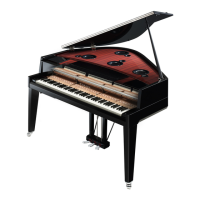
Yamaha AvantGrand N1X - User Manual

Yamaha AvantGrand N1X
56 pages
Print Icon
To Next Page IconTo Next Page
Loading...
FRANÇAIS
ESPAÑOL
ES
FR
EN
Owners Manual
Mode d'emploi
Manual de instrucciones
Thank you for purchasing this Yamaha Hybrid Piano! This
instrument provides touch and sound that are closer than ever to
an actual acoustic grand piano for your playing enjoyment.
We recommend that you read this manual carefully so that you
can fully take advantage of the advanced and convenient
functions of the instrument. We also recommend that you keep
this manual in a safe and handy place for future reference.
Before using this instrument, be sure to read “PRECAUTIONS”
on pages 5–6.
When assembling the unit, consult a qualified AvantGrand
dealer. (Refer to the assembly instructions at the end of this
manual.)
Nous vous remercions d'avoir acheté ce piano hybride Yamaha.
Pour votre plus grand plaisir, cet instrument offre un toucher et
un son qui n'ont jamais été aussi proches de ceux d'un véritable
piano à queue acoustique. Nous vous conseillons de lire
attentivement ce mode d'emploi afin de tirer pleinement profit
des fonctions avancées et très pratiques de votre instrument.
Nous vous recommandons également de garder ce manuel à
portée de main pour toute référence ultérieure.
Avant d'utiliser cet instrument, lisez attentivement la section
« PRÉCAUTIONS D'USAGE » aux pages 5-6.
Lors du montage de l'unité, contactez un revendeur AvantGrand
agréé. (Reportez-vous aux instructions de montage figurant à la
fin de ce manuel.)
Gracias por comprar este piano híbrido de Yamaha. Este
instrumento ofrece pulsación y sonido que se acercan más que
nunca a un piano de cola acústico real para que disfrute
tocando. Le recomendamos que lea este manual detenidamente
para poder aprovechar al máximo las funciones avanzadas y
prácticas del instrumento. También le recomendamos que lo
guarde en un lugar seguro y fácilmente accesible para futuras
consultas.
Antes de utilizar el instrumento, lea la sección
“PRECAUCIONES”, en las páginas 5-6.
Al montar la unidad, consulte con un concesionario cualificado
de AvantGrand (consulte las instrucciones de montaje al final de
este manual).
ENGLISH
N1X


Table of Contents

Questions and Answers

  • J
    James HarrisAug 18, 2025
    Why do notes sound incorrect with transpose setting on my Yamaha AvantGrand N1X Musical Instrument?
    • D
      Danielle CastroAug 18, 2025
      If higher or lower notes do not sound correctly when the transpose setting is made on your Yamaha Musical Instrument, keep in mind that the instrument can cover a range of C-2–G8 when you set the transposition. Notes lower than C-2 will sound one octave higher, and notes higher than G8 will sound one octave lower.
  • G
    gjonesAug 20, 2025
    What to do if I hear noise when using my Yamaha Musical Instrument with my iPhone/iPad?
    • A
      Anna WatersAug 20, 2025
      If you are hearing noise from the speakers or headphones of your Yamaha Musical Instrument when using it with a smart device like an iPhone/iPad, it's recommended to turn on Airplane Mode on your smart device. Then, turn the Wi-Fi/Bluetooth setting to 'on' in order to avoid noise caused by communication.
  • G
    George MeltonAug 23, 2025
    How to fix a Yamaha Musical Instrument that does not turn on?
    • J
      Jason HughesAug 23, 2025
      If your Yamaha Musical Instrument isn't turning on, make sure that the female plug is securely inserted into the socket on the instrument, and the male plug is properly connected to an AC outlet.
  • E
    Emily MackAug 26, 2025
    Why is the volume low on my Yamaha AvantGrand N1X Musical Instrument, or why is there no sound?
    • L
      Linda OrrAug 26, 2025
      If you're experiencing a low overall volume or no sound from your Yamaha Musical Instrument, first, ensure that the volume isn't set too low by using the [MASTER VOLUME] control. Also, check that headphones or an adapter plug are not connected to the [PHONES] jack. Finally, verify that Local Control is turned on.
  • A
    Andrea ReynoldsAug 28, 2025
    How to connect a Bluetooth device to my Yamaha Musical Instrument?
    • C
      Christopher FitzpatrickAug 28, 2025
      If you are having trouble pairing your Bluetooth device with your Yamaha Musical Instrument, ensure that the instrument's Bluetooth function is turned on. The device and instrument need to be paired via Bluetooth. Also, make sure the Bluetooth function on your device is activated and that the device is close to the instrument. Finally, move the instrument away from devices emitting radio-frequency signals, such as microwave ovens or wireless LAN devices.
  • M
    monique39Aug 30, 2025
    Why is there noise from the speakers of my Yamaha AvantGrand N1X Musical Instrument?
    • K
      Kari ProctorAug 30, 2025
      If you hear noise from the speakers or headphones of your Yamaha Musical Instrument, it could be due to interference from a mobile phone nearby. Try turning off the mobile phone or moving it further away from the instrument.
  • B
    Barbara SmithSep 2, 2025
    What to do if the damper pedal has no effect on my Yamaha AvantGrand N1X?
    • P
      Paula WilsonSep 2, 2025
      If the damper pedal on your Yamaha Musical Instrument isn't working, first turn off the power to the instrument. Then, fully insert the pedal cord into the [PEDAL] jack until the metal part of the plug is no longer visible. If the damper pedal was pressed when the power was turned on, press the pedal again to reset the function.
  • L
    Louis MartinSep 4, 2025
    What to do if the USB flash drive has hung up on my Yamaha Musical Instrument?
    • S
      Steven DuncanSep 4, 2025
      If the USB flash drive has stopped responding on your Yamaha Musical Instrument, disconnect the USB flash drive and then reconnect it. Also, ensure that the USB flash drive is compatible with the instrument and has been confirmed by Yamaha.
  • L
    Lisa SmithSep 7, 2025
    Why is there no sound on a particular key of my Yamaha AvantGrand N1X?
    • J
      Jennifer RodriguezSep 7, 2025
      If a particular key on your Yamaha Musical Instrument isn't producing sound, it may be because the keyboard didn't function correctly when the power was turned on. Turn off the power and then turn it back on to reset the function. Avoid touching any keys while turning the power on.
  • J
    jamie28Sep 9, 2025
    Why doesn't the key return smoothly on my Yamaha AvantGrand N1X Musical Instrument?
    • J
      Justin SmithSep 9, 2025
      If the key you pressed on your Yamaha Musical Instrument doesn't return to its original position smoothly, it may be due to changes in the keyboard mechanism over years of use. If this occurs or causes problems in performance, contact your Yamaha dealer.

Summary

Important Safety Instructions

General Safety Instructions

Lists essential safety instructions for operating the instrument to prevent injury and damage.

Hazard Warnings

Highlights precautions against electrical shock, water exposure, fire hazards, and operational abnormalities.

Precautions

Power Supply and Cord Safety

Instructions for safe use and handling of the power cord and plug.

Playing the Keyboard

Powering On;Off and Initial Setup

Step-by-step guide for powering the instrument on/off safely and initial operation.

Headphones and Pedals Usage

Connect headphones for immersive sound and learn about the function and usage of the three pedals.

Basic Operations and More

Playing Back Songs

Recording Your Performance

Recording Methods and Process

Choose between MIDI or Audio recording and follow the steps to save your performances.

Backup Data and Initialization

Initializing Instrument Settings

Procedure to reset instrument settings to default, excluding user songs.

Connections

Smart Device and Wireless LAN

Connect to smart devices and use wireless LAN for app integration and remote control.

Bluetooth Audio Functionality

Stream audio wirelessly via Bluetooth and pair devices for seamless wireless audio playback.

Troubleshooting

Common Problems and Solutions

Addresses common issues, their causes, and suggested solutions for the instrument's operation.

Assembling the Unit

Assembly Guide

Detailed instructions for unpacking and assembling the instrument safely and correctly.

Yamaha AvantGrand N1X Specifications

General IconGeneral
BrandYamaha
ModelAvantGrand N1X
CategoryMusical Instrument
LanguageEnglish

Related product manuals