EasyManua.ls Logo

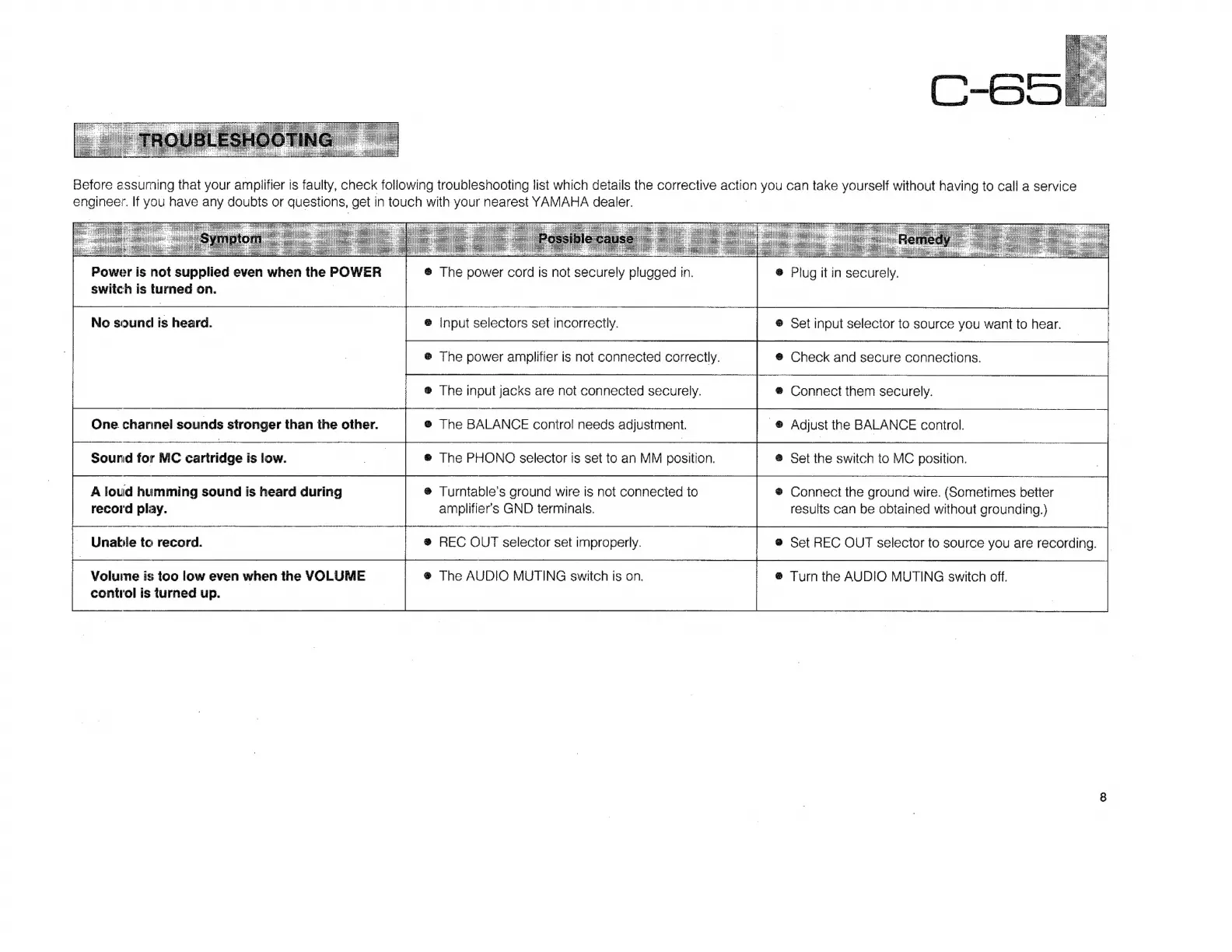
Yamaha C-65 - Troubleshooting; Common Issues and Remedies

Yamaha C-65
12 pages
Print Icon
To Next Page IconTo Next Page
To Previous Page IconTo Previous Page
Loading...
Power
is
not
supplied
even
when
the
POWER
switch
is
turned
on.
No
sound
is
heard.
One
channel
sounds
stronger
than
the
other.
Sound
for
MC
cartridge
is
low.
A
loud
humming
sound
is
heard
during
record
play.
Unable
to
record.
Volume
is
too
low
even
when
the
VOLUME
control
is
turned
up.
The
power
cord
is
not
securely
plugged
in.
Input
selectors
set
incorrectly.
The
power
amplifier
is
not
connected
correctly.
The
input
jacks
are
not
connected
securely.
The
BALANCE
control
needs
adjustment.
The
PHONO
selector
is
set
to
an
MM
position.
Turntable's
ground
wire
is
not
connected
to
amplifiers
GND
terminals.
REC
OUT
selector
set
improperly.
The
AUDIO
MUTING
switch
is
on.
Before
assuming
that
your
amplifier
is
faulty,
check
following
troubleshooting
list
which
details
the
corrective
action
you
can
take
yourself
without
having
to
call
a
service
engineer.
If
you
have
any
doubts
or
questions,
get
in
touch
with
your
nearest
YAMAHA
dealer.
Plug
it
in
securely.
Set
input
selector
to
source
you
want
to
hear.
Check
and
secure
connections.
Connect
them
securely.
Adjust
the
BALANCE
control.
Set
the
switch
to
MC
position.
Connect
the
ground
wire.
(Sometimes
better
results
can
be
obtained
without
grounding.)
oet
REC
OUT
selector
to
source
you
are
recording.
Turn
the
AUDIO
MUTING
switch
off.

Related product manuals