
 Need help?
Do you have a question about the Yamaha CVP-309PE and is the answer not in the manual?
Highlights critical safety measures to avoid severe injury or death from electrical hazards.
Details the keyboard's realistic feel and advanced touch response.
Covers various methods for learning and practicing musical pieces.
Buttons used to select different instrument sounds.
Function for saving and recalling custom panel settings.
Explains how to navigate and use the instrument's primary display screens.
How to select and play different instrument sounds.
How to play and practice with the instrument's built-in songs.
How to use the HELP function to learn about instrument features.
Shortcut for quickly accessing various displays.
Explains the primary display screens and their components.
Comprehensive guide to managing and customizing instrument sounds.
Detailed instructions for creating and editing custom instrument voices.
Description of different style types and their characteristics.
Tools and methods for creating custom accompaniment styles.
Step-by-step instructions for saving panel settings.
Loading previously saved panel setups.
Explains how to start, stop, and control song playback.
Detailed methods for recording performances.
How to modify recorded songs using various editing features.
Customizing and creating vocal harmony effects.
Fine-tuning microphone input and harmony sound levels.
Steps for establishing an internet connection using various methods.
How to access Yamaha's website for song data and other resources.
Steps for acquiring song and data files from the internet.
Overview of the display for configuring internet settings.
Connecting microphones or guitars for input.
Connecting and assigning functions to foot pedals or controllers.
Connecting MIDI devices using standard MIDI terminals.
Connecting computers and USB storage devices.
Explanation of the Musical Instrument Digital Interface (MIDI).
Configuration options for MIDI communication.
Addresses general issues with instrument operation.
Troubleshooting song playback, selection, and display problems.
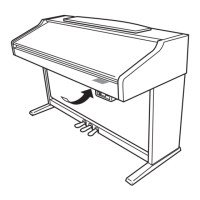
Instructions for assembling the keyboard stand for the grand piano model.
Technical details and features of the instrument models.
 General
| Keys | 88 |
|---|---|
| Polyphony | 128 |
| Effects | Reverb, Chorus, DSP |
| Amplifiers | 40W x 2 |
| Display | LCD |
| Recording | 16-track |
| Storage | USB |
| Connections | MIDI In/Out |
| Speakers | 2 x 12 cm |
| Voices | 480 XG voices + 22 drum/SFX kits + 480 GM2 voices |



 To Next Page