1
English
QUICK REFERENCE GUIDE
PURPOSE
This guide is intended as a quick reference
to the major functions on your D5000. For
detailed information, refer to the D5000
Operating Manual.
CONTENTS
Selecting a Program (RECALL) ............................... 1
Editing a Program ....................................................2
Saving a Program (STORE) ...................................... 3
Setting the Input Mode (Stereo or Mono) ................ 4
Displaying the Delay Tempo .................................. 5
FREEZE .................................................................... 6
REPEAT DELAY .......................................................8
Selecting a Program (RECALL)
Use the RECALL function to select and load one of the D5000’s 100 user programs.
When selecting a program, make sure that the program type suits your objectives.
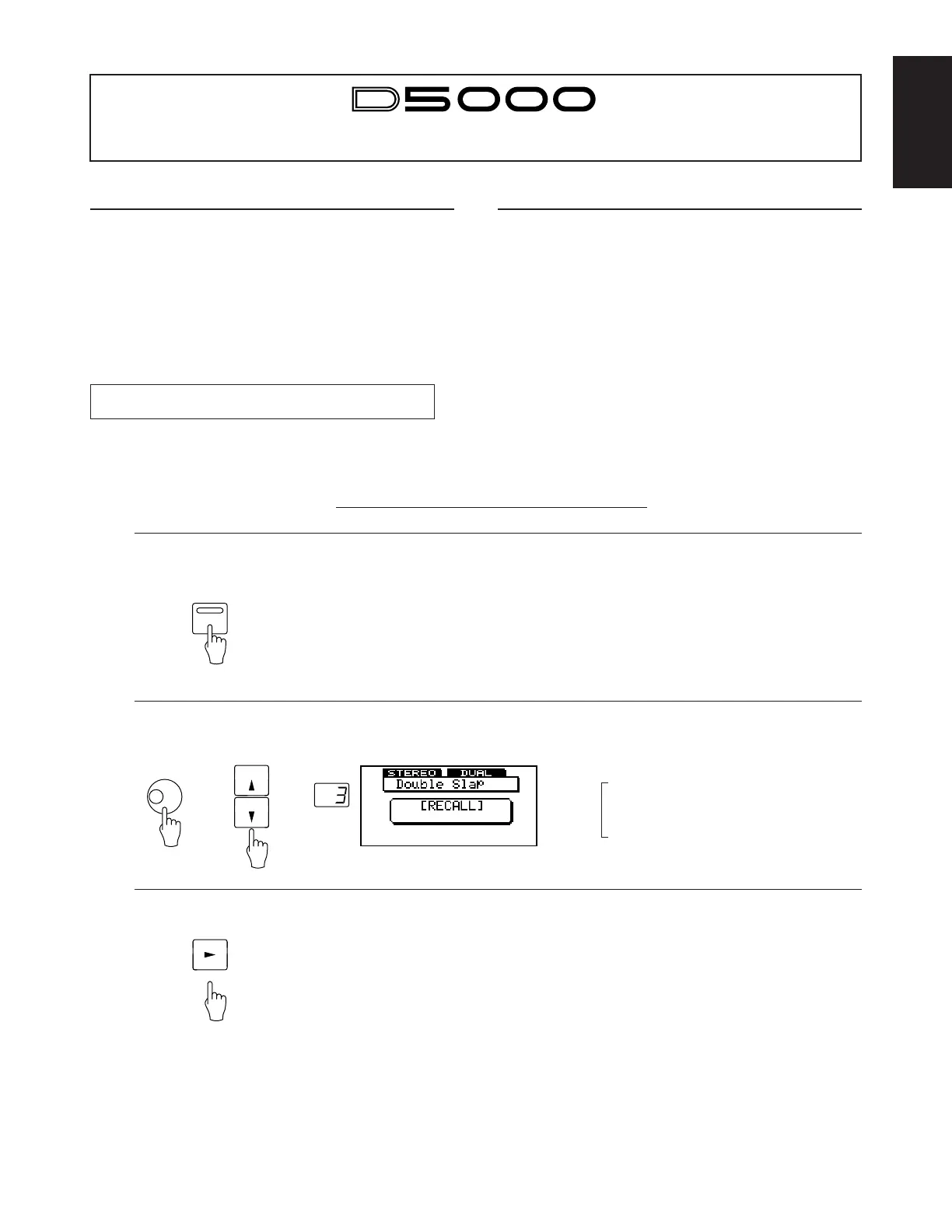
Example: Calling Program #3, “Double Slap”
Press [PROGRAM].
1
Use the cursor keys or DATA ENTRY dial to select
the program.
Press [RECALL].
3
★ If you have made changes to the current program and have not yet
saved them to memory, the LCD will display the “Are you sure?”
prompt when you first press [RECALL]. Press [RECALL] once
again to proceed with the recall (erasing the changes you have
made), or press any other key to abort.
2
PROGRAM
PROGRAM
DATA ENTRY
or
← • Check that the program type is appropriate.
DUAL = Dual Delay
SINGLE = Single Delay
FREEZE = Freeze
S & H = Sample & Hold
RECALL


 To Next Page