Play the Pads/Pedals
DD-75 Owner’s Manual
26
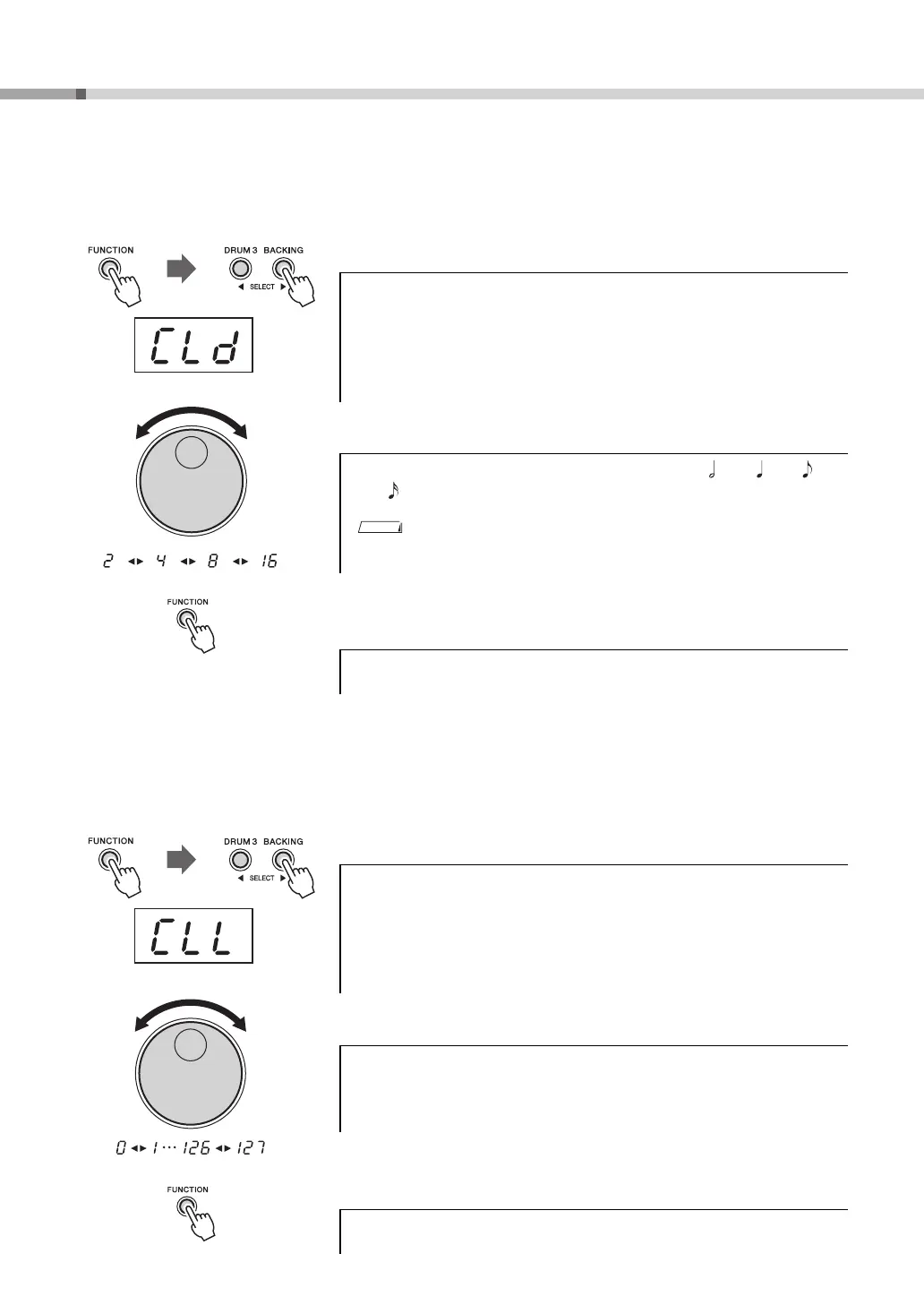
Setting the denominator of the time signature .............................................
Determines the basic note value for each measure; for example, in the time signature 6/8, “8” is the denomina-
tor, or basic note value.
1 Enter the denominator value setting function.
2 Set the denominator value of the time signature.
3 Press the [FUNCTION] button to exit from the Function
mode.
Setting the click volume..................................................................................
Sets the click volume (range: 0–127).
1 Enter the click volume setting function.
2 Set the click volume by using the dial.
3 Press the [FUNCTION] button to exit from the Function
mode.
Press the [FUNCTION] button once, then press the [DRUM 3] or
[BACKING] button a number of times until the “CLd” indication
appears.
After a while, the current denominator value appears next to the
“CLd” indication.
Set the denominator value to one of the values 2 ( ), 4 ( ), 8 ( ),
16 ( ) by using the dial.
• Default value is 4.
Press the [FUNCTION] button once, then press the [DRUM 3] or
[BACKING] button a number of times until the “CLL” indication
appears.
After a while, the current click volume will appear next to the “CLL”
indication.


 To Next Page