4
DKC55
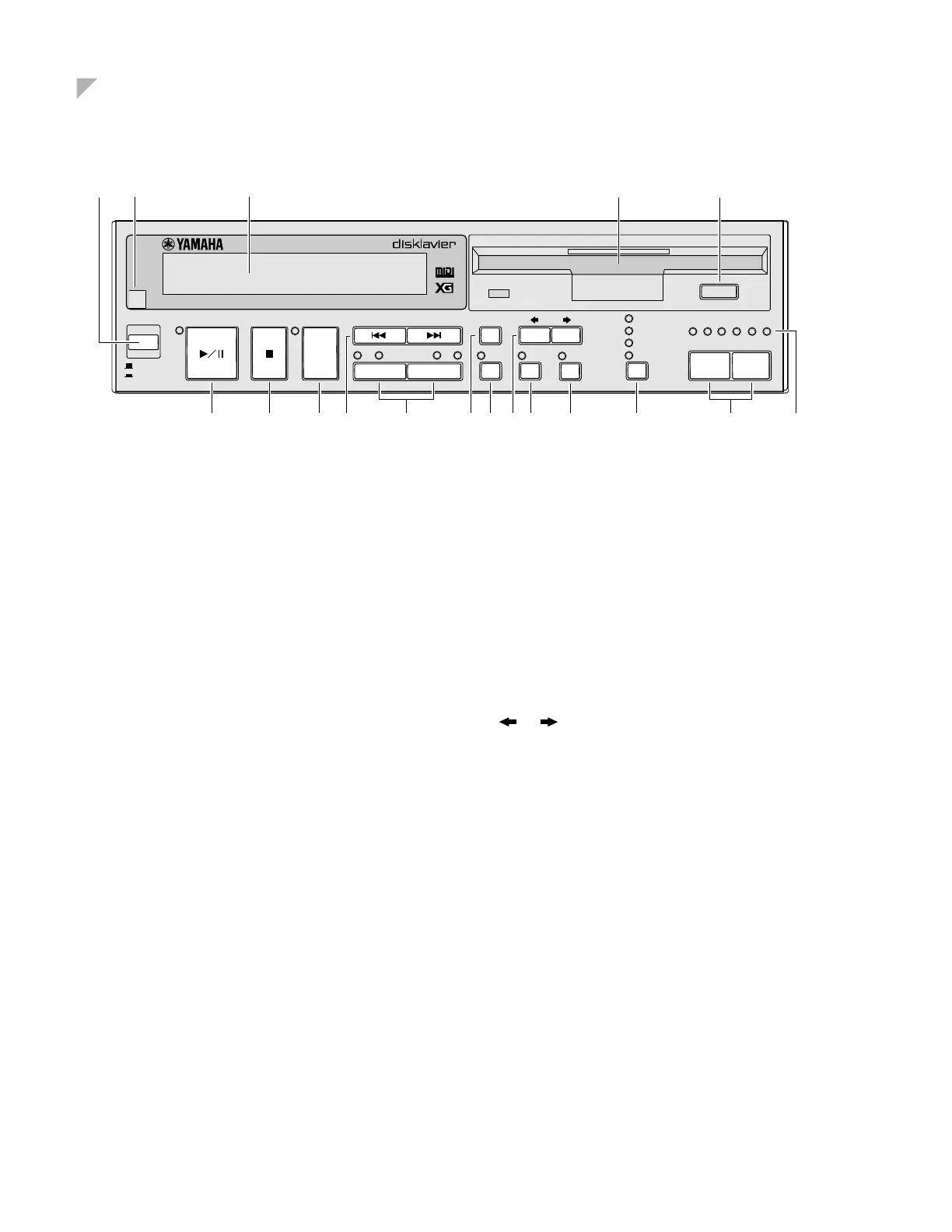
Control Unit — Front Panel
1
[STANDBY / ON] button
Turns on the Disklavier or puts it in Standby mode.
Press once to turn it on, and once again to put it in
Standby mode.
Note:
In Standby mode, the Control Unit is in effect
turned off. However, electrically it is in a state in
which a very small quantity of power is being
consumed, as the MAINS switch is still on and
the Disklavier is still connected to the AC power
receptacle.
2
Remote control sensor
When using the remote control, point it toward this sen-
sor.
3
Display (LCD)
Shows various information.
4
Floppy disk drive
Insert a floppy disk such as a PianoSoft or
PianoSoft•Plus song disk here.
5
Floppy disk eject button
Used to eject the disk from the floppy disk drive.
6
[PLAY/PAUSE] button
Used to start and pause playback.
7
[STOP] button
Used to stop playback.
8
[DRIVE] button
Used to select a disk. Toggles the floppy disk and Mem-
ory Disks (0 ~ 9 and A ~ F).
9
[SONG SELECT/REV•FWD] buttons
In Stop mode: Used to select songs.
In Play mode: Used to fast preview and review.
In Pause mode: Used to fast forward and reverse.
0
PART [L] [R] buttons
For L/R and Ensemble songs, these buttons allow you to
choose which part to play back: L (left-hand) part, R
(right-hand) part, or both.
Press both buttons together to turn pedal playback on or
off so that you can play the pedals yourself.
A
[ENTER] button
Used to select and execute functions.
B
[REPEAT] button
Used to select one of the Repeat functions: ALL, RPT or
RND.
C
[ ] [ ] cursor buttons
Used to move the cursor in the display.
D
[FUNC.] button
Used to access various Disklavier utility functions.
E
[METRONOME] button
Used to access the metronome.
F
Selector button
Used to select the feature you want to adjust from among
Volume, Tempo, Tranpose, and Balance.
G
[–/NO] [+/YES] buttons
Used to select options and parameters and to adjust the
volume.
H
LED volume level indicators
Indicates the playback volume level.
Also functions as a visual metronome.
PLAY/PAUSE
STOP
DRIVE
SONG SELECT
/
REV • FWD
PART
L
R
ENTER
REPEAT
FUNC.
METRO-
NOME
BALANCE
TRANSPOSE
TEMPO
VOLUME
•••–10 –8 –6 –4 –2 0
–/NO +/YES
CONTROL UNIT DKC55
GENERAL
INSTRUMENT
STANDBY
ON
245
67890 ABCDE F G H
1 3






 To Next Page