Adjusting the Trimmer
The operating efficiency of the piano action and keyboard will vary slightly according to the piano
model. Even if two pianos have the same model number, minute differences may occur due to humidity,
adjustment procedures, and other factors. When a person plays the piano, she/he listens to the sound
and feels the key touch, then plays while making the necessary compensations. In case of a
DISKLAVIER, however, the setting of the trimmer value must be regulated to the optimum status.
• Adjustment Procedure
Conduct "TEST 1. Sound Generation Test under Minimum Pressure" on the floppy disk.
Contents: Minimum-pressure single-note scale of 1 to 88 keys.
→Set
the
trimmer value
so
that
all
keys
are
sounded
at the
minimum
touch
pressure.
The better the regulation and action conditions, the more the sounding of notes under low touch
pressure is improved. Therefore, make sure to check the adjustment then perform re-adjustment if
necessary.
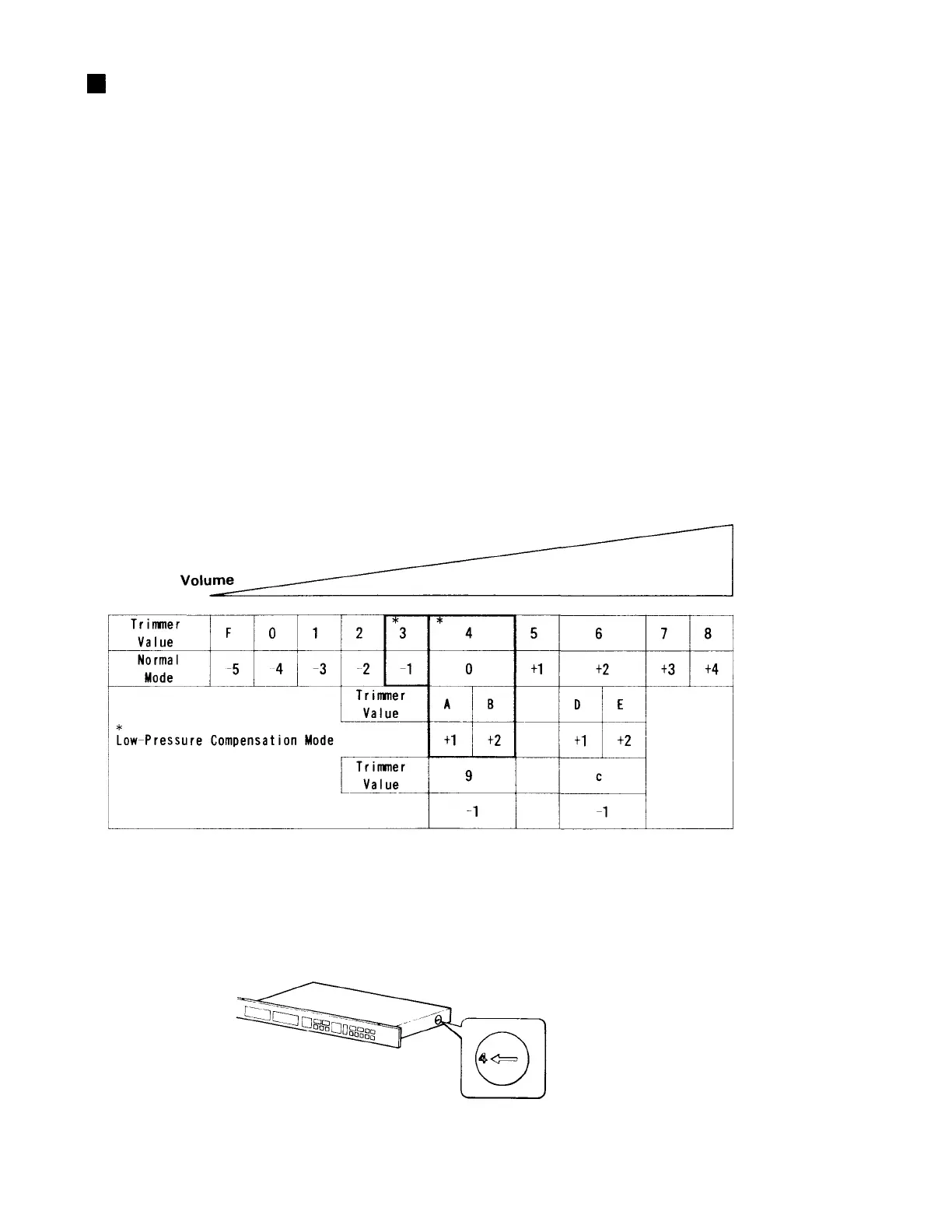
• The Trimmer Value and the Volume
* The recommended trimmer values are the circled values of "3" and "4".
* Low-Pressure Compensation Mode: When the volume data of a piano note indicates low volume,
only that volume of that note is raised in this mode (9 and C are lowered).
32



 To Next Page