Names and Functions
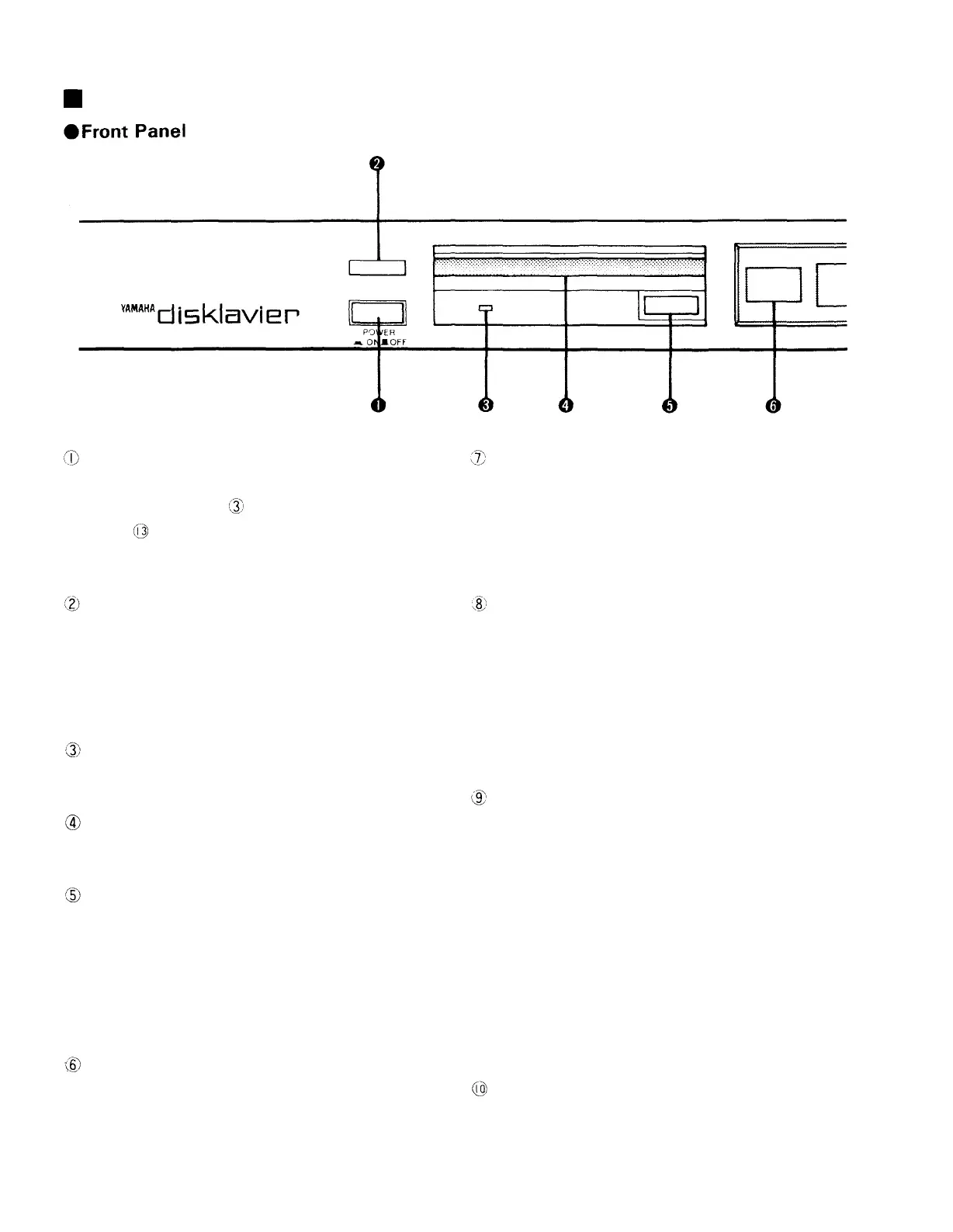
Power Switch
Pressing this switch turns power on, shown by
the power indicator and the Volume button
indicator lighting up. At the same time, the LCD
will display the message "DISK NOT READY!".
Remote control signal window
The infrared signals from the remote control unit
are received at this window. Be sure to leave it
uncovered so the signals from the remote control
unit can be received properly.
Power indicator
Lights up when power is turned on.
Disk slot
Floppy disks are inserted here.
Disk Eject button
Press this button when you wish to remove an
inserted disk.
* Please do not remove the disk during playback
or recording as this will damage the disk drive
head and the disk itself.
Music number indication
Displays the number of the selected piece of
music. Confirm this display before you play back
or record.
Liquid Crystal Display (LCD)
The LCD displays a variety of information such
as the music title, adjustment values, the time that
has elapsed since the beginning of the piece of
music, playback and recording levels, and so on.
Start Pause button
Press this button when you want to start
playback or recording. Also use it when you wish
to temporarily stop (pause) or restart a piece of
music during playback or recording. (If this button
is pressed during fast forward or rewind, playback
will recommence from there.)
Tune Select Return-FF buttons
In stop or record stand-by mode, the function of
these buttons is to select the music number, while
they function as Fast Forward or Return buttons
during playback. To stop fast forward or rewind
operation, press the respective button again. This
will restart playback from the point where the
button was pressed. If the button is not pressed
again, fast forward or Return will stop at the
beginning of the next piece of music or the present
one respectively.
Stop button
This button stops all operations such as playback
and recording, fast forward or rewind.
2



 To Next Page