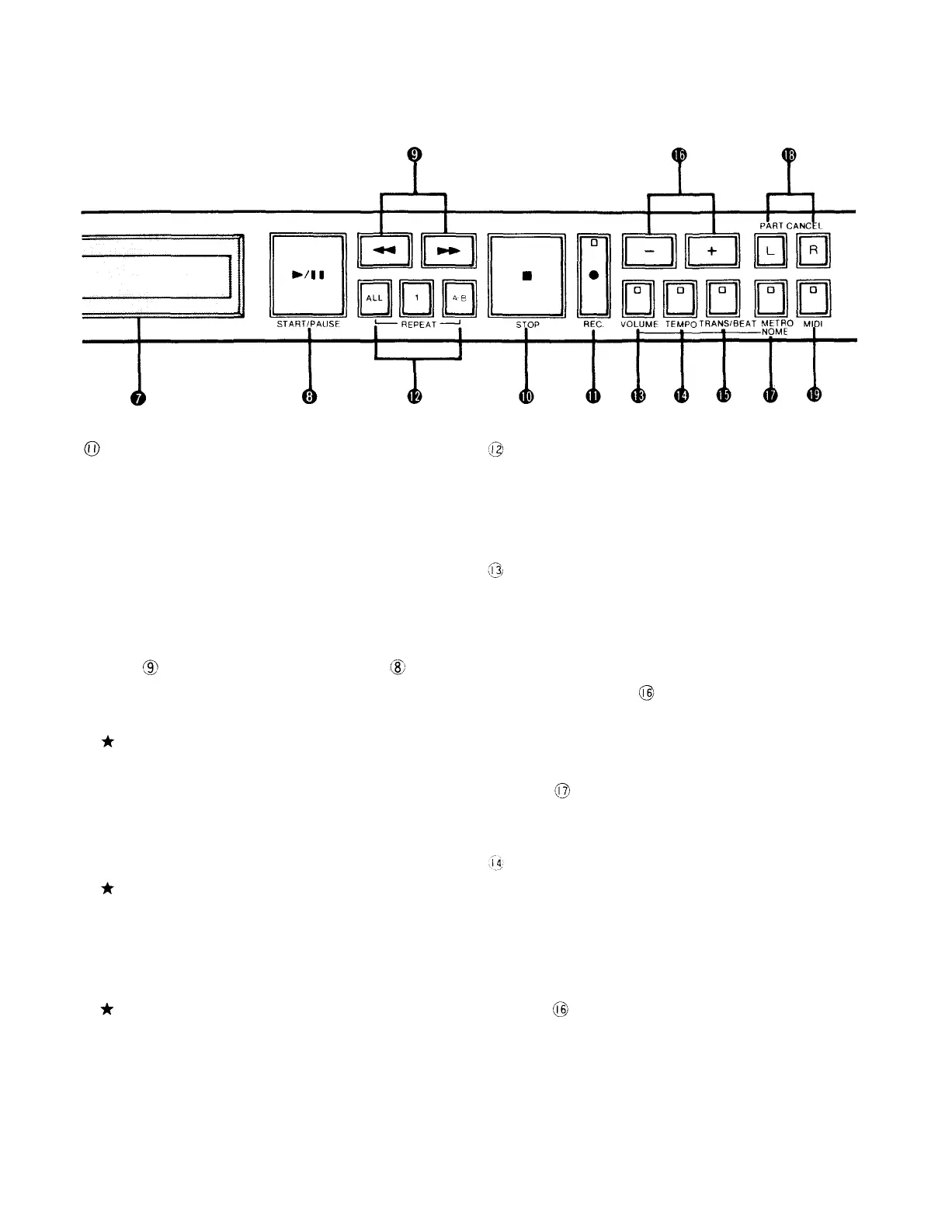
Rec. button
Pressing this button causes its indicator to light
up, entering record stand-by mode. Recording can
now be started by pressing the Start/Pause button.
If you would like to delete part of a recorded piece
of music and rerecord something else in its place,
first enter record stand-by mode by pressing this
button. Then display the number of the respective
piece of music with the Music Selection/Return-FF
buttons and use the Start/Pause button in order
to commence rerecording.
The number of pieces of music that can be
recorded on a single floppy disk is 60 for a total
recording time of about 90 minutes. However,
this is only an approximation and the actual
number of pieces and length of recording time
depends on the kind of music recorded.
If this button is pressed once again during
record stand-by mode, the mode will change
to "music/disk title entry mode", which is used
to input the names of single pieces of music or
entire disks.
If this button is pressed again twice during
record stand-by mode, the mode will change
to "split point setting for separate left-and
right-hand parts".
Repeat buttons
Operate these buttons when you desire repeated
playback of certain pieces of music or sections
within them.
Volume button
In order to adjust the playback volume, press this
button in stop mode, during playback or playback
pause, making sure that the button's indicator
lights up. You can then adjust the volume with
the + / - buttons . The adjustment range is
from -03 to +02. It is usually set to 00.
In addition, this button can be used to turn the
metronome sound on or off when the Metronome
button has been pressed to select the
metronome function.
Tempo button
When you want to adjust the tempo (speed) of
a piece of music for playback, press this button in
stop mode, during playback or playback pause,
making sure that the button's indicator lights up.
You can then adjust the tempo with the + / -
buttons . The adjustment range is from -50%
to +20%. It is usually set to 00.
Besides, this button can be used to enable
metronome tempo adjustment when the
metronome function is on.
3



 To Next Page