Using DM1000 Editor
Windows
Getting Started
Keyboard Shortcuts
Index
25
DM1000 Editor—Owner’s Manual
Windows
Timecode Counter Window
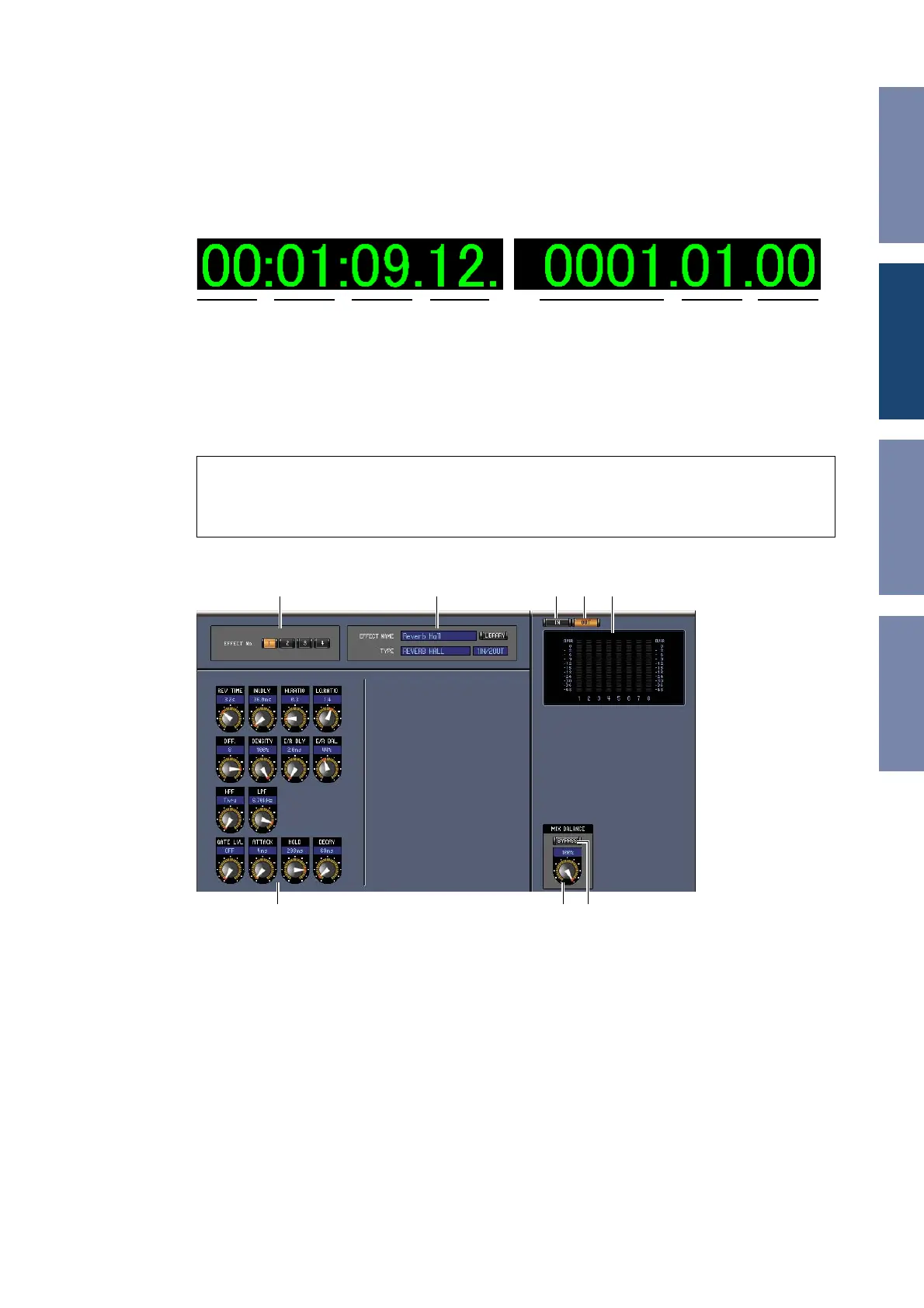
The Timecode Counter window displays the current timecode position in hours, minutes, seconds,
and frames — or measures, beats, and MIDI clocks — depending on the specified timecode source. It
works in unison with the timecode counters on the DM1000 Automix Main page. If the frame rate is
drop frame, a “.” is displayed following the frame number.
To open the Timecode Counter window, choose [Timecode Counter] from the [Windows] menu.
Effect Editor Window
The Effect Editor window enables you to edit the internal effects processors. To open the Effect Editor
window, choose [Effect Editor] from the [Windows] menu.
A Effects processor select
These buttons are used to select the internal effects processors.
B Effect select section
The EFFECT NAME, TYPE, and IN/OUT are the name, type and I/O configuration of the effect
recalled to the currently selected effects processor. To edit the EFFECT NAME, click it and type. The
[LIBRARY] button opens the Effects Library window.
C [IN] button
This button is used to set the metering position to the effects processor’s inputs.
D [OUT] button
This button is used to set the metering position to the effects processor’s outputs.
Note: Yo u can open multiple Effect Editor windows by choosing [Windows] menu -> [Effect Editor] and
making a choice other than [Generic Editor]. The titles of these windows will indicate [Locked]. You can-
not open Library windows from windows that are indicated as [Locked].
When you recall effects, windows that do not indicate “Locked” in the title will be recalled.
hour minute second frame measure beat MIDI clock
A B 53 4
F G H













 To Next Page