EasyManua.ls Logo

Yamaha DX21 - TEST PROGRAMS; Test Mode Entry Procedure; TEST 2: RAM, MIDI I;O, Cassette Interface Check

Yamaha DX21
29 pages
Print Icon
To Next Page IconTo Next Page
To Previous Page IconTo Previous Page
Loading...
DX21
DX21
TEST
PROGRAMS
NOTE:__
When
the
test
program
is
executed,
data
in
the
performance
memory
will
be
initialized.
Please
write
down
the
data
to
the
performance
data
table
before
executing
the
program.
BEFORE
ENTERING
THE
TEST
MODE
OF
THE
DX21,
IT
IS
RECOMMENDED
THAT
YOU
READ
THROUGH
THE
TEST
PROGRAM
PROCEDURES.
.
.
TEST
2
REQUIRES
THE
CONNECTION
OF
EXTER¬
NAL
DEVICES
AND
IT
MAY
HELP
TO
MAKE
THE
CONNECTIONS
AND
ADJUSTMENTS
OF
THIS
TEST
PRIOR
TO
ENTERING
THE
TEST
MODE.
Test
Mode
Entry
Procedure
To
enter
the
internal
test
mode
of
the
DX21,
turn
the
power
switch
on
while
depressing
the
voice
buttons
I
1
l
a
nd
[
2
|
o
n
the
side
A.
Release
buttons
j
1
|
a
nd
|
2
|
o
nce
characters
are
displayed
on
the
LCD.
The
unit
will
then
display
the
ROM
version
message
and
auto¬
matically
go
to
the
first
test
or
check.
TEST
1:
ROM
version
message
and
level
check
After
initiating
the
Test
Mode,
the
unit
displays
the
message
shown
below.
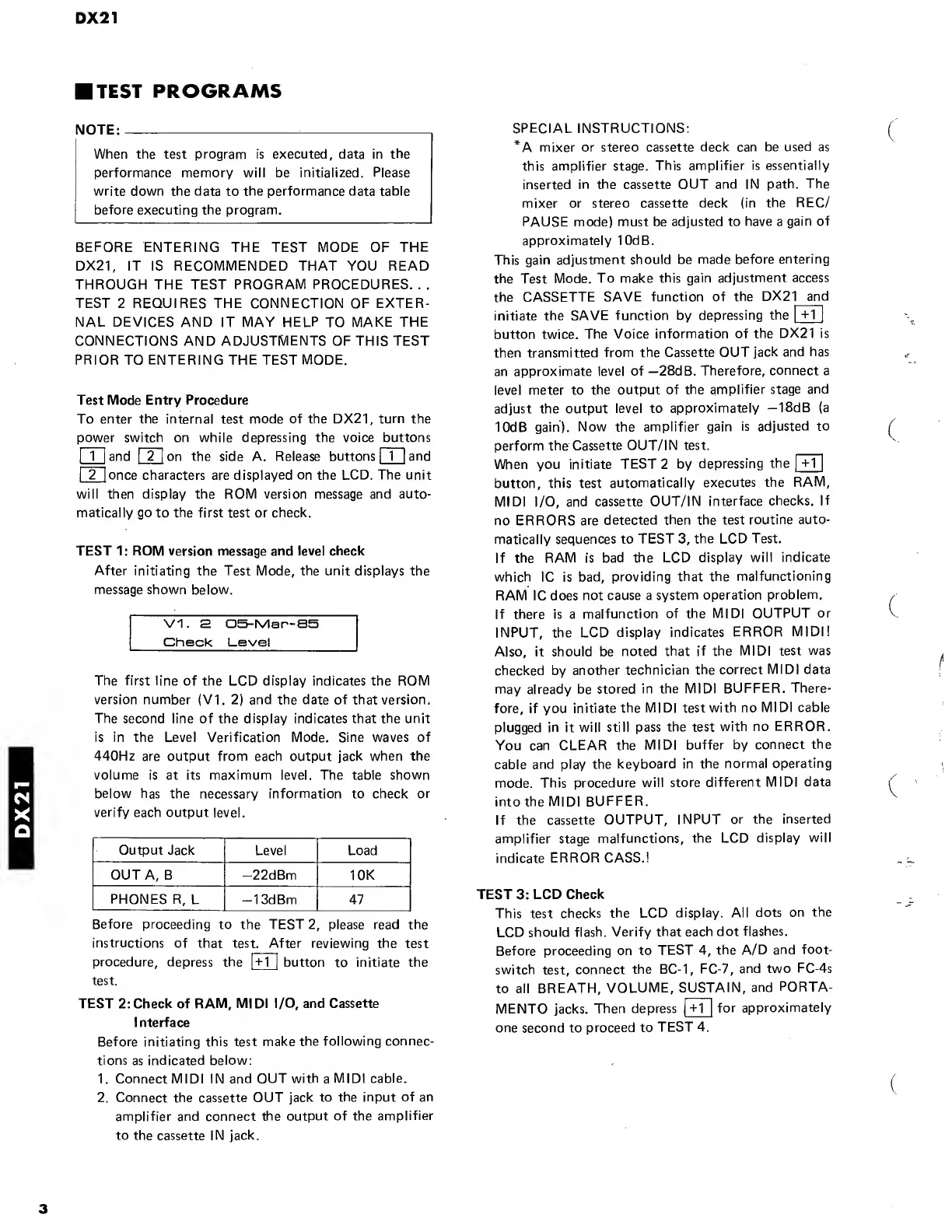
VI.
s
05-rVlar—85
Check
Level
The
first
line
of
the
LCD
display
indicates
the
ROM
version
number
(VI.
2)
and
the
date
of
that
version.
The
second
line
of
the
display
indicates
that
the
unit
is
in
the
Level
Verification
Mode.
Sine
waves
of
440Hz
are
output
from
each
output
jack
when
the
volume
is
at
its
maximum
level.
The
table
shown
below
has
the
necessary
information
to
check
or
verify
each
output
level.
Output
Jack
Level
Load
OUT
A,
B
—22dBm
10K
PHONES
R,
L
—13dBm
47
Before
proceeding
to
the
TEST
2,
please
read
the
instructions
of
that
test.
After
reviewing
the
test
procedure,
depress
the
1
+
1
1
button
to
initiate
the
test.
TEST
2:
Check
of
RAM,
MIDI
I/O,
and
Cassette
I
nterface
Before
initiating
this
test
make
the
following
connec¬
tions
as
indicated
below:
1.
Connect
MIDI
IN
and
OUT
with
a
MIDI
cable.
2.
Connect
the
cassette
OUT
jack
to
the
input
of
an
amplifier
and
connect
the
output
of
the
amplifier
to
the
cassette
IN
jack.
SPECIAL
INSTRUCTIONS:
*A
mixer
or
stereo
cassette
deck
can
be
used
as
this
amplifier
stage.
This
amplifier
is
essentially
inserted
in
the
cassette
OUT
and
IN
path.
The
mixer
or
stereo
cassette
deck
(in
the
REC/
PAUSE
mode)
must
be
adjusted
to
have
a
gain
of
approximately
10dB.
This
gain
adjustment
should
be
made
before
entering
the
Test
Mode.
To
make
this
gain
adjustment
access
the
CASSETTE
SAVE
function
of
the
DX21
and
initiate
the
SAVE
function
by
depressing
the
|
+1
1
button
twice.
The
Voice
information
of
the
DX21
is
then
transmitted
from
the
Cassette
OUT
jack
and
has
an
approximate
level
of
—28dB.
Therefore,
connect
a
level
meter
to
the
output
of
the
amplifier
stage
and
adjust
the
output
level
to
approximately
—18dB
(a
10dB
gain).
Now
the
amplifier
gain
is
adjusted
to
perform
the
Cassette
OUT/IN
test.
When
you
initiate
TEST
2
by
depressing
the
|
+1
|
button,
this
test
automatically
executes
the
RAM,
MIDI
I/O,
and
cassette
OUT/IN
interface
checks.
If
no
ERRORS
are
detected
then
the
test
routine
auto¬
matically
sequences
to
TEST
3,
the
LCD
Test.
If
the
RAM
is
bad
the
LCD
display
will
indicate
which
1C
is
bad,
providing
that
the
malfunctioning
RAM
1C
does
not
cause
a
system
operation
problem.
If
there
is
a
malfunction
of
the
MIDI
OUTPUT
or
INPUT,
the
LCD
display
indicates
ERROR
MIDI!
Also,
it
should
be
noted
that
if
the
MIDI
test
was
checked
by
another
technician
the
correct
MIDI
data
may
already
be
stored
in
the
MIDI
BUFFER.
There¬
fore,
if
you
initiate
the
MIDI
test
with
no
MIDI
cable
plugged
in
it
will
still
pass
the
test
with
no
ERROR.
You
can
CLEAR
the
MIDI
buffer
by
connect
the
cable
and
play
the
keyboard
in
the
normal
operating
mode.
This
procedure
will
store
different
MIDI
data
into
the
MIDI
BUFFER.
If
the
cassette
OUTPUT,
INPUT
or
the
inserted
amplifier
stage
malfunctions,
the
LCD
display
will
indicate
ERROR
CASS.!
TEST
3:
LCD
Check
This
test
checks
the
LCD
display.
All
dots
on
the
LCD
should
flash.
Verify
that
each
dot
flashes.
Before
proceeding
on
to
TEST
4,
the
A/D
and
foot-
switch
test,
connect
the
BC-1,
FC-7,
and
two
FC-4s
to
all
BREATH,
VOLUME,
SUSTAIN,
and
PORTA¬
MENTO
jacks.
Then
depress
|
+1
|
for
approximately
one
second
to
proceed
to
TEST
4.

Other manuals for Yamaha DX21

Related product manuals