EasyManua.ls Logo

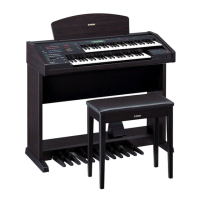
Yamaha Electone EL-57 - User Manual

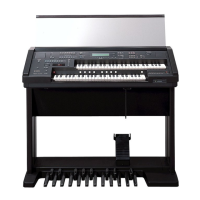
Yamaha Electone EL-57
143 pages
Print Icon
To Next Page IconTo Next Page
Loading...
Yamaha Corporation
International Marketing Group
P.O.Box1, Hamamatsu, Japan
Phone: 81(country code)-53-460-2301
Fax: 81-53-456-8872, 1109

Questions and Answers

  • C
    Christine DillonSep 4, 2025
    Why does my Yamaha Musical Instrument Electone play percussion sounds unexpectedly?
    • N
      Nicholas SmithSep 4, 2025
      If you hear percussion sounds when pressing keys on the Lower keyboard or Pedalboard of your Yamaha Musical Instrument Electone, the keyboard Percussion function has likely been turned on. If you are not using this function, turn it off.
  • C
    Carmen CampbellSep 18, 2025
    Why doesn't the Touch Tone function operate on my Yamaha Musical Instrument Electone?
    • P
      peter42Sep 18, 2025
      Adjust the Touch Tone settings in the Voice Condition display of your Yamaha Musical Instrument Electone.
  • A
    Albert DaySep 16, 2025
    Why can't I hear Symphonic, Flanger, and Delay effects on my Yamaha Musical Instrument Electone?
    • A
      Anna JonesSep 16, 2025
      Effects must be selected first in the Voice Condition display of your Yamaha Musical Instrument Electone.
  • A
    abigail37Sep 14, 2025
    Why can't I hear the Tremolo effect on my Yamaha Musical Instrument Electone?
    • D
      darren27Sep 14, 2025
      Tremolo must be selected first in the Voice Condition display of your Yamaha Musical Instrument Electone.
  • J
    Jennifer FrederickSep 12, 2025
    Why doesn't the Pan function operate on my Yamaha Musical Instrument Electone?
    • A
      Alyssa JonesSep 12, 2025
      The Pan function on your Yamaha Musical Instrument Electone can only be used if all other effects in the Voice Condition page are set to off.
  • D
    Donald GilbertSep 12, 2025
    Why does the Lower keyboard not produce sound during Intro/Ending pattern on Yamaha Musical Instrument?
    • C
      Christine HarperSep 12, 2025
      Since the Accompaniment chords play automatically one after another, the Lower keyboard is designed not to produce any sound during the playback of an Intro./Ending pattern on your Yamaha Musical Instrument Electone.
  • J
    Jon WardSep 9, 2025
    Why doesn't the Dotted button rhythm sound on my Yamaha Musical Instrument Electone?
    • N
      nicole05Sep 9, 2025
      Since the Dotted buttons contain User rhythms, no rhythm will sound if a pattern has not been saved to the selected Dotted button on your Yamaha Musical Instrument Electone.
  • B
    bwilliamsSep 7, 2025
    Why doesn't pitch change in Single Finger mode on Yamaha Musical Instrument?
    • D
      Dr. Anthony MendozaSep 7, 2025
      If the pitch in Single Finger mode does not change when pressing different keys on your Yamaha Musical Instrument Electone, Single Finger mode will only produce notes when played within a fixed octave interval on the Lower keyboard. If notes with the same letter name are pressed outside of that range, the chords that are sounded will share the same pitch.
  • A
    Amanda CurrySep 5, 2025
    Why don't the pedal voices sound on my Yamaha Musical Instrument Electone?
    • S
      Shannon StephensSep 5, 2025
      If the Pedal voices on your Yamaha Musical Instrument Electone do not sound, even with the volume properly set, the Single Finger or Fingered Chord mode of Auto Bass Chord might be active. Turn off the mode in the display.
  • A
    achapmanAug 20, 2025
    How to fix no sound from Yamaha Musical Instrument Electone speakers?
    • M
      Michael CisnerosAug 21, 2025
      If no sound comes from your Yamaha Musical Instrument Electone's speakers, the plug of the cable from the speaker unit might be disconnected. Reconnect the plug securely, referring to the Assembly Instructions.

Summary

Special Message Section

Product Safety Markings

Explains safety symbols and their meanings.

Precautions

Warnings and Cautions

Lists essential safety guidelines for operation.

Quick Introductory Guide

Getting Started

Basic setup and power-on procedures.

Voice Sections

Selecting Voices from the Panel

Method for choosing voices from the panel.

Voice Controls and Effects

Voice Condition Pages

Adjusting voice parameters like Touch Tone, Feet, Pan.

Effect Set Pages

Managing effects like Reverb, Delay, Flanger.

Rhythm and Accompaniment

Registration Memory

Storing and Selecting Registrations

Saving and recalling performance settings.

Music Disk Recorder

Voice Edit

Editing a Voice

Step-by-step guide to voice editing.

Rhythm Program

Rhythm Pattern Program

Creating custom rhythm patterns.

Footswitches, Knee Lever and Expression Pedal

Appendix

Troubleshooting

Solutions for common problems.

Yamaha Electone EL-57 Specifications

General IconGeneral
BrandYamaha
ModelElectone EL-57
CategoryMusical Instrument
LanguageEnglish

Related product manuals