EasyManua.ls Logo

Yamaha FC900 - Front and Rear Panel

Yamaha FC900
7 pages
Print Icon
To Next Page IconTo Next Page
To Previous Page IconTo Previous Page
Loading...
4.
Front
and
rear
panel
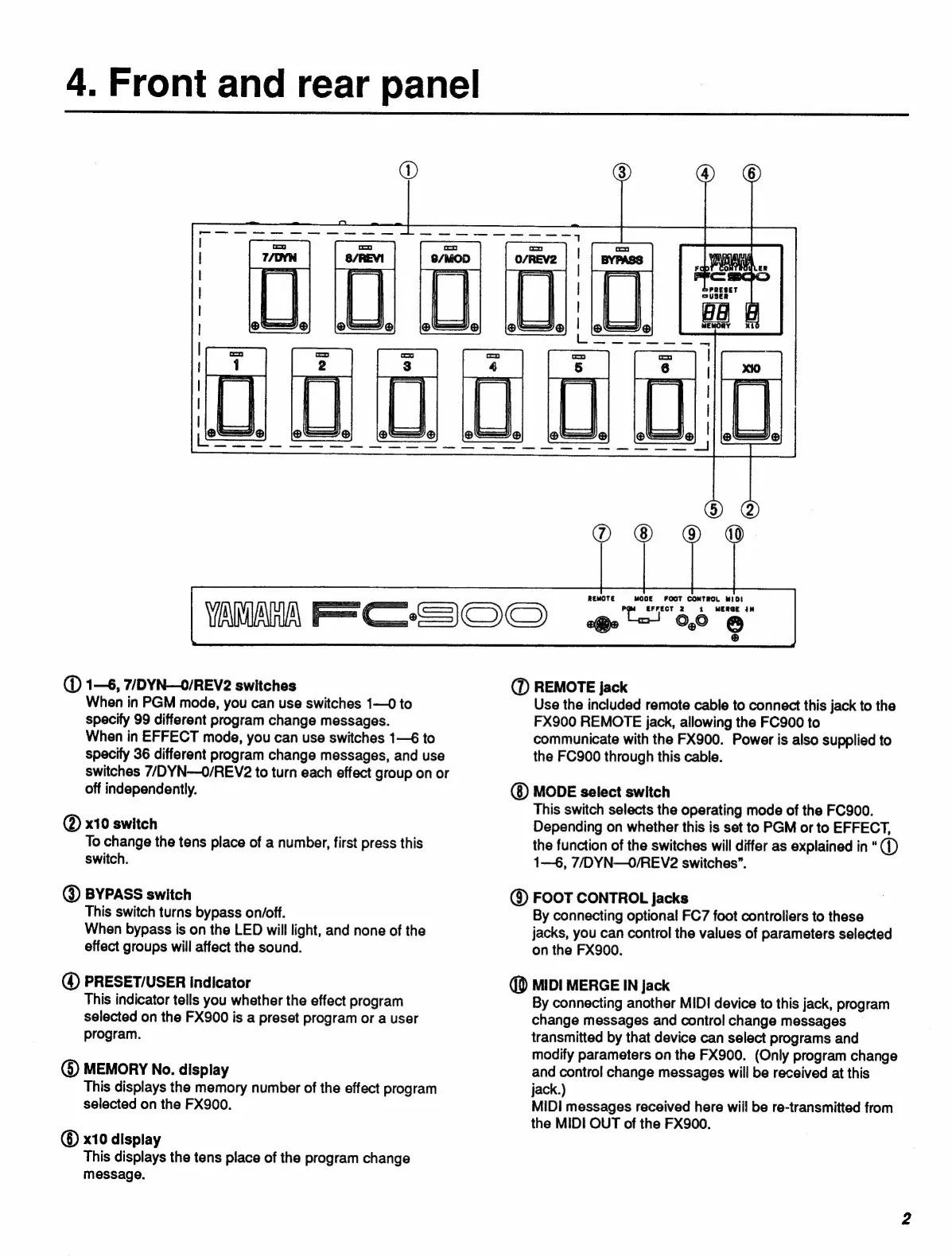
(D
1—6,
7/DYN—0/REV2
switches
When
in
PGM
mode,
you
can use
switches
1—0
to
specify
99
different
program
change
messages.
When
in
EFFECT
mode,
you
can
use
switches
1—6
to
specify
36
different
program
change
messages,
and
use
switches
7/DYN--O/REV2
to
turn
each
effect
group
on
or
off
independently.
@
x10
switch
To
change
the
tens
place
of
a
number,
first
press
this
switch.
@
BYPASS
switch
This
switch
turns
bypass
on/off.
When
bypass
is
on
the
LED
will
light,
and
none
of
the
effect
groups
will
affect
the
sound.
@
PRESET/USER
indicator
This
indicator
tells
you
whether
the
effect
program
selected
on
the
FX900
is
a
preset
program
or
a
user
program.
($)
MEMORY
No.
display
This
displays
the
memory
number
of
the
effect
program
selected
on
the
FX900.
©
x10
display
This
displays
the
tens
place
of
the
program
change
message.
AMAA
re
CH
REMOTE
MODE
FOOT
CONTROL
MIDI
EFFECT
2
1
MERGE
IN
«e
00
O
(D
REMOTE
jack
Use
the
included
remote
cable
to
connect
this
jack
to
the
FX900
REMOTE
jack,
allowing
the
FC900
to
communicate
with
the
FX900.
Power
is
also
supplied
to
the
FC900
through
this
cable.
MODE
select
switch
This
switch
selects
the
operating
mode
of
the
FC900.
Depending
on
whether
this
is
set
to
PGM
or
to
EFFECT,
the
function
of
the
switches
will
differ
as
explained
in
*
(1)
1—6,
7D
YN—O0/REV2
switches”.
@
FOOT
CONTROL
Jacks
By
connecting
optional
FC7
foot
controliers
to
these
jacks,
you
can
control
the
values
of
parameters
selected
on
the
FX900.
(
MIDI
MERGE
IN
jack
By
connecting
another
MIDI
device
to
this
jack,
program
change
messages
and
control
change
messages
transmitted
by
that
device
can
select
programs
and
modify
parameters
on
the
FX900.
(Only
program
change
and
control
change
messages
will
be
received
at
this
jack.)
MIDI
messages
received
here
wiil
be
re-transmitted
from
the
MIDI
OUT
of
the
FX900.

Related product manuals