EasyManua.ls Logo

Yamaha FC900 - EFFECT Mode

Yamaha FC900
7 pages
Print Icon
To Next Page IconTo Next Page
To Previous Page IconTo Previous Page
Loading...
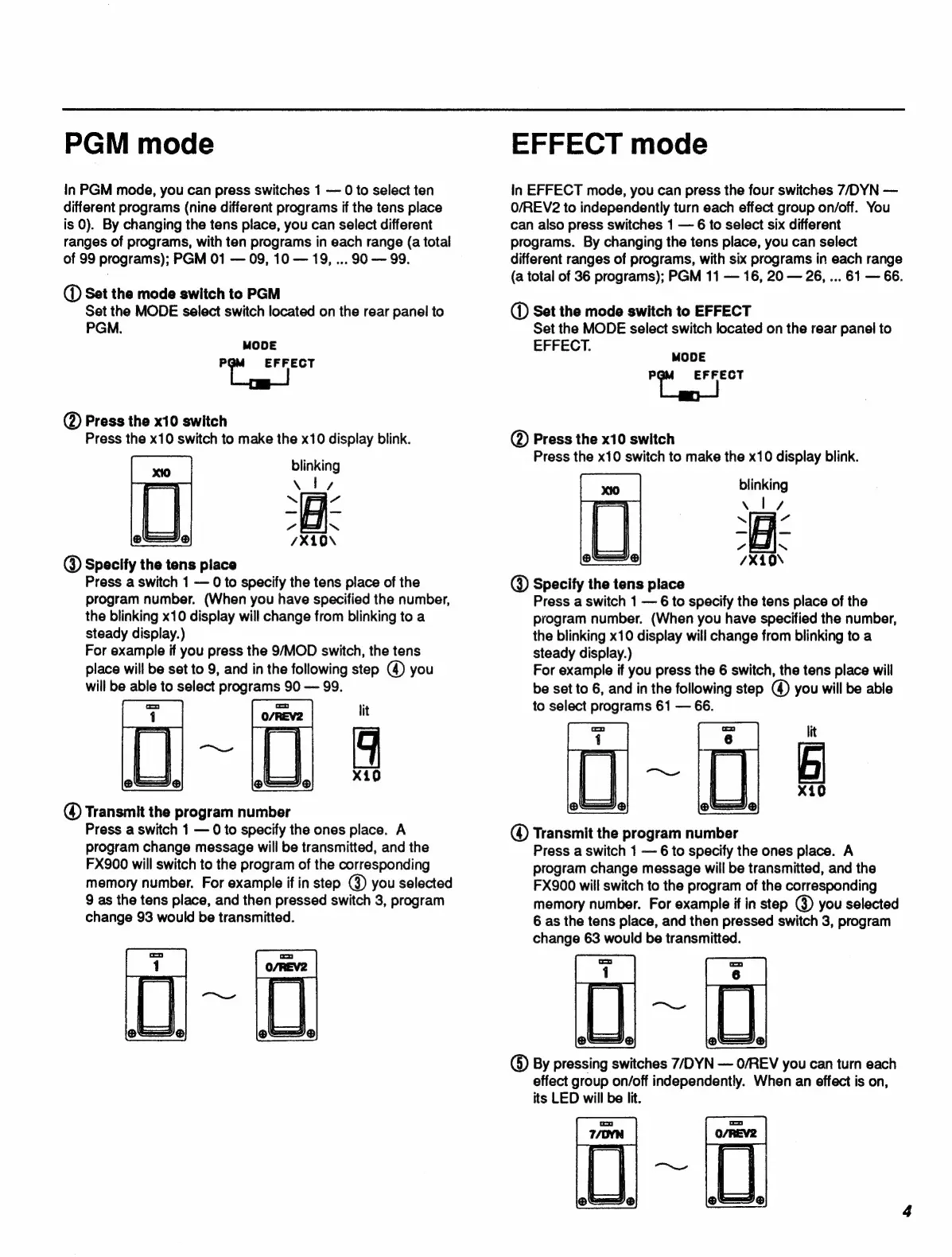
PGM
mode
In
PGM
mode,
you
can
press
switches
1
0
to
select
ten
different
programs
(nine
different
programs
if
the
tens
place
is
0).
By
changing
the
tens
place,
you
can
select
different
ranges
of
programs,
with
ten
programs
in
each
range
(a
total
of
99
programs);
PGM
01
09,
10
19,
...
90
99.
(D
Set
the
mode
switch
to
PGM
Set
the
MODE
select
switch
located
on
the
rear
panel
to
PGM.
MODE
us
EFFECT
@)
Press
the
x10
switch
Press
the
x10
switch
to
make
the
x10
display
blink.
blinking
xi,
@
Specify
the
tens
place
Press
a
switch
1
0
to
specify
the
tens
place
of
the
program
number.
(When
you
have
specified
the
number,
the
blinking
x10
display
will
change
from
blinking
to
a
steady
display.)
For
example
if
you
press
the
9/MOD
switch,
the
tens
place
will
be
set
to
9,
and
in
the
following
step
(4)
you
will
be
able
to
select
programs
90
99.
@
Transmit
the
program
number
Press
a
switch
1
0
to
specify
the
ones
place.
A
program
change
message
will
be
transmitted,
and
the
FX900
will
switch
to
the
program
of
the
corresponding
memory
number.
For
example
if
in
step
(3)
you
selected
9
as
the
tens
place,
and
then
pressed
switch
3,
program
change
93
would
be
transmitted.
EFFECT
mode
in
EFFECT
mode,
you
can
press
the
four
switches
7/DYN
O/REV2
to
independently
turn
each
effect
group
on/off.
You
can
also
press
switches
1
6
to
select
six
different
programs.
By
changing
the
tens
place,
you
can
select
different
ranges
of
programs,
with
six
programs
in
each
range
(a
total
of
36
programs);
PGM
11
16,
20
26,
...
61
66.
(D
Set
the
mode
switch
to
EFFECT
Set
the
MODE
select
switch
located
on
the
rear
panel
to
EFFECT.
MODE
Eu
EFFECT
(D
Press
the
x10
swltch
Press
the
x10
switch
to
make
the
x10
display
blink.
blinking
Specify
the
tens
place
Press
a
switch
1
6
to
specify
the
tens
place
of
the
program
number.
(When
you
have
specified
the
number,
the
blinking
x10
display
will
change
from
blinking
to
a
steady
display.)
For
example
if
you
press
the
6
switch,
the
tens
place
will
be
set
to
6,
and
in
the
following
step
(4)
you
will
be
able
to
select
programs
61
66.
Transmit
the
program
number
Press
a
switch
1
6
to
specify
the
ones
place.
A
program
change
message
will
be
transmitted,
and
the
FX900
will
switch
to
the
program
of
the
corresponding
memory
number.
For
example
if
in
step
(3)
you
selected
6
as
the
tens
place,
and
then
pressed
switch
3,
program
change
63
would
be
transmitted.
O
By
pressing
switches
7/DYN
O/REV
you
can
turn
each
effect
group
on/off
independently.
When
an
effect
is
on,
its
LED
will
be
lit.

Related product manuals