74 Genos Owner’s Manual
Selecting Songs (Dual Player mode)
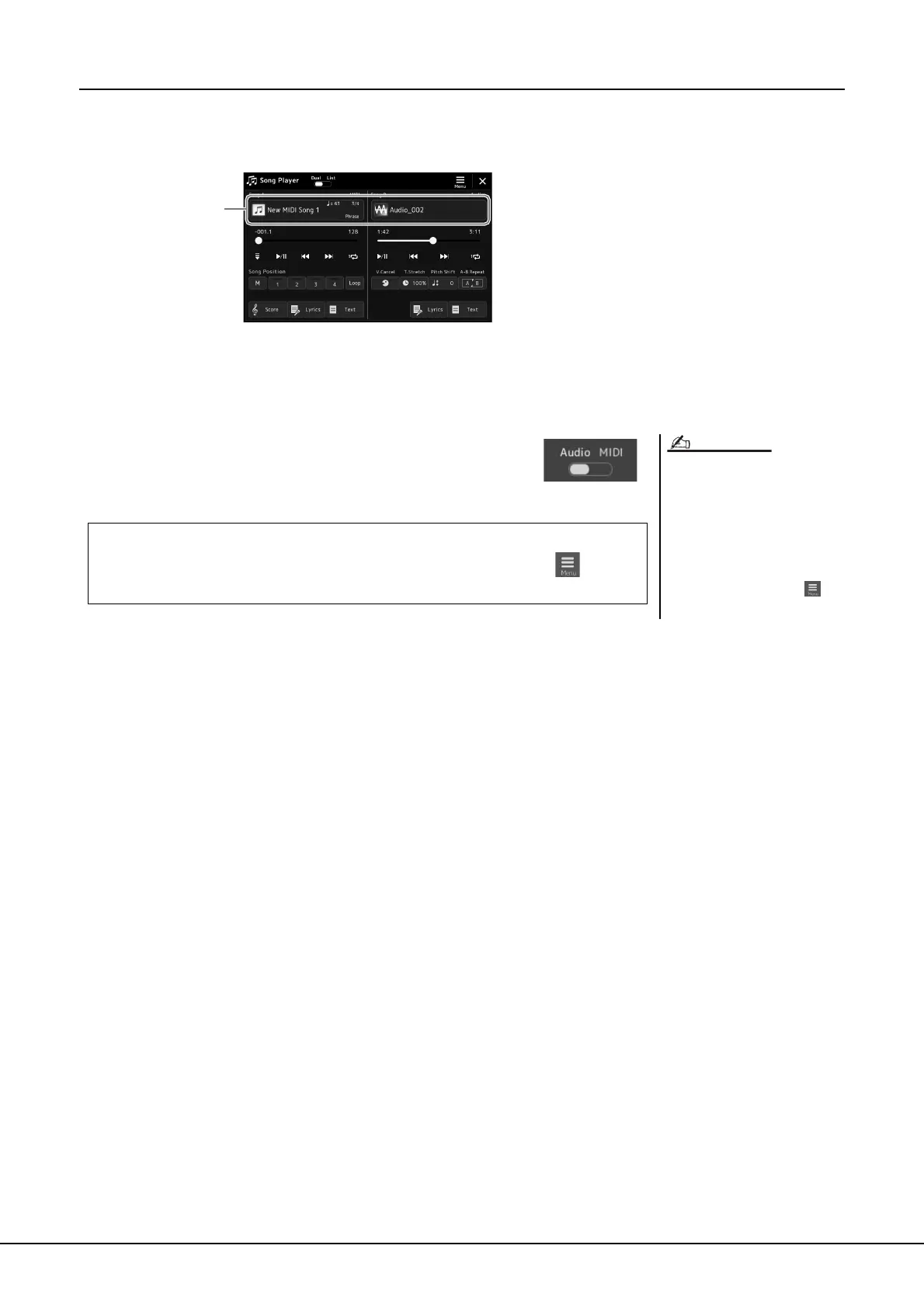
1 Press the [SONG] button to call up the Song Playback display.
Make sure that Dual Player mode is selected.
2 Touch the Song name in the Song A or Song B area.
The Song Selection display appears.
3 Select the desired Song for each, A and B.
For selecting from Audio Songs, touch [Audio].
For selecting from MIDI Songs, touch [MIDI].
For detailed playback operations and the crossfade function, refer to pages 78, 85.
• For basic operations of the Song
Selection display, refer to “File Selec-
tion Display” (page 32).
• You can select two Audio Songs or
one Audio Song and one MIDI Song
for SONG A and SONG B. Two MIDI
Songs cannot be selected.
• You can call up the display of Song
playback related settings, via
(Menu) [Song Setting].
NOTE
Viewing Song information
When an Audio Song is selected on the Song Selection display, touching (Menu)
then [Audio Song Information] calls up the information window.



 To Next Page