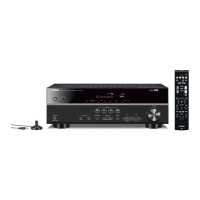
What to do if Yamaha HTR-5790 Stereo Receiver shows E-7: NO MIC error?
- EEdward EatonAug 20, 2025
If the optimizer microphone was unplugged during the auto setup procedure, connect it to the OPTIMIZER MIC jack on the front panel.
What to do if Yamaha HTR-5790 Stereo Receiver shows E-7: NO MIC error?
If the optimizer microphone was unplugged during the auto setup procedure, connect it to the OPTIMIZER MIC jack on the front panel.
How to fix Yamaha Stereo Receiver E-5: NOISY error?
If the Yamaha Stereo Receiver shows E-5: NOISY, try running the auto setup procedure in a quiet environment. Also, turn off noisy electrical equipment like air conditioners or move them away from the unit.
Why does my Yamaha Stereo Receiver show W-1: OUT OF PHASE?
If the Yamaha Stereo Receiver displays W-1: OUT OF PHASE, check the speaker connections. This message may appear even when the speakers are connected correctly, depending on the speakers.
What to do if my Yamaha HTR-5790 displays E-1:NO FRONT SP?
If the Yamaha Stereo Receiver displays E-1:NO FRONT SP, select the front speakers using SPEAKER A or B. Also, check the front L/R speaker connections.
How to troubleshoot Yamaha HTR-5790 W-3: LEVEL ERROR?
If the Yamaha Stereo Receiver shows W-3: LEVEL ERROR, readjust the speaker installation and check the speaker connections. Use speakers of similar quality and adjust the output volume of the subwoofer.
What causes Yamaha HTR-5790 W-5: VOL ERROR and how to fix it?
If the Yamaha Stereo Receiver displays W-5: VOL ERROR, perform the auto setup procedure again, ensuring that you do not change the volume during the process. The error appears because the volume was changed during the auto setup procedure.
Why Yamaha HTR-5790 says E-8: NO SIGNAL?
If your Yamaha Stereo Receiver displays E-8: NO SIGNAL, check the microphone setting and the speaker connections and placement. The optimizer microphone may not be detecting test tones.
What to do if Yamaha HTR-5790 displays E-2:NO SURR.SP?
If the Yamaha Stereo Receiver shows E-2:NO SURR.SP, check the surround speaker connections, because a surround channel signal is not detected.
How to resolve Yamaha Stereo Receiver E-3:NO PRES. SP error?
If the Yamaha Stereo Receiver displays E-3:NO PRES. SP, check the presence speaker connections, because a presence channel signal is not detected.
What does E-6:CHECK SURR mean on my Yamaha Stereo Receiver?
If the Yamaha Stereo Receiver displays E-6:CHECK SURR, connect surround speakers when you use surround back speaker(s), as surround back speaker(s) is (are) connected, though surround L/R speakers are not.
Covers essential warnings for safe operation and maintenance.
Essential advice for optimal performance and unit safety.
Explains the unit's various controls and indicators across its panels.
Guides on speaker placement, connections, and impedance settings.
Instructions for connecting audio, video, digital, and antenna components.
Provides solutions for common operational problems and errors.
Covers essential warnings for safe operation and maintenance.
Essential advice for optimal performance and unit safety.
Explains the unit's various controls and indicators across its panels.
Guides on speaker placement, connections, and impedance settings.
Instructions for connecting audio, video, digital, and antenna components.
Provides solutions for common operational problems and errors.
| Channels | 7.1 |
|---|---|
| HDMI Inputs | 2 |
| Component Video Inputs | 3 |
| Frequency Response | 10 Hz - 100 kHz |
| Total Harmonic Distortion (THD) | 0.04% (20 Hz - 20 kHz) |
| Input Sensitivity | 200 mV |
| Signal-to-Noise Ratio | 100 dB |
| Dimensions | 17-1/8" x 6-3/4" x 17-1/8" (435 x 171 x 435 mm) |
| Digital Audio Inputs | 3 Optical, 2 Coaxial |
| Surround Sound Formats | Dolby Digital |
| Amplifier Section | Discrete amplifier design |
| Tuner Section | FM/AM |
| FM Sensitivity | 1.0 µV |
| AM Sensitivity | 300 μV/m |
| Video Section | Video Upconversion |
Loading...