EasyManua.ls Logo

Yamaha MC2410M - Page 5

Yamaha MC2410M
58 pages
Print Icon
To Next Page IconTo Next Page
To Previous Page IconTo Previous Page
Loading...
CH.
INPUT
SECTION
®
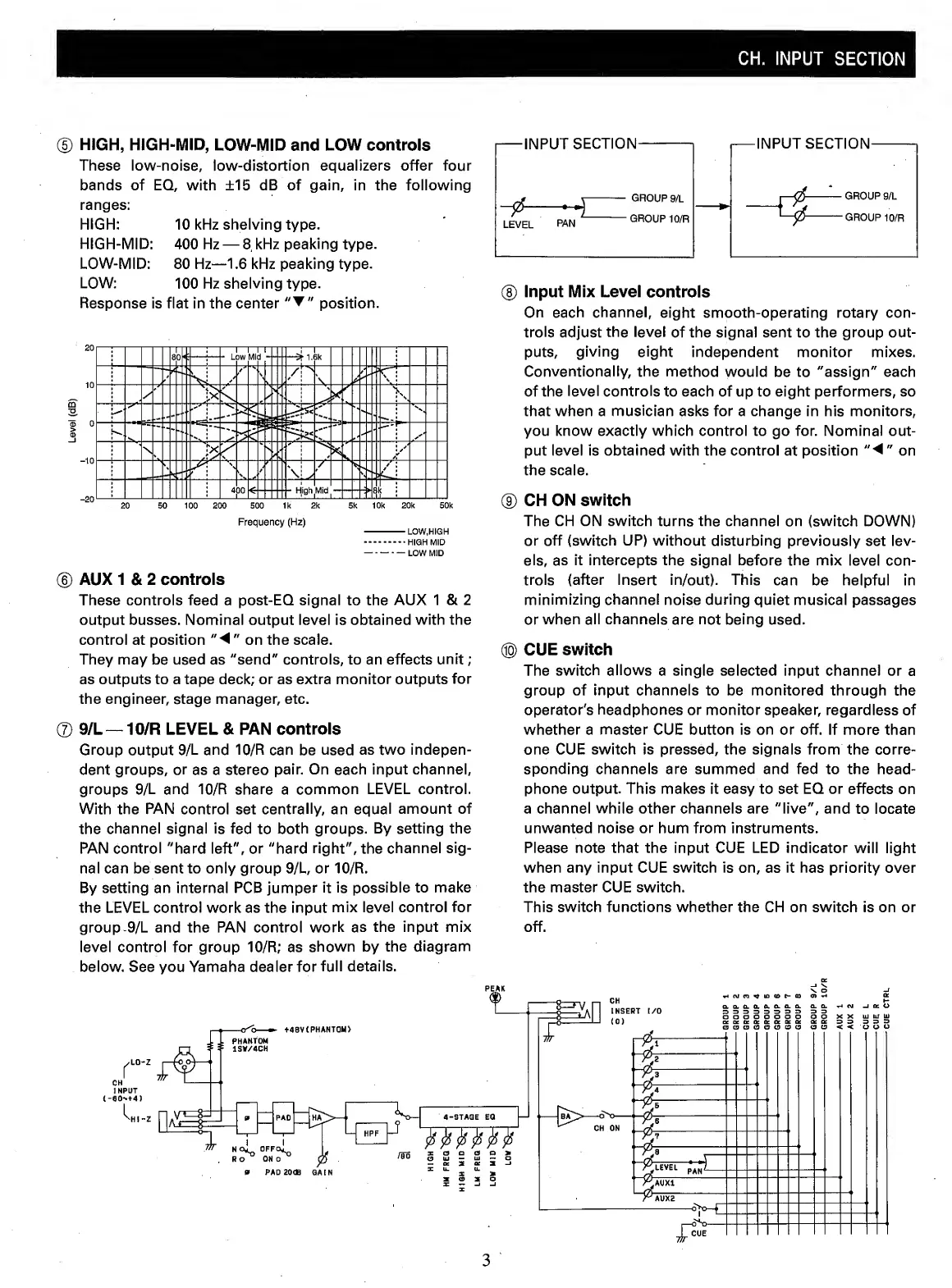
HIGH,
HIGH-MID,
LOW-MID
and
LOW
controls
These
low-noise,
low-distortion
equalizers
offer
four
bands
of
EQ,
with
±15
dB
of
gain,
in
the
following
ranges:
HIGH:
10
kHz
shelving
type.
HIGH-MID:
400
Hz
—
8
kHz
peaking
type.
LOW-MID:
80
Hz—1.6
kHz
peaking
type.
LOW:
100
Hz
shelving
type.
Response
is
flat
in
the
center
position.
Frequency
(Hz)
-LOW,HIGH
.HIGH
MID
-LOW
MID
(D
AUX
1
&
2
controls
These
controls
feed
a
post-EQ
signal
to
the
AUX
1
&
2
output
busses.
Nominal
output
level
is
obtained
with
the
control
at
position
"
on
the
scale.
They
may
be
used
as
"send"
controls,
to
an
effects
unit;
as
outputs
to
a
tape
deck;
or
as
extra
monitor
outputs
for
the
engineer,
stage
manager,
etc.
®
9/L
—
10/R
LEVEL
&
PAN
controls
Group
output
9/L
and
10/R
can
be
used
as
two
indepen¬
dent
groups,
or
as
a
stereo
pair.
On
each
input
channel,
groups
9/L
and
10/R
share
a
common
LEVEL
control.
With
the
PAN
control
set
centrally,
an
equal
amount
of
the
channel
signal
is
fed
to
both
groups.
By
setting
the
PAN
control
"hard
left",
or
"hard
right",
the
channel
sig¬
nal
can
be
sent
to
only
group
9/L,
or
10/R.
By
setting
an
internal
PCB
jumper
it
is
possible
to
make
the
LEVEL
control
work
as
the
input
mix
level
control
for
group-9/L
and
the
PAN
control
work
as
the
input
mix
level
control
for
group
10/R;
as
shown
by
the
diagram
below.
See
you
Yamaha
dealer
for
full
details.
-
I
N
P
U
T
SECTION
-
-
I
N
P
U
T
SECTION
-
<0
t
-
GROUP
9/L
j
—0
-
—
GROUP
9/L
Jra.
PAN
SROUP
urn
'—p
-
G
ROUP
10/R
(
8
)
Input
Mix
Level
controls
On
each
channel,
eight
smooth-operating
rotary
con¬
trols
adjust
the
level
of
the
signal
sent
to
the
group
out¬
puts,
giving
eight
independent
monitor
mixes.
Conventionally,
the
method
would
be
to
"assign"
each
of
the
level
controls
to
each
of
up
to
eight
performers,
so
that
when
a
musician
asks
for
a
change
in
his
monitors,
you
know
exactly
which
control
to
go
for.
Nominal
out¬
put
level
is
obtained
with
the
control
at
position
"
◄
"
on
the
scale.
(9)
CH
ON
switch
The
CH
ON
switch
turns
the
channel
on
(switch
DOWN)
or
off
(switch
UP)
without
disturbing
previously
set
lev¬
els,
as
it
intercepts
the
signal
before
the
mix
level
con¬
trols
(after
Insert
in/out).
This
can
be
helpful
in
minimizing
channel
noise
during
quiet
musical
passages
or
when
all
channels
are
not
being
used.
®
CUE
switch
The
switch
allows
a
single
selected
input
channel
or
a
group
of
input
channels
to
be
monitored
through
the
operator's
headphones
or
monitor
speaker,
regardless
of
whether
a
master
CUE
button
is
on
or
off.
If
more
than
one
CUE
switch
is
pressed,
the
signals
from
the
corre¬
sponding
channels
are
summed
and
fed
to
the
head¬
phone
output.
This
makes
it
easy
to
set
EQ
or
effects
on
a
channel
while
other
channels
are
"live",
and
to
locate
unwanted
noise
or
hum
from
instruments.
Please
note
that
the
input
CUE
LED
indicator
will
light
when
any
input
CUE
switch
is
on,
as
it
has
priority
over
the
master
CUE
switch.
This
switch
functions
whether
the
CH
on
switch
is
on
or
off.
3