EasyManua.ls Logo

Yamaha MC2410M - Group out Section

Yamaha MC2410M
58 pages
Print Icon
To Next Page IconTo Next Page
To Previous Page IconTo Previous Page
Loading...
GROUP
OUT
SECTION
□
H—©
□
—
■
—®
CUE
—
10
—
10
—
16
—
20
—26
—30
—40
—
oo
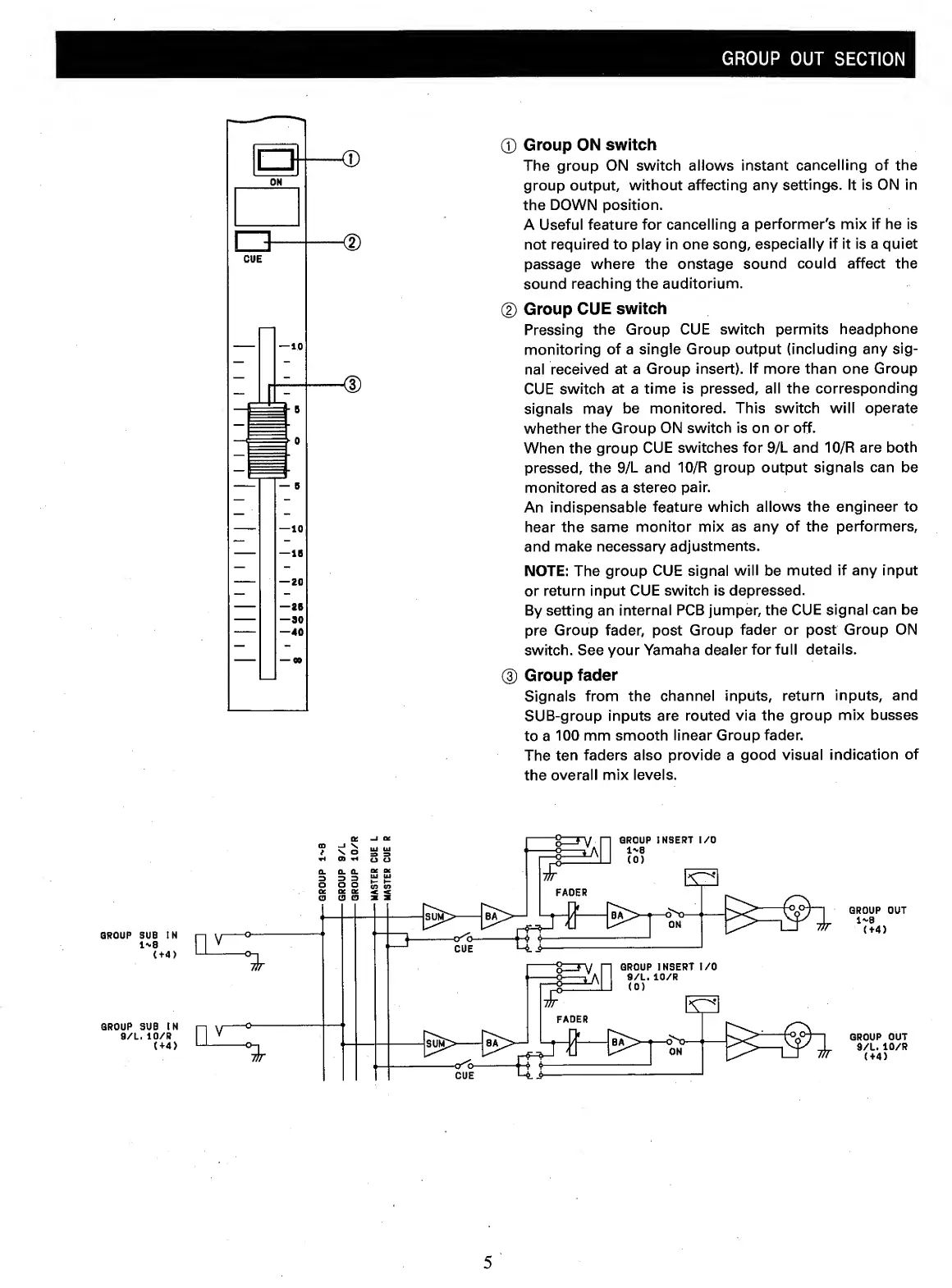
(T)
Group
ON
switch
The
group
ON
switch
allows
instant
cancelling
of
the
group
output,
without
affecting
any
settings.
It
is
ON
in
the
DOWN
position.
A
Useful
feature
for
cancelling
a
performer's
mix
if
he
is
not
required
to
play
in
one
song,
especially
if
it
is
a
quiet
passage
where
the
onstage
sound
could
affect
the
sound
reaching
the
auditorium.
(2)
Group
CUE
switch
Pressing
the
Group
CUE
switch
permits
headphone
monitoring
of
a
single
Group
output
(including
any
sig¬
nal
received
at
a
Group
insert).
If
more
than
one
Group
CUE
switch
at
a
time
is
pressed,
all
the
corresponding
signals
may
be
monitored.
This
switch
will
operate
whether
the
Group
ON
switch
is
on
or
off.
When
the
group
CUE
switches
for
9/L
and
10/R
are
both
pressed,
the
9/L
and
10/R
group
output
signals
can
be
monitored
as
a
stereo
pair.
An
indispensable
feature
which
allows
the
engineer
to
hear
the
same
monitor
mix
as
any
of
the
performers,
and
make
necessary
adjustments.
NOTE:
The
group
CUE
signal
will
be
muted
if
any
input
or
return
input
CUE
switch
is
depressed.
By
setting
an
internal
PCB
jumper,
the
CUE
signal
can
be
pre
Group
fader,
post
Group
fader
or
post
Group
ON
switch.
See
your
Yamaha
dealer
for
full
details.
®
Group
fader
Signals
from
the
channel
inputs,
return
inputs,
and
SUB-group
inputs
are
routed
via
the
group
mix
busses
to
a
100
mm
smooth
linear
Group
fader.
The
ten
faders
also
provide
a
good
visual
indication
of
the
overall
mix
levels.
GROUP
OUT
1^8
(+4)
GROUP
OUT
9/L.
10/R
(+4)
5