EasyManua.ls Logo

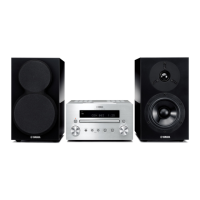
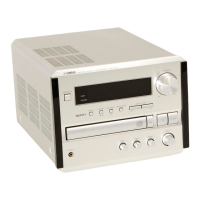
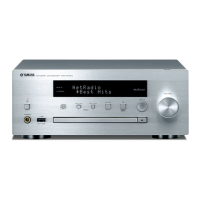
Yamaha MCR-550 - User Manual

Yamaha MCR-550
56 pages
Print Icon
To Next Page IconTo Next Page
Loading...
OWNER’S MANUAL
MODE D’EMPLOI
CAB
CD RECEIVER
AMPLI-TUNER CD

Table of Contents

Question and Answer IconNeed help?

Do you have a question about the Yamaha MCR-550 and is the answer not in the manual?

Summary

Safety and Operation Precautions

General Safety Guidelines

Covers 24 numbered safety points for unit operation and placement.

Laser Safety Warnings

Details risks associated with the unit's laser system and required precautions.

Disc and File Format Compatibility

Playable Disc Types

Details compatible CD formats including CD-R/RW and CD-TEXT.

MP3 and WMA File Support

Lists supported MP3 and WMA file formats, bitrates, and sampling frequencies.

Remote Control Operation

Remote Control Button Layout

Identifies buttons and their general functions on the remote.

Front Panel Display Guide

Indicator Lights Explained

Details the meaning of indicators like SLEEP, PRESET, STEREO, AUTO, SHUFFLE, REPEAT.

System Setup and Connections

Connecting Speakers and Antennas

Guides connection of speakers, FM, and DAB/FM antennas.

Listening to Music

Music Playback Procedure

Step-by-step guide to play music from various sources.

Music Playback Controls

iPod Playback Navigation

Controls for navigating and playing music on an iPod.

CD;USB Playback Controls

Controls for playing music from CDs and USB devices.

Listening to DAB Stations

Initial DAB Station Scan

How to perform an initial scan to find available DAB stations.

Storing DAB Presets

Steps for saving favorite DAB stations into memory presets.

Listening to FM Radio Stations

Tuning FM Radio Broadcasts

Methods for tuning into FM stations, including automatic and manual.

Storing FM Radio Presets

How to save favorite FM stations using automatic or manual preset tuning.

Recalling FM Presets

How to select and play back stored FM stations.

Clock and Timer Settings

Troubleshooting Common Issues

General Unit Malfunctions

Solutions for power, operation, sound, and clock issues.

Troubleshooting Reception

DAB Reception Problems

Fixes for issues like no DAB stations or weak signal.

FM Reception Problems

Solutions for noisy FM stereo, poor tuning, and distortion.

Troubleshooting iPod Connectivity

Troubleshooting Media Playback

USB Device Playback Issues

Fixes for USB connection, file recognition, and playback errors.

Disc Playback Errors

Solutions for no sound, distortion, and playback failures with discs.

Summary

Safety and Operation Precautions

General Safety Guidelines

Covers 24 numbered safety points for unit operation and placement.

Laser Safety Warnings

Details risks associated with the unit's laser system and required precautions.

Disc and File Format Compatibility

Playable Disc Types

Details compatible CD formats including CD-R/RW and CD-TEXT.

MP3 and WMA File Support

Lists supported MP3 and WMA file formats, bitrates, and sampling frequencies.

Remote Control Operation

Remote Control Button Layout

Identifies buttons and their general functions on the remote.

Front Panel Display Guide

Indicator Lights Explained

Details the meaning of indicators like SLEEP, PRESET, STEREO, AUTO, SHUFFLE, REPEAT.

System Setup and Connections

Connecting Speakers and Antennas

Guides connection of speakers, FM, and DAB/FM antennas.

Listening to Music

Music Playback Procedure

Step-by-step guide to play music from various sources.

Music Playback Controls

iPod Playback Navigation

Controls for navigating and playing music on an iPod.

CD;USB Playback Controls

Controls for playing music from CDs and USB devices.

Listening to DAB Stations

Initial DAB Station Scan

How to perform an initial scan to find available DAB stations.

Storing DAB Presets

Steps for saving favorite DAB stations into memory presets.

Listening to FM Radio Stations

Tuning FM Radio Broadcasts

Methods for tuning into FM stations, including automatic and manual.

Storing FM Radio Presets

How to save favorite FM stations using automatic or manual preset tuning.

Recalling FM Presets

How to select and play back stored FM stations.

Clock and Timer Settings

Troubleshooting Common Issues

General Unit Malfunctions

Solutions for power, operation, sound, and clock issues.

Troubleshooting Reception

DAB Reception Problems

Fixes for issues like no DAB stations or weak signal.

FM Reception Problems

Solutions for noisy FM stereo, poor tuning, and distortion.

Troubleshooting iPod Connectivity

Troubleshooting Media Playback

USB Device Playback Issues

Fixes for USB connection, file recognition, and playback errors.

Disc Playback Errors

Solutions for no sound, distortion, and playback failures with discs.

Yamaha MCR-550 Specifications

General IconGeneral
KaraokeNo
Impedance6 Ω
Bass reflexYes
Speaker type2-way
Frequency range55 - 28000 Hz
RMS rated power64 W
Woofer diameter120 mm
Tweeter diameter30 mm
Number of speakers2
Signal-to-Noise Ratio (SNR)85 dB
Peak Music Power Output (PMPO)110 W
Total Harmonic Distortion (THD)0.05 %
TypeHome audio mini system
Product colorBlack
Number of optical discs1 discs
Disc types supportedCD
Playback disc formatsCD audio
Audio formats supportedCD-A, MP3, WMA
Supported radio bands-
Speaker depth287 mm
Speaker width154 mm
Speaker height274 mm
Apple docking compatibilityiPhone, iPod
Headphone connectivity3.5 mm
USB 2.0 ports quantity1
Power sourceAC
Volume controlRotary
Weight and Dimensions IconWeight and Dimensions
Depth309 mm
Width215 mm
Height125 mm
Weight12600 g

Related product manuals