Supplementary infomation
195
Voice mode
Performance
mode
Song modeUtility modeFile modeMaster mode
Pattern mode
Mixing Voice
mode
Reference
Owner’s Manual
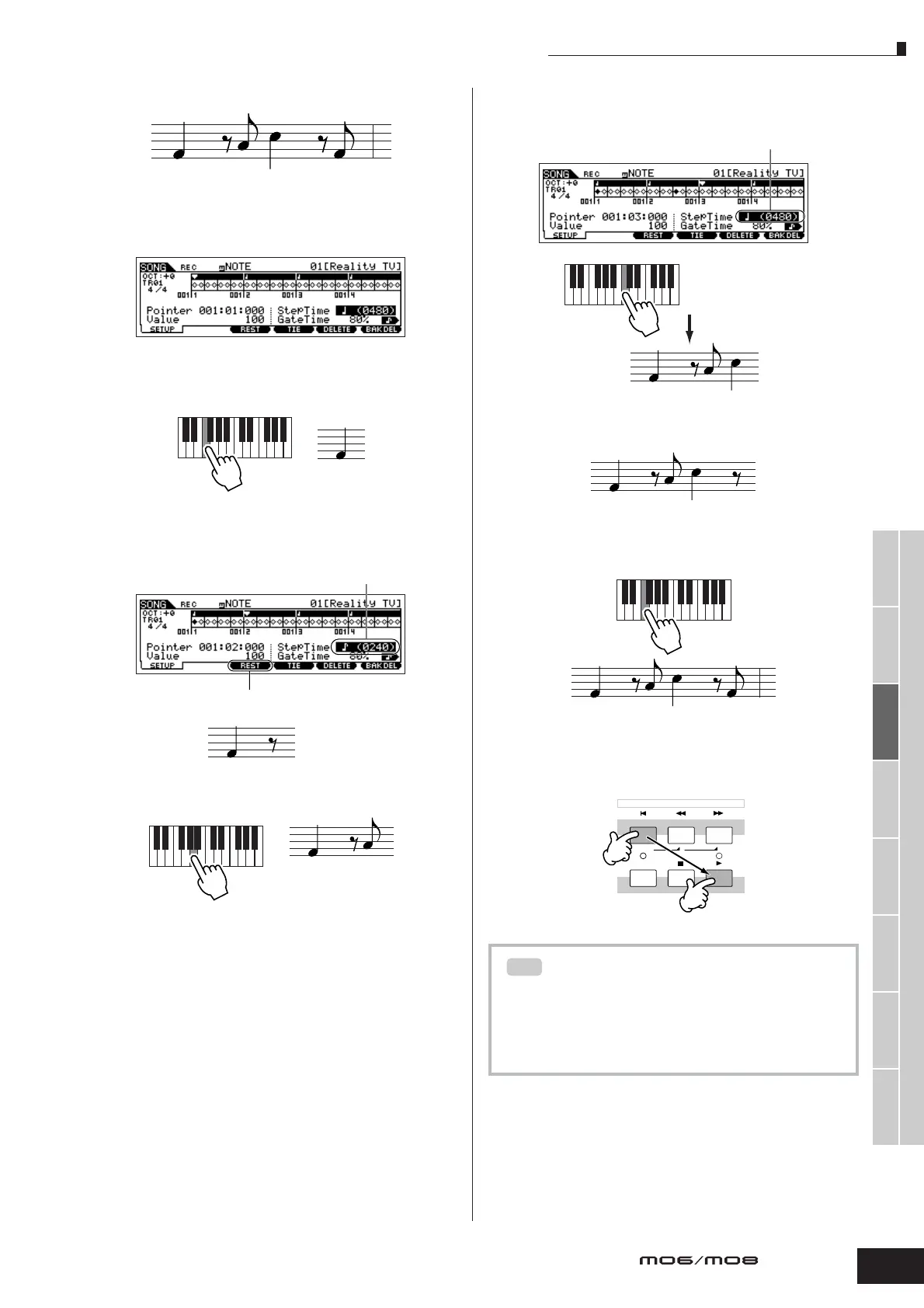
• Example 3 (Using the Rest function)
1 Set the parameters as illustrated below.
Set the StepTime to a quarter note (480) and the Gate Time to
80%.
2 Enter the first note, F.
3 Enter the next 8th rest as shown below.
4 Enter the next 8th note A.
5 Enter the next 4th note C as shown below.
6 Enter the next 8th rest as you did in step 3 above.
7 Enter the last 8th note, F.
8 Move the pointer to the top (beginning) of the song and
press the [F] (Play) button to hear the note data you
just recorded in steps 1 – 7.
Press and release F.
1 Change this to an eighth note (240),
since we’ll be entering an eighth-note rest.
2 Enter the selected rest value (eighth note)
by pressing the [F3] button
Press and release A.
Entering a chord
In Step recording, you can also enter chords. Press and hold
down each note of the chord in succession, then release
them all together to record them as a chord. Keep in mind
that notes are not actually recorded to a track until they are
released.
1 Change this value to 480,
since the rest value is a quarter note.
2 Press and release C.
TIP



 To Next Page