Instrument and control functions
5-19
1
2
3
4
5
6
7
8
9
10
11
12
13
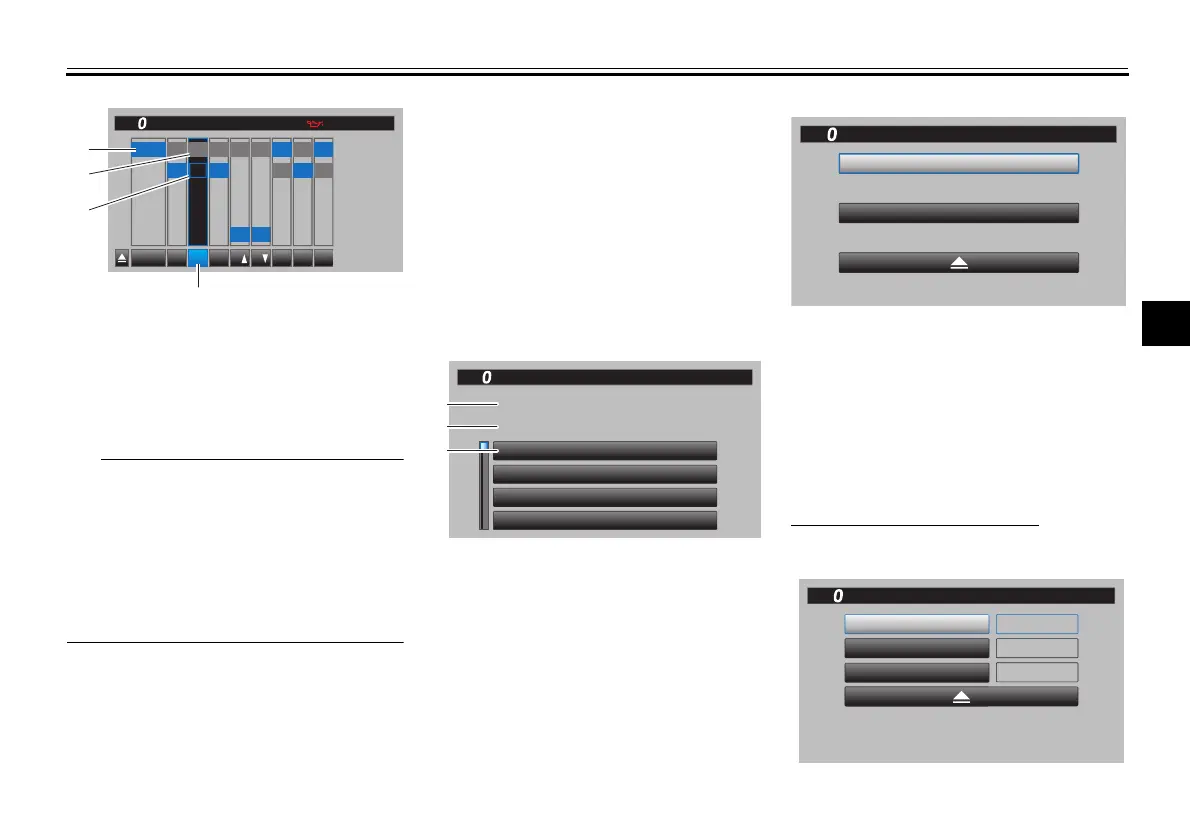
When a YRC item is selected, the
current setting level is highlighted
blue and the factory preset level is
highlighted grey.
Factory preset levels vary depend-
ing on the selected YRC mode
preset.
3. When finished, select the triangle
mark on the far left to return to the
MENU screen.
“Lap Time”
This module allows you to view and de-
lete the lap time record. The fastest lap
and the average lap time stored in the
lap time record are displayed at the top
of the screen. Use the wheel switch to
scroll and see all lap times. The top
three fastest laps will be highlighted in
silver. Up to 40 laps can be stored in
memory. If more than 40 laps are re-
corded, the oldest laps (starting from
lap 1) will be overwritten.
This module has two options. “Display”
allows you to view the lap time record.
“Reset” allows you to delete the lap
time record data.
“Maintenance”
This module allows you to record dis-
tance traveled between engine oil
changes (use the OIL item), and for two
other items of your choice (use INTER-
VAL 1 and INTERVAL 2).
To reset a maintenance item
1. Select the item you want to reset.
1. YRC item
2. Current level setting
3. Factory preset level
4. YRC mode
YRC
PWR TCS SCS
QS QS
LIF
EBM
BC
10
:
00
YRC Setting
A
B
C
D
1
2
3
4
2
3
4
5
1
2
3
OFF OFF
ONON
OFF
1
2
3
OFF
1
2
1
2
1
MPH
1
3
4
2
1. Fastest lap
2. Average lap time
3. Lap time record
LAP 1
LAP 2
LAP 3
LAP 4
FASTEST / LAP 12
02:54.56
02:55.20
02:56.04
02:56.80
02:34.56
02:53.00
AVERAGE
Lap Time
GPGPS
10
:
00
MPH
1
2
3
10
:
00
Reset
Display
Lap Time
MPH
INTERVAL 2
OIL
INTERVAL 1
123456 km
123456 km
123456 km
Maintenance
GPS
10
:
00
MPH
B5Y-9-10-E0.book 19 ページ 2021年12月15日 水曜日 午後1時30分







 To Next Page