Instrument and control functions
5-20
1
2
3
4
5
6
7
8
9
10
11
12
13
2. Long push the wheel switch to re-
set the item.
Maintenance item names cannot be
changed.
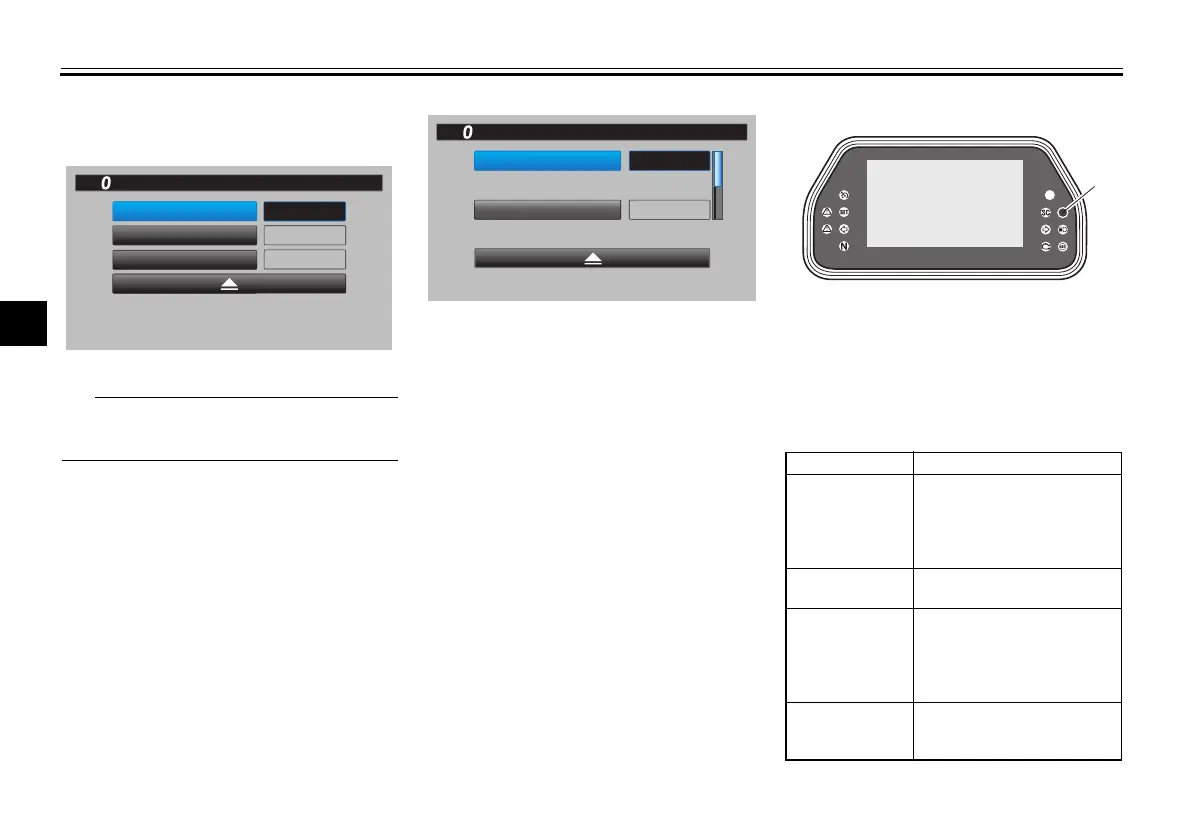
“Unit”
This module allows you to switch the
display between kilometers and miles.
When using kilometers, the fuel con-
sumption units can be changed be-
tween km/L or L/100km. When using
miles, only MPG will be available.
“Wallpaper”
This module allows you to individually
set the STREET MODE and TRACK
MODE display background colors to
black or white for both day and night
settings. A photo sensor equipped in
the instrument panel detects lighting
conditions and will automatically
change the display between its day and
night settings. The photo sensor also
controls a subtle automatic brightness
adjustment function within both day
and night modes to suit ambient light
conditions.
“Shift indicator”
The shift indicator module contains the
following sub-modules.
mile
mile
mile INTERVAL 2
OIL
INTERVAL 1
Maintenance
GPS
10
:
00
0
123456
123456
MPH
MPG
km or mile
Unit
GPGPS
10
:
00
MPG
mile
MPH
1. Photo sensor
Module Description
Set the shift indicator pattern
to “ON”, “Flash”, or “OFF”
and adjust at what r/min the
indicator will come on and go
off.
Adjust the brightness of
the shift indicator.
Set the tachometer color
display to “ON” or “OFF”
and adjust at what r/min
the tachometer will be
green and orange.
Set the tachometer peak
rev indicator to “ON” or
“OFF”.
1
Shift IND
Brightness
Tach IND
Setting
B5Y-9-10-E0.book 20 ページ 2021年12月15日 水曜日 午後1時30分



 To Next Page