Instrument and control functions
4-9
4
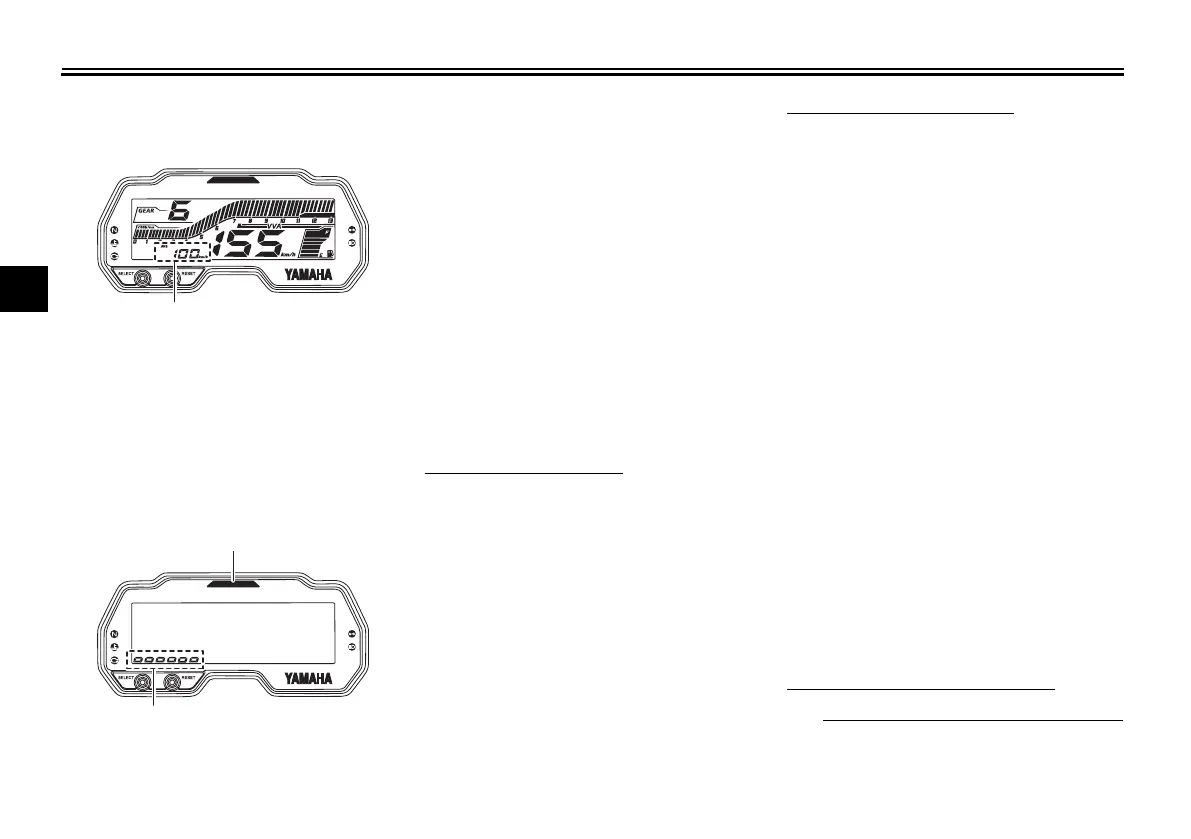
Average speed mode
This shows the vehicle’s average trav-
eling speed since it was last reset. To
reset the average speed display, push
the “RESET” button for one second.
Shift light control mode
The shift light has four settings which
can be adjusted.
z Flashing pattern: choose whether
or not the shift light will come on,
and whether it will flash or light
continuously.
z Activation point: select the engine
speed at which the shift light is ac-
tivated.
z Deactivation point: select the en-
gine speed at which the shift light
is deactivated.
z Brightness adjustment: adjust the
brightness of the shift light.
To adjust the shift light
1. Turn the main switch off.
2. Push and hold the “SELECT” but-
ton.
3. Turn the main switch on, and then
release the “SELECT” button after
five seconds. After that, push the
“SELECT” button again. The
multi-function meter unit will enter
the shift light control mode.
To set the flashing pattern
1. Push the “RESET” button to select
one of the following flashing pat-
tern settings:
z On: the shift light will come on
continuously when activated.
(This setting is selected when
the shift light stays on.)
z Flash: the shift light will flash
when activated. (This setting
is selected when the shift light
flashes four times per sec-
ond.)
z Off: the shift light is deactivat-
ed; in other words, it does not
come on or flash. (This setting
is selected when the shift light
flashes once every two sec-
onds.)
2. Push the “SELECT” button to con-
firm the selected flashing pattern.
Next the shift light activation point
can be set.
To set the shift activation point
z The tachometer will show the cur-
rent activation point.
1. Average speed display
1. Shift light
2. Brightness level display
UB7DE0E0.book Page 9 Tuesday, September 18, 2018 3:25 PM



 To Next Page