Instrument and control functions
4-11
4
8. After the sixth character is set, all
characters will flash twice and the
setting mode will automatically
end.
Screen brightness control mode
To adjust the screen brightness
1. Turn the main switch off.
2. Push and hold the “SELECT” but-
ton.
3. Turn the main switch on and then
release the “SELECT” button after
five seconds.
4. Push the “RESET” button to select
the desired brightness level.
EAU1234M
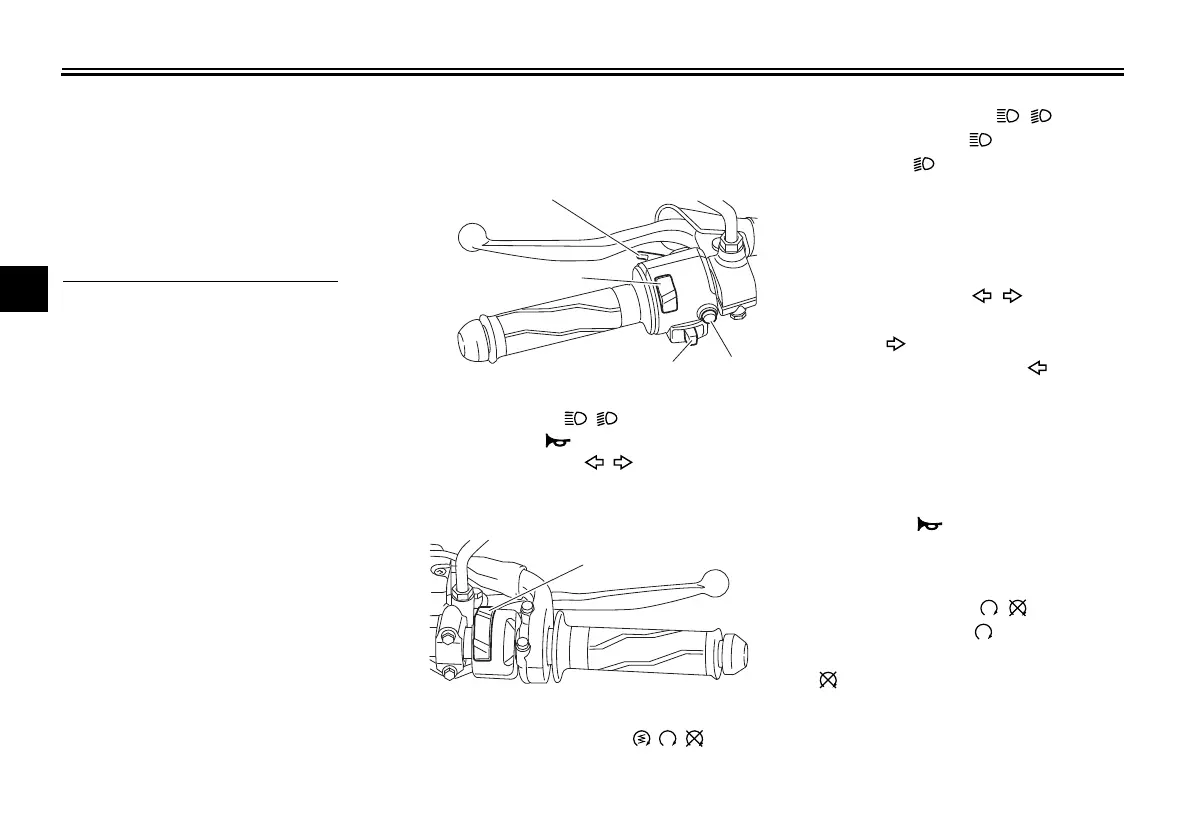
Handlebar switches
Left
Right
EAU54202
Dimmer/Pass switch “ / /PASS”
Set this switch to “ ” for the high
beam and to “ ” for the low beam.
To flash the high beam, push the
switch down towards “PASS” while the
headlights are on low beam.
EAU12461
Turn signal switch “ / ”
To signal a right-hand turn, push this
switch to “ ”. To signal a left-hand
turn, push this switch to “ ”. When
released, the switch returns to the cen-
ter position. To cancel the turn signal
lights, push the switch in after it has re-
turned to the center position.
EAU12501
Horn switch “ ”
Press this switch to sound the horn.
EAU12663
Engine stop switch “ / ”
Set this switch to “ ” (run) before
starting the engine. Set this switch
to “ ” (stop) to stop the engine in case
of an emergency, such as in the event
of an overturn or if the throttle is stuck.
1. Pass switch “PASS”
2. Dimmer switch “ / ”
3. Horn switch “ ”
4. Turn signal switch “ / ”
1. Start/Engine stop switch “ / / ”
UB7DE0E0.book Page 11 Tuesday, September 18, 2018 3:25 PM










 To Next Page