Instrument and control functions
3-7
3
EWA12423
Be sure to stop the vehicle before
making any setting changes to the
multi-function meter unit. Changing
settings while riding can distract the
operator and increase the risk of an
accident.
Except when accessing the
brightness control mode or when
displaying the clock, the key must
be turned to “ON” before you can
use the left and right set buttons to
adjust the multi-function meter.
For the UK: To switch between ki-
lometers and miles, press the left
set button for three seconds.
Speedometer
The speedometer shows the vehicle’s
traveling speed.
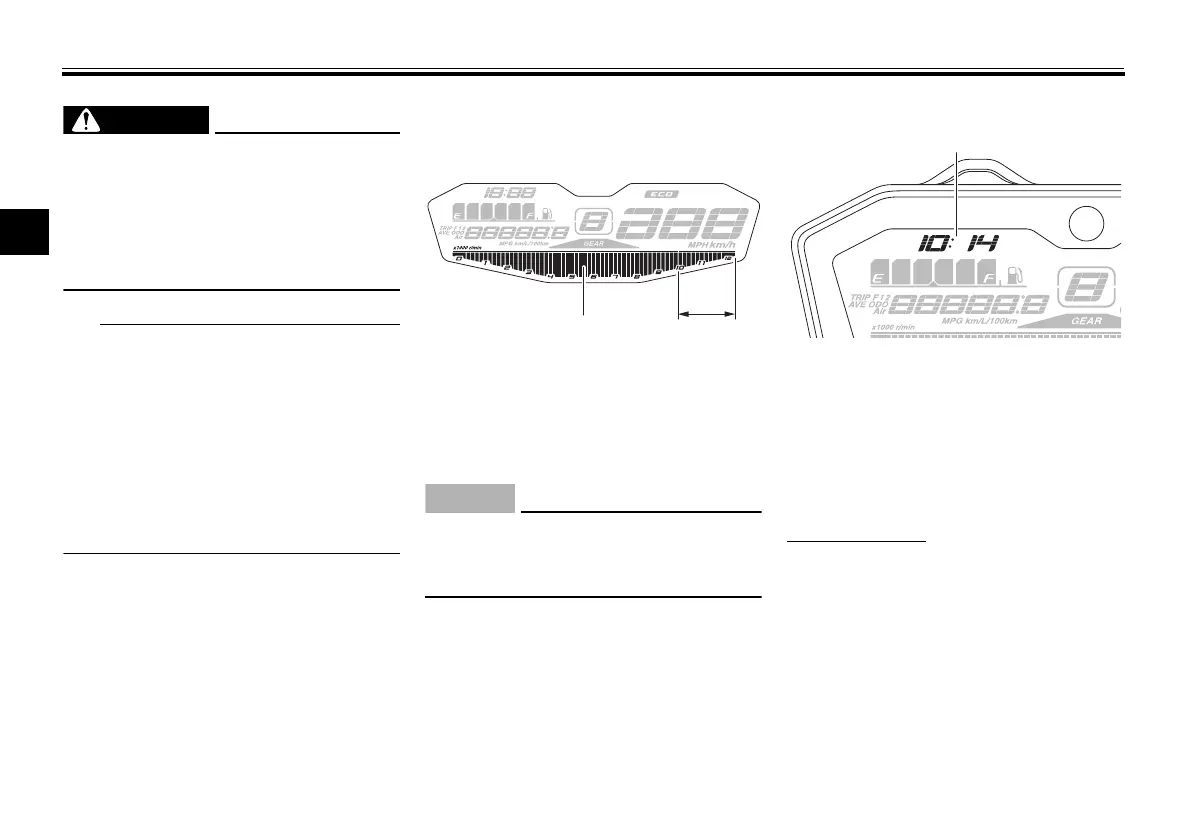
Tachometer
The tachometer allows the rider to
monitor the engine speed and keep it
within the ideal power range.
ECA10032
Do not operate the engine in the ta-
chometer red zone.
Red zone: 10000 r/min and above
Clock
The clock uses a 12-hour time system.
When the main switch is not in the
“ON” position, the clock can be viewed
for 10 seconds by pushing the left set
button.
To set the clock
1. Turn the key to “ON”.
2. Push the left set button and right
set button together for two sec-
onds. The hour digits will start
flashing.
3. Use the right set button to set the
hours.
4. Push the left set button, and the
minute digits will start flashing.
1. Tachometer
2. Tachometer red zone
1. Clock
U1WSE3E0.book Page 7 Monday, June 8, 2015 10:12 AM










 To Next Page