Periodic maintenance and adjustment
6-20
6
EAU57070
Brake light switches
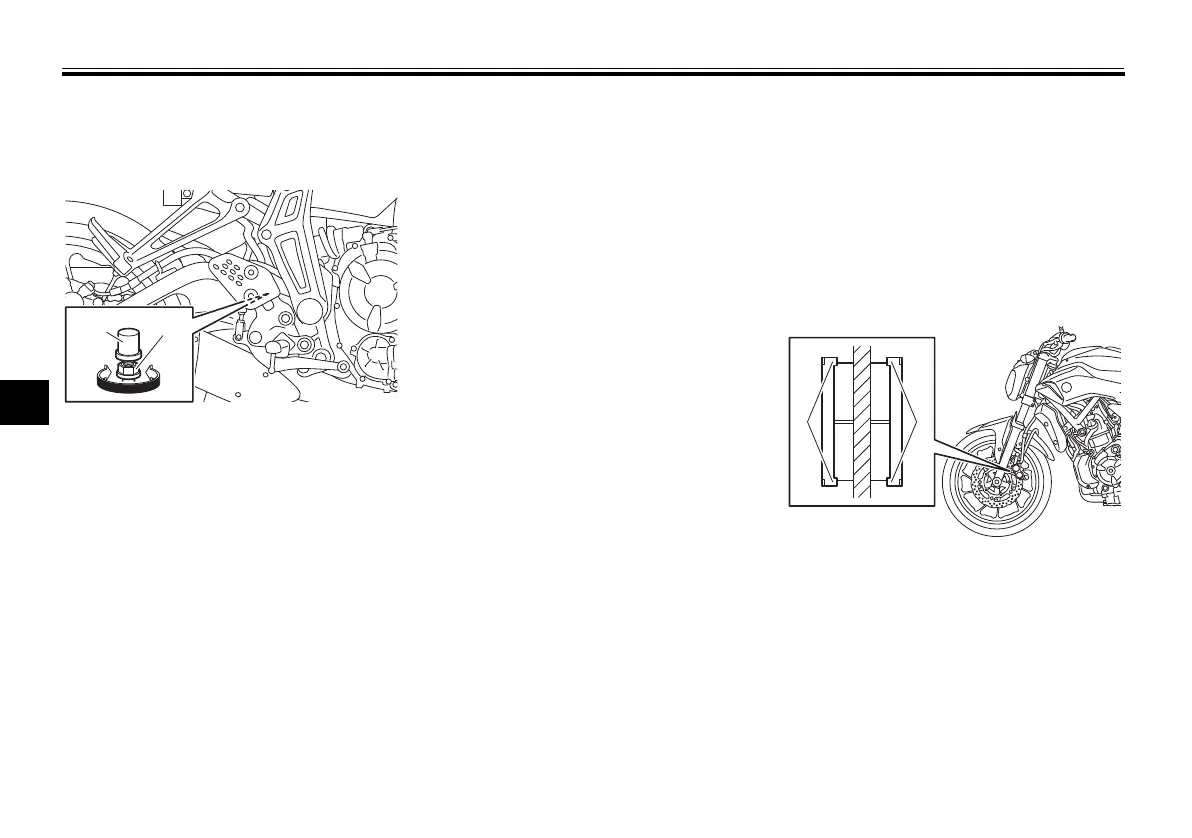
For non-ABS models
The brake light, which is activated by
the brake pedal and brake lever,
should come on just before braking
takes effect. If necessary, adjust the
rear brake light switch as follows, but
the front brake light switch should be
adjusted by a Yamaha dealer.
Turn the rear brake light switch adjust-
ing nut while holding the rear brake
light switch in place. To make the
brake light come on earlier, turn the ad-
justing nut in direction (a). To make the
brake light come on later, turn the ad-
justing nut in direction (b).
For ABS models
The brake light, which is activated by
the brake pedal and brake lever,
should come on just before braking
takes effect. If necessary, have a
Yamaha dealer adjust the brake light
switches.
EAU22393
Checking the front and rear
brake pads
The front and rear brake pads must be
checked for wear at the intervals spec-
ified in the periodic maintenance and
lubrication chart.
EAU36891
Front brake pads
Each front brake pad is provided with
wear indicators, which allows you to
check the brake pad wear without hav-
ing to disassemble the brake. To check
the brake pad wear, check the position
of the wear indicators while applying
the brake. If a brake pad has worn to
the point that a wear indicator almost
1. Rear brake light switch
2. Rear brake light switch adjusting nut
1. Brake pad wear indicator
U1WSE3E0.book Page 20 Monday, June 8, 2015 10:12 AM











 To Next Page