Instrument and control functions
3-10
3
Fuel reserve tripmeter
When the fuel level becomes low, the
fuel level warning indicator and the last
segment of the fuel meter will start
flashing. The display will change to the
fuel reserve tripmeter “TRIP F” and
start counting the distance traveled
from that point. In this case, push the
left set button to switch the display in
the following order:
TRIP F → km/L or L/100 km → AVE_
_._ km/L or AVE_ _._ L/100 km → _ _
°C → Air_ _ °C → ODO → TRIP 1 →
TRIP 2 → TRIP F
For the UK:
TRIP F → km/L, L/100 km or MPG →
AVE_ _._ km/L, AVE_ _._ L/100 km or
AVE_ _._ MPG → _ _ °C → Air_ _ °C →
ODO → TRIP 1 → TRIP 2 → TRIP F
Push the right set button to chan-
ge the display in the reverse order.
You can manually reset the fuel re-
serve tripmeter, or after refueling
and traveling 5 km (3 mi) it will re-
set automatically and disappear
from the display.
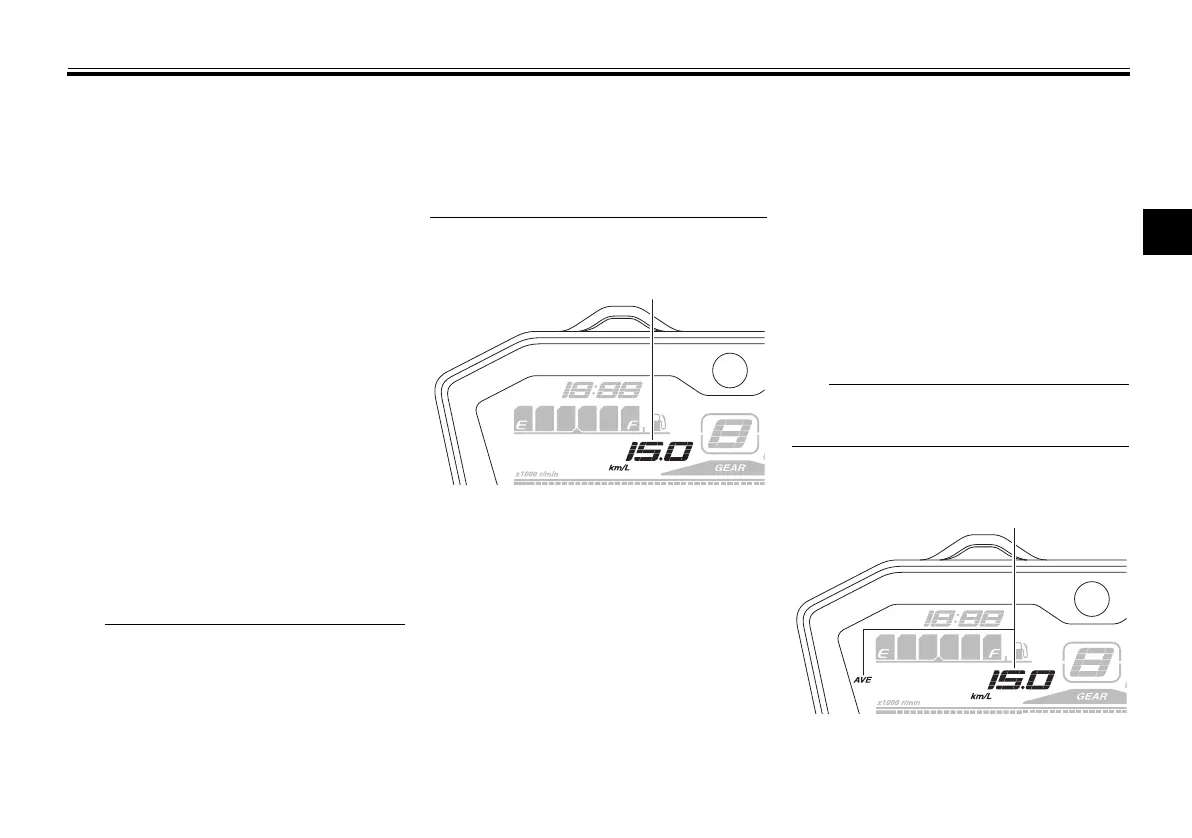
Instantaneous fuel consumption
This function calculates the fuel con-
sumption under current riding condi-
tions.
The instantaneous fuel consumption
can be set to either “km/L”, “L/100 km”
or “MPG” (for the UK).
“km/L”: The distance that can be
traveled on 1.0 L of fuel under the
current riding conditions is shown.
“L/100 km”: The amount of fuel
necessary to travel 100 km under
the current riding conditions is
shown.
“MPG” (for the UK): The distance
that can be traveled on
1.0 Imp.gal of fuel under the cur-
rent riding conditions is shown.
To switch the instantaneous fuel con-
sumption settings, push the left set
button for one second.
If traveling at speeds under 20 km/h
(12 mi/h), “_ _._” is displayed.
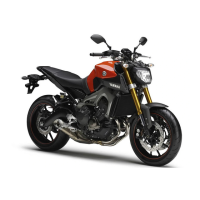
Average fuel consumption
1. Instantaneous fuel consumption display
1. Average fuel consumption display
U1WSE3E0.book Page 10 Monday, June 8, 2015 10:12 AM




 To Next Page